
UIModalPresentationStyle.CurrentContext Swift iOS 7
我想在另一个视图上显示一个视图-- PresentedView,Background View使用iOS 7。在我的应用程序中,我使用的是UITabBArController,所以在运行时,我不知道哪个视图将是背景视图(可能是任何选项卡栏项)。结构如下:
UITabBarController
  ---> TabItem1 - FirstUIViewController
  ---> TabItem2 - SecondUIViewController
  ---> TabItem3 - ThirdUIViewController
需要这样的东西:
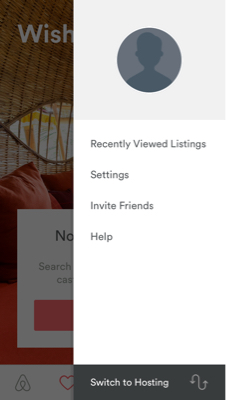
当应用程序加载时,我在TabItem1 - FirstUIViewController上。当我点击TabItem3时,我希望ThirdUIViewController出现在FirstUIViewController的顶部,而'FirstUIViewController‘应该出现在没有启用用户交互的背景中。
到目前为止我所做的:
- 由于在` `UITabBarController中将
UIViewControllers作为Relationship Controllers添加为TabBar Item,所以我从tabbarcontroller添加了一个segue到ThridViewController。 - 将此段的PresentationStyle更改为UIModalPresentationStyle.CurrentContext,并进行以下修改
func
viewDidLoad(){ super.viewDidLoad() self.performSegue(“标识符”,发件人: self) }
什么都没发生,我只看到白色背景的ThridViewController
- 我尝试了手动编码方法:
func
viewDidLoad(){ super.viewDidLoad() let overlayController:UIThirdViewController = UIThirdViewController() //此控制器上添加了一个视图,该视图仅覆盖上半屏幕,仅覆盖overlayController.modalPresentationStyle = UIModalPresentationStyle.CurrentContext self.presentViewController(overlayController,动画: true,completion: nil) }
不变。新视图将覆盖previos视图。如果我添加这个overlayController.view.backgroundColor = UIColor.clearColor()**,,我会看到半屏幕黑色,一半包含我的新视图**
问题点:
- 我应该在哪里编写代码来初始化/调用ThirdViewController以显示在当前视图的顶部?
- 如何解决黑屏问题并使其在iOS 7上工作?
我使用Xcode 7并在iOS7上运行。请帮帮忙。工作代码片段将不胜感激。不要发布其他堆栈溢出帖子作为答案,除非代码有效&您已经自己尝试过了。
更新:-通过这种方法,我得到了一个黑色屏幕
class TabBarViewController: UITabBarController, UITabBarControllerDelegate {

    override func viewDidLoad() {
        super.viewDidLoad()
        self.delegate = self
    }

    func tabBarController(tabBarController: UITabBarController, shouldSelectViewController viewController: UIViewController) -> Bool {

        let switchController:UIViewController = SwitchViewController()

        self.presentingViewController?.modalPresentationStyle = UIModalPresentationStyle.CurrentContext
        self.presentingViewController?.view.backgroundColor = UIColor.clearColor()
        self.presentViewController(switchController, animated: true, completion: nil)
        return false
    }
}回答 2
Stack Overflow用户
发布于 2015-09-10 07:37:03
使其成为自定义容器视图控制器(苹果文档)。工作示例代码:
class MyTabVC: UITabBarController, UITabBarControllerDelegate {

    override func viewDidLoad() {
        super.viewDidLoad()
        self.delegate = self
    }

    func tabBarController(tabBarController: UITabBarController, shouldSelectViewController viewController: UIViewController) -> Bool {
        presentThirdVC()
        return false
    }

    func presentThirdVC() {
        let myThirdVC = MyThirdVC.makeVC()

        myThirdVC.view.backgroundColor = UIColor.blackColor().colorWithAlphaComponent(0.1)
        addChildViewController(myThirdVC)
        var newFrame = CGRectInset(view.bounds, 0, 50) // hack, do what you want
        myThirdVC.view.frame = newFrame
        view.addSubview(myThirdVC.view)
        didMoveToParentViewController(myThirdVC)
    }

}

class MyThirdVC: UIViewController {
    class func makeVC() -> MyThirdVC {
        return UIStoryboard(name: "Main", bundle: nil).instantiateViewControllerWithIdentifier("myThirdVC") as! MyThirdVC
    }
}
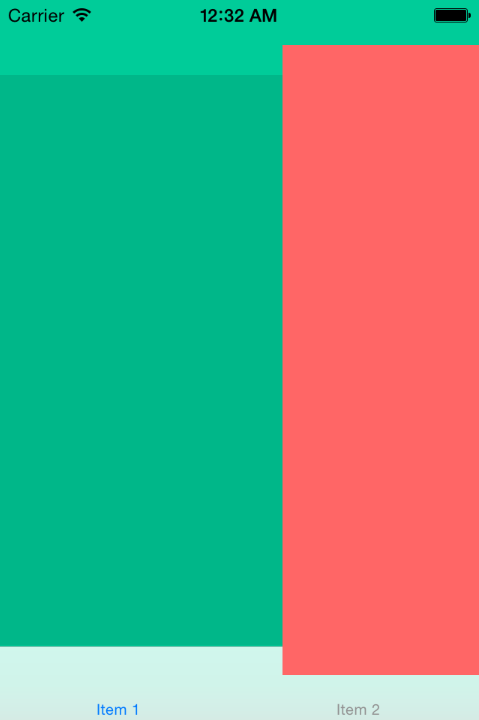
截图:
Stack Overflow用户
发布于 2015-09-05 05:46:17
您应该将UITabBarController子类添加到自定义子类中。将UITabBarController委托设置为self,然后单击特定索引,而不是让它切换选项卡,这样就可以正常显示菜单。UITabBarControllerDelegate方法将给您这样做的机会。
具体使用这个委托方法..。
- tabBarController:shouldSelectViewController:当调用其中的选项卡并返回NO时,您可以显示菜单。只是这个选项卡的空白viewController,因为它永远不会显示给用户。
对于转换本身,我强烈建议使用UIPresentationController的子类将容器视图框架设置为略小于屏幕大小,并添加"dimmingView“。不过,这只能在iOS8上使用,所以如果您想要iOS7,就需要做更多的恶意操作。
https://stackoverflow.com/questions/32345288
复制相似问题
腾讯云开发者

Copyright © 2013 - 2026 Tencent Cloud. All Rights Reserved. 腾讯云 版权所有
深圳市腾讯计算机系统有限公司 ICP备案/许可证号:粤B2-20090059  粤公网安备44030502008569号
腾讯云计算(北京)有限责任公司 京ICP证150476号 | 京ICP备11018762号