
DNX 8-15530:无法加载文件或程序集“Microsoft.DNX.PackageManager”
我已经在控制台中运行了这个命令来升级dnx。
"dnvm upgrade -u default"一旦它得到更新,我可以看到(C:\Users\Chandrasekar.dnx\runtimes)新的运行时版本,如下所述
"dnx-clr-win-x86.1.0.0-beta8-15530" 我开始在VS2015 --> ASPNET5web应用程序中创建新项目,结果出现了一些错误。
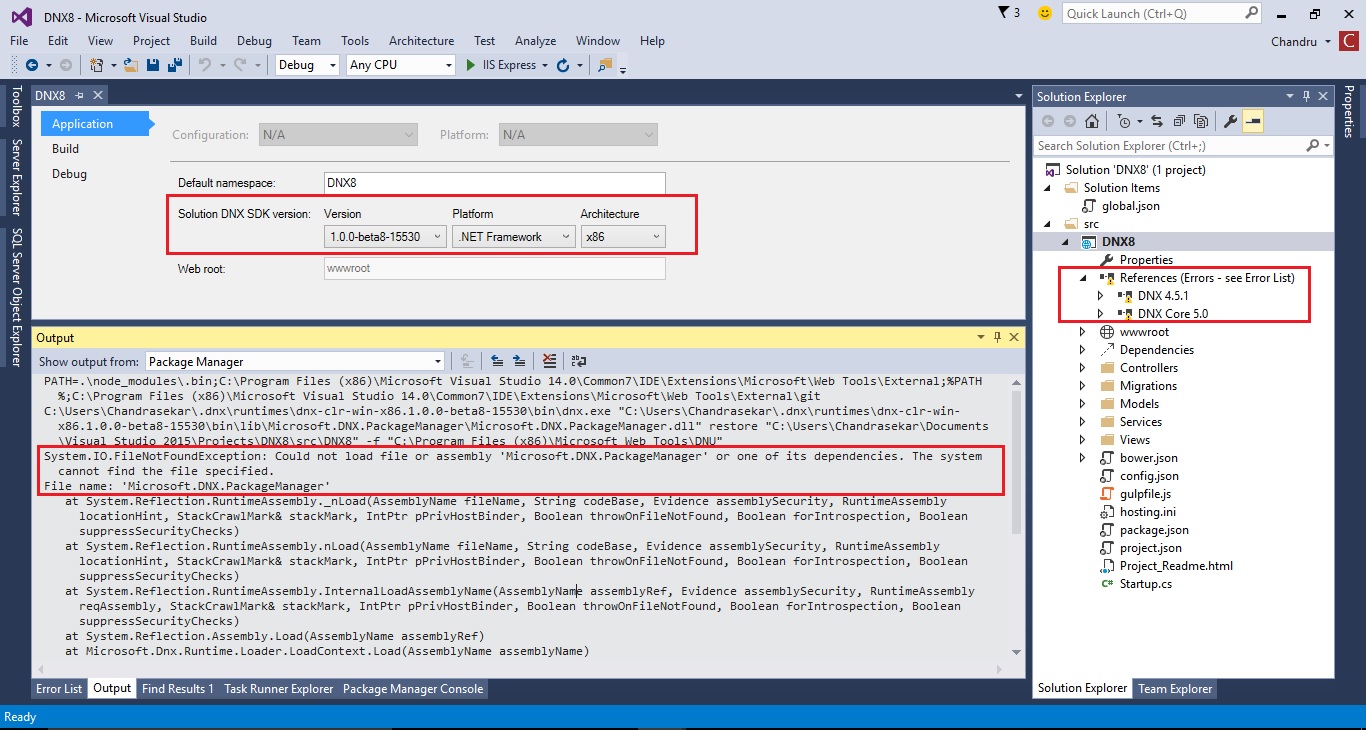
在输出窗口中,您可以看到错误“无法加载'Microsoft.DNX.PackageManager'",根据这个公告,它已被重命名为'Microsoft.Dnx.Tooling‘,所以我的问题是,为什么新的DNX 8版本仍然依赖于这个删除或重命名的DLL 'Microsoft.DNX.PackageManager’
输出窗口错误:
PATH=.\node_modules\.bin;C:\Program Files (x86)\Microsoft Visual Studio 14.0\Common7\IDE\Extensions\Microsoft\Web Tools\External;%PATH%;C:\Program Files (x86)\Microsoft Visual Studio 14.0\Common7\IDE\Extensions\Microsoft\Web Tools\External\git
C:\Users\Chandrasekar\.dnx\runtimes\dnx-clr-win-x86.1.0.0-beta8-15530\bin\dnx.exe "C:\Users\Chandrasekar\.dnx\runtimes\dnx-clr-win-x86.1.0.0-beta8-15530\bin\lib\Microsoft.DNX.PackageManager\Microsoft.DNX.PackageManager.dll" restore "C:\Users\Chandrasekar\Documents\Visual Studio 2015\Projects\DNX8\src\DNX8" -f "C:\Program Files (x86)\Microsoft Web Tools\DNU"
System.IO.FileNotFoundException: Could not load file or assembly 'Microsoft.DNX.PackageManager' or one of its dependencies. The system cannot find the file specified.
File name: 'Microsoft.DNX.PackageManager'
   at System.Reflection.RuntimeAssembly._nLoad(AssemblyName fileName, String codeBase, Evidence assemblySecurity, RuntimeAssembly locationHint, StackCrawlMark& stackMark, IntPtr pPrivHostBinder, Boolean throwOnFileNotFound, Boolean forIntrospection, Boolean suppressSecurityChecks)
   at System.Reflection.RuntimeAssembly.nLoad(AssemblyName fileName, String codeBase, Evidence assemblySecurity, RuntimeAssembly locationHint, StackCrawlMark& stackMark, IntPtr pPrivHostBinder, Boolean throwOnFileNotFound, Boolean forIntrospection, Boolean suppressSecurityChecks)
   at System.Reflection.RuntimeAssembly.InternalLoadAssemblyName(AssemblyName assemblyRef, Evidence assemblySecurity, RuntimeAssembly reqAssembly, StackCrawlMark& stackMark, IntPtr pPrivHostBinder, Boolean throwOnFileNotFound, Boolean forIntrospection, Boolean suppressSecurityChecks)
   at System.Reflection.Assembly.Load(AssemblyName assemblyRef)
   at Microsoft.Dnx.Runtime.Loader.LoadContext.Load(AssemblyName assemblyName)
   at Microsoft.Dnx.Host.Bootstrapper.RunAsync(List`1 args, IRuntimeEnvironment env, FrameworkName targetFramework)
   at Microsoft.Dnx.Host.RuntimeBootstrapper.ExecuteAsync(String[] args, FrameworkName targetFramework)
   at Microsoft.Dnx.Host.RuntimeBootstrapper.Execute(String[] args, FrameworkName targetFramework)
WRN: Assembly binding logging is turned OFF.
To enable assembly bind failure logging, set the registry value [HKLM\Software\Microsoft\Fusion!EnableLog] (DWORD) to 1.
Note: There is some performance penalty associated with assembly bind failure logging.
To turn this feature off, remove the registry value [HKLM\Software\Microsoft\Fusion!EnableLog].
你能帮我解决这个问题吗?我需要更新任何dll或软件吗?
工具: Microsoft Visual Studio Enterprise 2015版本14.0.23107.0
回答 3
Stack Overflow用户
发布于 2015-09-02 15:54:03
您没有使用最新的工具版本。您的版本可能是14.0.20711.0,而最新版本是14.0.20723.0。
20711有一个错误,因为它试图加载Microsoft.DNX.PackageManager,实际上是Microsoft.Dnx.Tooling。
获取最新版本:http://www.microsoft.com/en-us/download/details.aspx?id=48222
见这公告。
Stack Overflow用户
发布于 2015-11-09 04:47:42
Stack Overflow用户
发布于 2015-11-29 07:54:48
对于WebToolsExtensionsVS14.msi.页面下的下载,RC1有很多选择,我所缺少的是微软ASP.NET和网络工具2015 (RC) - Visual 2015安装后,引用被修复,软件包能够恢复。
https://stackoverflow.com/questions/32330004
复制相似问题
腾讯云开发者

Copyright © 2013 - 2026 Tencent Cloud. All Rights Reserved. 腾讯云 版权所有
深圳市腾讯计算机系统有限公司 ICP备案/许可证号:粤B2-20090059  粤公网安备44030502008569号
腾讯云计算(北京)有限责任公司 京ICP证150476号 | 京ICP备11018762号