
JavaFX FontMetrics
JavaFX FontMetrics
提问于 2015-08-26 21:31:02
我试图将文本准确地放置在窗格的中间,无论是水平还是垂直。通过使用字体度量和测试程序,我得到了以下结果:
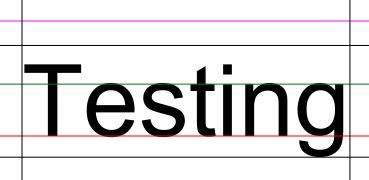
此测试引发以下问题:
- 为什么上升值(上黑线)这么高?我以为它会穿过T的顶端。品红线是“lineheight”值,所以我假设这是它上面的任何文本的基线。
- 如果黑线包括线间距,为什么没有测量'T‘顶部?
- 是否有一种方法可以得到一个精确的边框,还是我必须用图形扫描文本图像来找到边界?显然,左和右的值也包含某种间距,因此扫描似乎是唯一的解决方案。
回答 2
Stack Overflow用户
回答已采纳
发布于 2015-08-27 00:48:14
经过一些实验,我想出了一个解决方案:

下面是生成它的代码:
public void getBoundingBox(String s, Font myFont) {

    final FontMetrics fm = Toolkit.getToolkit().getFontLoader().getFontMetrics(myFont);

    final Canvas canvas = new Canvas(fm.computeStringWidth(s), fm.getAscent() + fm.getDescent());
    final GraphicsContext gc = canvas.getGraphicsContext2D();

    gc.setFill(Color.RED);                  // Just an abitrary color
    gc.setTextBaseline(VPos.TOP);           // This saves having to scan the bottom
    gc.setFont(myFont);

    gc.fillText(s, -fm.getLeading(), 0);    // This saves having to scan the left

    // Get a snapshot of the canvas
    final WritableImage image = canvas.snapshot(null, null);
    final PixelReader pr = image.getPixelReader();

    final int h = (int) canvas.getHeight();
    final int w = (int) canvas.getWidth();

    int x;
    int y = 0;

    // Scan from the top down until we find a red pixel

    boolean found = false;
    while (y < h && !found) {
        x = 0;
        while (x < w && !found) {
            found = pr.getColor(x, y).equals(Color.RED);
            x++;
        }
        y++;
    }
    int yPos = y - 2;

    // Scan from right to left until we find a red pixel

    x = w;
    found = false;
    while (x > 0 && !found) {
        y = 0;
        while (y < h && !found) {
            found = pr.getColor(x, y).equals(Color.RED);
            y++;
        }
        x--;
    }
    int xPos = x + 3;

    // Here is a visible representation of the bounding box

    Rectangle mask = new Rectangle(0, yPos, xPos, h - yPos);

    mask.setFill(Color.rgb(0, 0, 255, 0.25));
    root.getChildren().addAll(canvas, mask);   // root is a global AnchorPane

    System.out.println("The width of the bounding box is " + xPos);
    System.out.println("The height of the bounding box is " + (h - yPos));
}
FontMetrics需要两个导入:
 import com.sun.javafx.tk.FontMetrics;
 import com.sun.javafx.tk.Toolkit;
然后像这样调用边界框:
 Font myFont = new Font("Arial", 100.0);
 getBoundingBox("Testing", myFont);
它解决了我的问题,我希望这对其他人也有帮助。
Stack Overflow用户
发布于 2015-08-30 00:15:22
下面是Frank的reportSize函数的另一个实现:
public void reportSize(String s, Font myFont) {
    Text text = new Text(s);
    text.setFont(myFont);
    Bounds tb = text.getBoundsInLocal();
    Rectangle stencil = new Rectangle(
            tb.getMinX(), tb.getMinY(), tb.getWidth(), tb.getHeight()
    );

    Shape intersection = Shape.intersect(text, stencil);

    Bounds ib = intersection.getBoundsInLocal();
    System.out.println(
            "Text size: " + ib.getWidth() + ", " + ib.getHeight()
    );
}此实现使用形状相交来确定呈现形状的边框的大小,而不需要空格。该实现不依赖于com.sun包类,这些类可能无法被Java9+中的用户应用程序代码直接访问。
页面原文内容由Stack Overflow提供。腾讯云小微IT领域专用引擎提供翻译支持
原文链接:
https://stackoverflow.com/questions/32237048
复制相关文章
相似问题
腾讯云开发者

Copyright © 2013 - 2026 Tencent Cloud. All Rights Reserved. 腾讯云 版权所有
深圳市腾讯计算机系统有限公司 ICP备案/许可证号:粤B2-20090059  粤公网安备44030502008569号
腾讯云计算(北京)有限责任公司 京ICP证150476号 | 京ICP备11018762号