
动锚链接- Wordpress
我有一个锚链接设置在我的Wordpress网站,从导航链接到页脚。
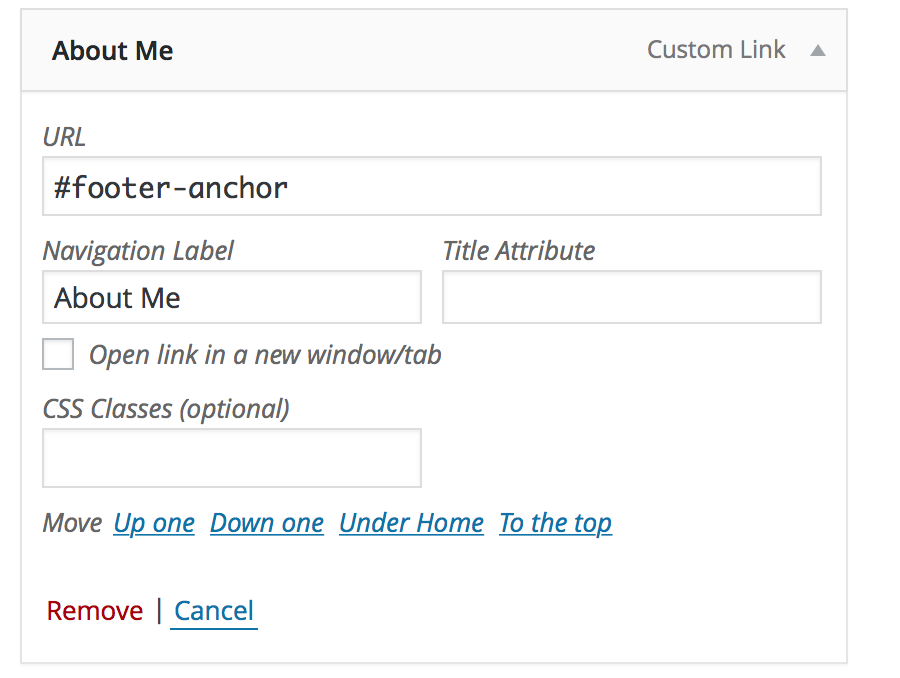
HTML-footer.php
<footer id="footer-anchor">

  <div class="row">

    ...
当选择链接时,页面“跳转”到页脚。我想让它向下移动到页脚。类似于页面如何用“返回到顶部”按钮动画到顶部,但相反。
回答 2
Stack Overflow用户
发布于 2015-08-24 03:03:07
我喜欢使用来自卡尔·斯威德伯格的这段代码,我通常在<script></script>标记之前的footer.php文件中包含它,或者您可以在functions.php文件中对它进行排队,并在页脚中加载它。我喜欢这段代码,因为一旦单击锚,它就会从URL中删除#散列。
jQuery(document).ready(function($){
    // From: http://www.learningjquery.com/2007/10/improved-animated-scrolling-script-for-same-page-links/
    function filterPath(string) {
      return string
        .replace(/^\//,'')
        .replace(/(index|default).[a-zA-Z]{3,4}$/,'')
        .replace(/\/$/,'');
      }
      var locationPath = filterPath(location.pathname);
      var scrollElem = scrollableElement('html', 'body');

      $('a[href*=#]').each(function() {
        var thisPath = filterPath(this.pathname) || locationPath;
        if (  locationPath == thisPath
        && (location.hostname == this.hostname || !this.hostname)
        && this.hash.replace(/#/,'') ) {
          var $target = $(this.hash), target = this.hash;
          // Added line below from previous version
          target = target.length ? target : $('[name=' + this.hash.slice(1) +']');
          if (target) {
            var targetOffset = $target.offset().top;
            $(this).click(function(event) {
              event.preventDefault();
        $(scrollElem).animate({
            scrollTop: targetOffset
        }, 400);
          return false;
            });
          }
        }
      });

      // use the first element that is "scrollable"
      function scrollableElement(els) {
        for (var i = 0, argLength = arguments.length; i <argLength; i++) {
          var el = arguments[i],
              $scrollElement = $(el);
          if ($scrollElement.scrollTop()> 0) {
            return el;
          } else {
            $scrollElement.scrollTop(1);
            var isScrollable = $scrollElement.scrollTop()> 0;
            $scrollElement.scrollTop(0);
            if (isScrollable) {
              return el;
            }
          }
        }
        return [];
      }
});
您可以通过更改代码的这一部分中的数字来控制滚动的速度:
$(scrollElem).animate({
    scrollTop: targetOffset
}, 400);Stack Overflow用户
发布于 2015-08-24 02:47:53
页面-滚动到ID插件怎么样?它在我的WordPress网站上运行得很好。我们可以在几分钟内在管理页面上轻松地设置它,并且我们完成了。这个插件就是你要找的。请检查这个链接页面-滚动到ID插件教程
更新:如果您不想使用插件,请遵循以下步骤。我们将只使用纯jQuery插件,令人惊讶的是,代码工作起来像一个魅力,看起来很简单!
1.准备WordPress主题
请用下面的类包装您的菜单,稍后我们将使用这个类。例如:
<nav id='scrollNav'>
   <?php wp_nav_menu(array('theme_location'  => 'your-menu-location', 'container'=>false, 'depth'=>1) ?>
</nav>然后将id添加到特定元素,但已经将id添加到footer元素,即#footer-anchor。
2.编写javascript代码,我们将只使用jQuery
(function($){
   $("#scrollNav").find("a").click(function(){
       var $targetElm = $($(this).attr("href"));
       $('html,body').animate({scrollTop: $targetElm.offset().top},
    'slow');
   });
})(jQuery)
3.让您的脚本(以WordPress的方式包含您的脚本)
function your_scripts_method() {
    wp_enqueue_script(
        'your-script',
        get_stylesheet_directory_uri() . '/js/your_script.js',
        array( 'jquery' )
    );
}

add_action( 'wp_enqueue_scripts', 'your_scripts_method' );
4.再次运行您的网站
恭喜!
https://stackoverflow.com/questions/32173363
复制相似问题
腾讯云开发者

Copyright © 2013 - 2026 Tencent Cloud. All Rights Reserved. 腾讯云 版权所有
深圳市腾讯计算机系统有限公司 ICP备案/许可证号:粤B2-20090059  粤公网安备44030502008569号
腾讯云计算(北京)有限责任公司 京ICP证150476号 | 京ICP备11018762号