
必须是: View.VISIBLE,View.INVISIBLE,View.GONE
必须是: View.VISIBLE,View.INVISIBLE,View.GONE
提问于 2015-08-21 02:21:50
在我的一项活动中,我正在保存和恢复视图的可见度。为此,我调用mButton.getVisibility()并将其保存在Bundle中。在onRestore中,我得到了int值,它显示了一个错误。
Must be one of: View.VISIBLE, View.INVISIBLE, View.GONE less... (Ctrl+F1)
Reports two types of problems:
- Supplying the wrong type of resource identifier. For example, when calling Resources.getString(int id), you should be passing R.string.something, not R.drawable.something.
- Passing the wrong constant to a method which expects one of a specific set of constants. For example, when calling View#setLayoutDirection, the parameter must be android.view.View.LAYOUT_DIRECTION_LTR or android.view.View.LAYOUT_DIRECTION_RTL.
代码编译和运行时没有任何错误。
码
@Override
public void onSaveInstanceState(@NonNull Bundle savedInstanceState) {
    savedInstanceState.putInt("BUTTON_VISIBILITY", mButton.getVisibility());

    super.onSaveInstanceState(savedInstanceState);
}

public void onRestoreInstanceState(@NonNull Bundle savedInstanceState) {
    super.onRestoreInstanceState(savedInstanceState);

    mButton.setVisibility(savedInstanceState.getInt("BUTTON_VISIBILITY"));
    // savedInstanceState.getInt("BUTTON_VISIBILITY") is underlined red
}回答 1
Stack Overflow用户
回答已采纳
发布于 2015-08-21 02:33:38
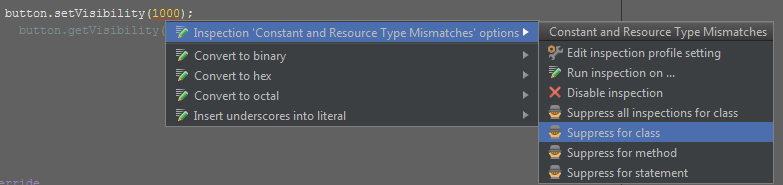
正如我刚才所评论的,您可以添加@SuppressWarnings("ResourceType")。希望这能有所帮助!
Alt-输入
页面原文内容由Stack Overflow提供。腾讯云小微IT领域专用引擎提供翻译支持
原文链接:
https://stackoverflow.com/questions/32131417
复制相关文章
相似问题
腾讯云开发者

Copyright © 2013 - 2026 Tencent Cloud. All Rights Reserved. 腾讯云 版权所有
深圳市腾讯计算机系统有限公司 ICP备案/许可证号:粤B2-20090059  粤公网安备44030502008569号
腾讯云计算(北京)有限责任公司 京ICP证150476号 | 京ICP备11018762号