
在TextMate2注释中间使用交替语法突出显示
从评论的本质来看,这可能是毫无意义的。
另一方面,我想要达到的目标和转义角色并没有太大的不同。
作为一个简单的例子,我希望# comment :break: comment显示得更像
#comment
"break"
# comment如果没有第二个#,一切都在同一条线上,而不是引号,而是有一些其他转义字符。尽管像引号一样(不像我熟悉的转义字符,例如\),我还是打算明确指出注释中断的开始和结束。
多亏了@Graham,我才得以实现alternate forms of comments in this question。我所追求的是对那里所取得的成就的增强。在我的场景中,#是我使用的语言(R)中的注释,#'函数既是R注释,也是另一种语言中代码的开始。现在,我可以让#'之后的所有内容都进行与典型的R注释不同的语法突出显示,但我正在尝试在这种子语言中获得非常少量的语法高亮(#'实际上表示标记代码的开始,我希望文本环绕在一对`中的“原始”语法突出显示)。
我试图打断的语言语法部分如下:
{   begin = '(^[ \t]+)?(?=#'' )';
            end = '(?!\G)';
            beginCaptures = { 1 = { name = 'punctuation.whitespace.comment.leading.r'; }; };
            patterns = (
                {   name = 'comment.line.number-sign-tick.r';
                    begin = "#' ";
                    end = '\n';
                    beginCaptures = { 0 = { name = 'punctuation.definition.comment.r'; }; };
                },
            );
},回答 1
Stack Overflow用户
发布于 2015-08-20 20:20:01
我很确定我已经搞清楚了。我之前不明白的是范围界定是如何工作的。我仍然不完全理解它,但我现在知道的足够多,可以为每种语法的begin和end创建嵌套定义(regex)。
范围调整使事情变得容易多了!以前,我想做像(?<=\A#'\s.*)(\$)这样的正则表达式,在#'-style评论中找到一个美元符号.但是很明显,由于*的重复,这是行不通的(因为同样的原因,+不能工作)。通过范围界定,这已经意味着我们必须在\A#'\s匹配中才能匹配\$。
以下是我语言语法的相关部分:
{   begin = '(^[ \t]+)?(?=#\'' )';
            end = '(?!\G)';
            beginCaptures = { 1 = { name = 'punctuation.whitespace.comment.leading.r'; }; };
            patterns = (

                {   name = 'comment.line.number-sign-tick.r';
                    begin = "#' ";
                    end = '\n';
                    beginCaptures = { 0 = { name = 'punctuation.definition.comment.r'; }; };


                    patterns = (

                        // Markdown within Comment
                        {   name = 'comment.line.number-sign-tick-raw.r';
                            begin = '(`)(?!\s)'; // backtick not followed by whitespace
                            end = '(?<!\s)(`)'; // backtick not preceded by whitespace
                            beginCaptures = { 0 = { name = 'punctuation.definition.comment.r'; }; };
                        },

                        // Equation within comment
                        {   name = 'comment.line.number-sign-tick-eqn.r';
                            begin = '((?<!\G)([\$]{1,2})(?!\s))';
                            end = '(?<!\s)([\$]{1,2})';
                            beginCaptures = { 0 = { name = 'punctuation.definition.comment.r'; }; };

                            // Markdown within Equation
                            patterns = (
                                {   name = 'comment.line.number-sign-tick-raw.r';
                                    begin = '(`)(?!\s)'; // backtick not followed by whitespace
                                    end = '(?<!\s)(`)'; // backtick not preceded by whitespace
                                    beginCaptures = { 0 = { name = 'punctuation.definition.comment.r'; }; };
                                },
                            );
                        },
                    );
                },

            );
        },
以下是一些R代码:
# below is a `knitr` (note no effect of backticks) code chunk
#+ codeChunk, include=FALSE


# normal R comment, follow by code
data <- matrix(rnorm(6,3, sd=7), nrow=2)

#' This would be recognized as markdown by `knitr::spin()`, with the preceding portion as "raw" text
`note that this doesnt go to the 'raw' format ... it is normal code!`

#+ anotherChunk
# also note how the dollar signs behave normally
data <- as.list(data)
data$blah <- "blah"
`data`[[1]] # backticks behaving

#' I can introduce a Latex-style equation, filling in values from R using `knitr` code chunks: $\frac{top}{bottom}=\frac{`r topValue`}{`r botValue`}$ then continue on with markdown.
在进行这些更改之后,下面是TextMate2中的样子:
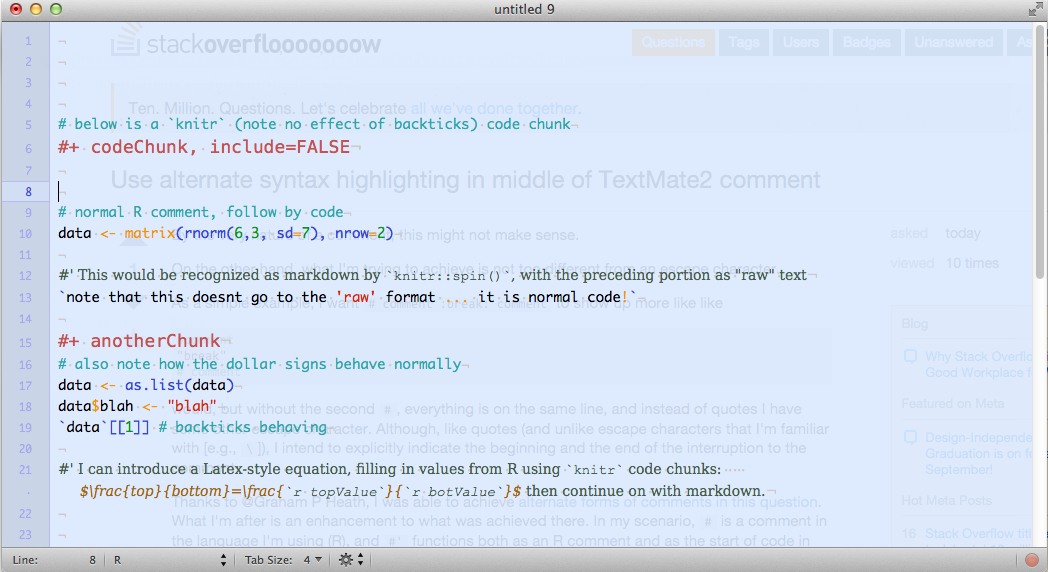
非常好,除了背面的部分在方程内时会出现斜体。我能忍受这一切。我甚至可以说服自己,我想这样做;) (顺便说一句,我为快递新指定了fontName='regular',所以我不知道为什么会被覆盖)
https://stackoverflow.com/questions/32123801
复制相似问题
腾讯云开发者

Copyright © 2013 - 2026 Tencent Cloud. All Rights Reserved. 腾讯云 版权所有
深圳市腾讯计算机系统有限公司 ICP备案/许可证号:粤B2-20090059  粤公网安备44030502008569号
腾讯云计算(北京)有限责任公司 京ICP证150476号 | 京ICP备11018762号