
获取winforms文本框的光标位置
如何获得.NET中winforms文本框的当前光标(插入符号)位置?SelectionStart只返回选定文本的开始(选择的左侧)。意味着如果光标位于所选内容的右侧,则此值是错误的。
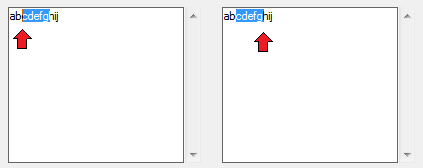
为了澄清:在.NET TextBox中,SelectionStart指向选择的左边,也是当插入符位于选择的右侧时。这意味着在这两张图片中,SelectionStart为2,但插入符号位置在第一张图片中为2,在正确图片中为7。
回答 4
Stack Overflow用户
发布于 2015-08-18 10:33:08
如前所述,SelectionStart属性在选择活动的TextBox中获取实际的卡雷特位置是不可靠的。这是由于以下事实造成的:该属性始终位于选择开始处(线索:名称不说谎),并且取决于使用鼠标选择文本的方式,插入符号可能位于所选内容的左侧或右侧。
这段代码(用LinqPAD测试)显示了另一种方法
public class WinApi
{
    [DllImport("user32.dll")]
    public static extern bool GetCaretPos(out System.Drawing.Point lpPoint);
}

TextBox t = new TextBox();
void Main()
{
    Form f = new Form();
    f.Controls.Add(t);
    Button b = new Button();
    b.Dock = DockStyle.Bottom;
    b.Click += onClick;
    f.Controls.Add(b);
    f.ShowDialog();
}

// Define other methods and classes here
void onClick(object sender, EventArgs e)
{
    Console.WriteLine("Start:" + t.SelectionStart + " len:" +t.SelectionLength);
    Point p = new Point();
    bool result = WinApi.GetCaretPos(out p);
    Console.WriteLine(p);
    int idx = t.GetCharIndexFromPosition(p);
    Console.WriteLine(idx);
}
API GetCaretPos返回客户端坐标中的点。您可以使用托管方法GetCharIndexFromPosition在位置之后返回字符的索引。当然,您需要添加对System.Runtime.InteropServices的引用和使用。
不确定这个解决方案是否有一些缺点,并等待更多的专家告诉我们是否有什么错误或下落不明。
Stack Overflow用户
发布于 2015-08-18 09:02:03
如果您想要选择的左侧,可以使用:
int index = textBox.SelectionStart;如果您想要选择的右侧,可以使用:
int index = textBox.SelectionStart + textBox.SelectionLength;如果需要知道所选文本的方向,则可以尝试跟踪鼠标向下和鼠标向上的事件,并比较事件发生时光标的位置。
例如:
// On mouse down event.
int mouseDownX = MousePosition.X;

// On mouse up event.
int mouseUpX = MousePosition.X;

// Check direction.
if(mouseDownX < mouseUpX)
{
    // Left to Right selection.
    int index = textBox.SelectionStart;
}
else
{
    // Right to Left selection.
    int index = textBox.SelectionStart + textBox.SelectionLength;
}Stack Overflow用户
发布于 2021-03-18 06:25:57
这可能会被一些人使用:
int lastSelectionStart = 0;

int getCaretPosition()
{
    if (tbx.SelectionLength == 0)
    {
        lastSelectionStart = tbx.SelectionStart;
        return lastSelectionStart;
    }
    else
    {
        if (tbx.SelectionStart == lastSelectionStart)
        {
            return tbx.SelectionStart + tbx.SelectionLength;
        }
        else
        {
            return lastSelectionStart - tbx.SelectionLength;
        }
    }
}https://stackoverflow.com/questions/32067342
复制相似问题
腾讯云开发者

Copyright © 2013 - 2026 Tencent Cloud. All Rights Reserved. 腾讯云 版权所有
深圳市腾讯计算机系统有限公司 ICP备案/许可证号:粤B2-20090059  粤公网安备44030502008569号
腾讯云计算(北京)有限责任公司 京ICP证150476号 | 京ICP备11018762号