
在循环中使用Java LayoutInflater添加视图,或者不设置宽度,或者只添加循环中的第一项
在循环中使用Java LayoutInflater添加视图,或者不设置宽度,或者只添加循环中的第一项
提问于 2015-08-15 10:59:04
我有从服务器加载数据的函数,比如搜索,然后将这些添加到主菜单中。为此,我在JSON结果上使用一个for循环来添加项。
这个循环工作得很好,它读取数据并通过精细循环:
Java循环:
JSONArray teams = result.getJSONArray("teams");
LayoutInflater inflater = (LayoutInflater) activity.getSystemService(Context.LAYOUT_INFLATER_SERVICE);
LinearLayout parent = (LinearLayout) mainMenu.findViewById(R.id.team_list_view);
//Log.d("TEAMS",teams.toString());
for(int x = 0; x < teams.length(); x++) {
     JSONObject cTeam = teams.getJSONObject(x);
     String name = cTeam.getString("name");
     String thumb = cTeam.getString("thumb");
     String id = cTeam.getString("id");
     View custom = inflater.inflate(R.layout.teams_menu_template, null);
     int width = LinearLayout.LayoutParams.FILL_PARENT;
     int height = LinearLayout.LayoutParams.WRAP_CONTENT;

     ImageButton pp = (ImageButton) custom.findViewById(R.id.tempPPbtn);
     Button teamName = (Button) custom.findViewById(R.id.tempPPTxtbtn);
     teamName.setText(name);

     loadImage loadImage = new loadImage("imagebutton",pp);
     loadImage.execute(thumb);

     LinearLayout.LayoutParams params = new LinearLayout.LayoutParams(width,height);

     parent.addView(custom);

 }
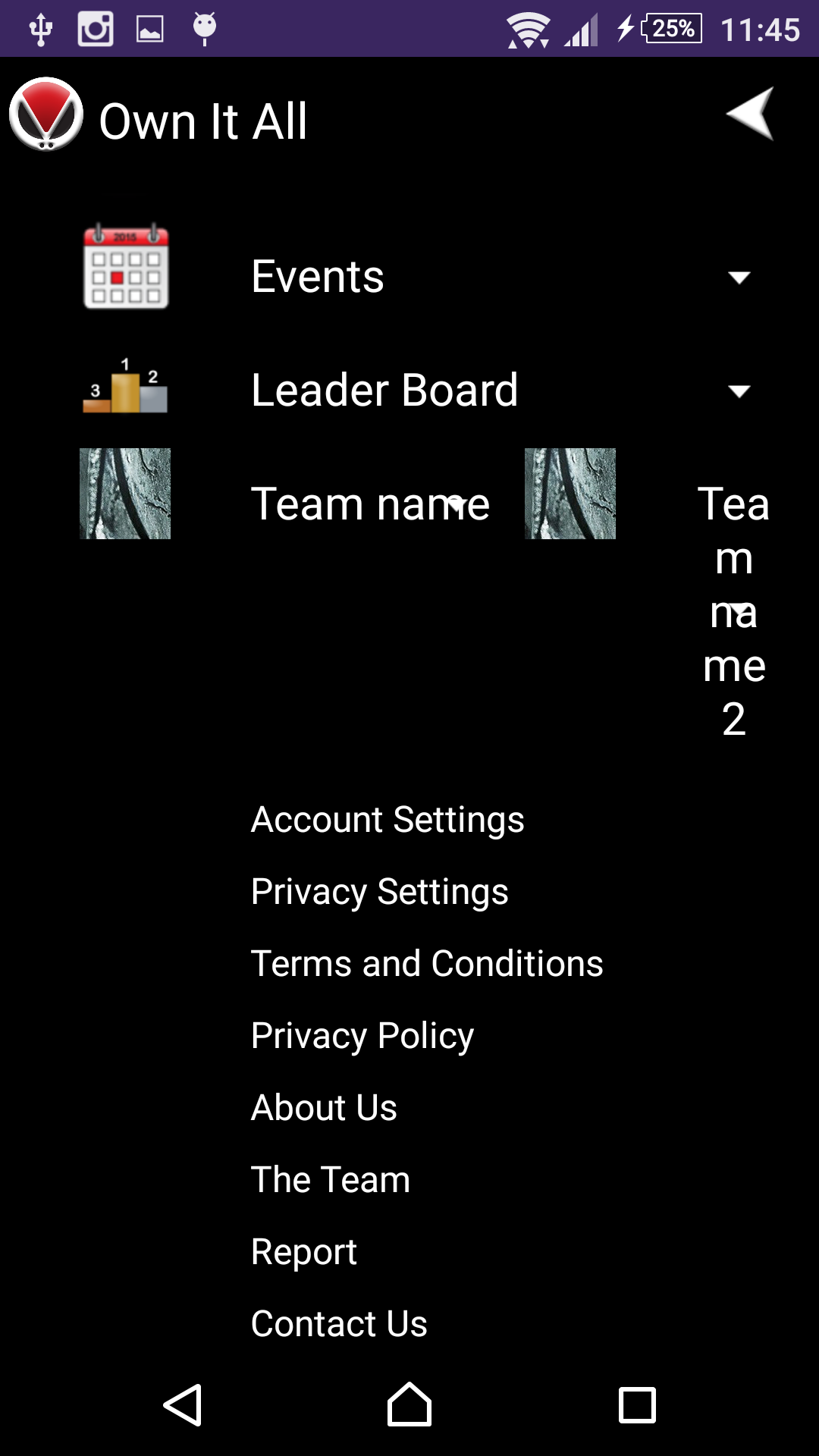
现在它确实工作得很好,它循环并添加图像和文本,并附加到父布局中。但是,它没有堆叠新的布局,而是将它们并排放置,如下图所示:
在进行了一些googling搜索之后,我尝试添加params来将宽度设置为FILL_PARENT,但结果只添加了第一项。不过,它确实添加了我想要的。
我已经坚持了很长一段时间了,如果有人能帮上忙的话,我会很高兴的。
我正在使用的模板XML文件。
<?xml version="1.0" encoding="utf-8"?>
<LinearLayout xmlns:android="http://schemas.android.com/apk/res/android"
    android:orientation="vertical"
    android:layout_width="fill_parent"
    android:layout_height="wrap_content"
    android:layout_marginTop="10dp"
    android:id="@+id/tempDropCont"
    android:background="@drawable/drop_down"
    android:weightSum="100"
    android:baselineAligned="true">

    <LinearLayout
        android:orientation="horizontal"
        android:layout_width="fill_parent"
        android:layout_height="wrap_content"
        android:weightSum="2">

        <LinearLayout
            android:orientation="vertical"
            android:layout_width="70dp"
            android:layout_height="wrap_content">

            <ImageButton
                android:layout_width="40dp"
                android:layout_height="40dp"
                android:id="@+id/tempPPbtn"
                android:background="@drawable/profile"
                android:layout_marginLeft="15dp" />
        </LinearLayout>

        <LinearLayout
            android:orientation="vertical"
            android:layout_width="wrap_content"
            android:layout_height="wrap_content"
            android:layout_gravity="center_horizontal"
            android:layout_marginLeft="20dp">

            <Button
                android:layout_width="wrap_content"
                android:layout_height="wrap_content"
                android:text="@string/leader_board"
                android:id="@+id/tempPPTxtbtn"
                android:background="@android:color/transparent"
                android:textColor="@color/white"
                android:textSize="20sp"
                android:layout_marginTop="10dp" />

            <LinearLayout
                android:orientation="vertical"
                android:layout_width="wrap_content"
                android:layout_height="wrap_content"
                android:id="@+id/tempDrop"
                android:visibility="gone">
                <Button
                    android:layout_width="wrap_content"
                    android:layout_height="wrap_content"
                    android:text="@string/view_team"
                    android:id="@+id/tempTxtBtn1"
                    android:background="@android:color/transparent"
                    android:textColor="@color/white"
                    android:textSize="20sp"
                    android:layout_marginTop="10dp" />
                <Button
                    android:layout_width="wrap_content"
                    android:layout_height="wrap_content"
                    android:text="@string/edit_team"
                    android:id="@+id/tempTxtBtn2"
                    android:background="@android:color/transparent"
                    android:textColor="@color/white"
                    android:textSize="20sp"
                    android:layout_marginTop="10dp" />
                <Button
                    android:layout_width="wrap_content"
                    android:layout_height="wrap_content"
                    android:text="@string/team_settings"
                    android:id="@+id/tempTxtBtn3"
                    android:background="@android:color/transparent"
                    android:textColor="@color/white"
                    android:textSize="20sp"
                    android:layout_marginTop="10dp" />
            </LinearLayout>

        </LinearLayout>
    </LinearLayout>
</LinearLayout>
起初,我确实认为它是xml,但我尝试在不同的布局上使用include,而且它还包括文件,就像它所设想的那样。
注意,服务器上有两个返回项。
回答 1
Stack Overflow用户
回答已采纳
发布于 2015-08-15 19:23:41
如果有父布局,或者至少定义父布局的方式(LinearLayout具有id列表视图),那就太好了。但是,对于您描述的行为有几个原因:
- 确保父布局的方向设置为垂直。此时,您可以在布局中复制粘贴几个模板项,并查看它们在xml中定义时是否正常。
- 在膨胀项时,还需要传递父项,以便子元素继承布局属性:
View custom = inflater.inflate(R.layout.teams_menu_template, parent, false);
这将创建具有父容器中定义的预期属性的项,但尚未将其附加到父容器。
- 这一行不使用:
LinearLayout.LayoutParams params = new LinearLayout.LayoutParams(width,height);
一旦创建了参数,就不会设置它们。但我认为,一旦你适当地控制通货膨胀,这将是多余的。
页面原文内容由Stack Overflow提供。腾讯云小微IT领域专用引擎提供翻译支持
原文链接:
https://stackoverflow.com/questions/32024054
复制相关文章
相似问题
腾讯云开发者

Copyright © 2013 - 2026 Tencent Cloud. All Rights Reserved. 腾讯云 版权所有
深圳市腾讯计算机系统有限公司 ICP备案/许可证号:粤B2-20090059  粤公网安备44030502008569号
腾讯云计算(北京)有限责任公司 京ICP证150476号 | 京ICP备11018762号