
JavaFX 8对话框
JavaFX 8对话框
提问于 2015-08-14 14:51:44
我正在用JavaFX8和e(fx)clipse实现一个文档编辑器,希望在导出(写到磁盘)正在进行时通知用户。为此,我使用主( gui )线程,因为我希望在此操作期间阻塞gui(这需要2-3秒)。在此操作期间,我想显示一个小的弹出窗口,以通知用户导出正在进行,没有什么花哨。
   @FXML
   public void export() {
       Dialog dialog = new Dialog();
       dialog.setContentText("exporting ...");
       dialog.show();

       // some lenghty methods come here, ~equivalent to Thread.sleep(3000);

       dialog.hide();
    }
当我按下调用导出方法的相应按钮时,会得到两个对话框,其中一个对话框在方法完成后不关闭并保持打开状态。
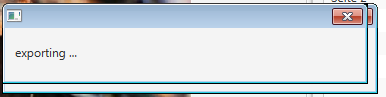
有人知道这里发生了什么吗?我真的对一个简单的解决方案感兴趣,我不需要一个进度条等等。
另一种可能是在操作开始之前显示一个等待游标,然后切换回默认游标。不幸的是,这似乎也行不通。我知道UI在“长”操作期间被阻塞,但我不知道为什么在操作前后不能更改UI .
回答 1
Stack Overflow用户
回答已采纳
发布于 2015-08-14 18:06:24
您的示例不是很完整-但是我建议使用两种方法中的一种。然而,你不会把长进程放在后台线程上,这会冻结你的应用程序。你想卸下这个过程。
1)使用具有Progess的ControlsFX对话框。将您的工作绑定到任务或服务,并将其提供给警报。这将在线程处于活动状态时弹出警报,并在完成时自动关闭它。如果您有中间进度值,则可以使用它来更新进度条。
或者,如果您不想使用这个对话框,您可以这样做:
Alert progressAlert = displayProgressDialog(message, stage);
    Executors.newSingleThreadExecutor().execute(() -> {
           try {
               //Do you work here....
               Platform.runLater(() ->forcefullyHideDialog(progressAlert));
            } catch (Exception e) {
                //Do what ever handling you need here....
                Platform.runLater(() ->forcefullyHideDialog(progressAlert));
            }

    });

private Alert displayProgressDialog(String message, Stage stage) {
        Alert progressAlert = new Alert(AlertType.NONE);
        final ProgressBar progressBar = new ProgressBar();
        progressBar.setMaxWidth(Double.MAX_VALUE);
        progressBar.setPrefHeight(30);

        final Label progressLabel = new Label(message);
        progressAlert.setTitle("Please wait....");
        progressAlert.setGraphic(progressBar);
        progressAlert.setHeaderText("This will take a moment...");

        VBox vbox = new VBox(20, progressLabel, progressBar);
        vbox.setMaxWidth(Double.MAX_VALUE);
        vbox.setPrefSize(300, 100);
        progressAlert.getDialogPane().setContent(vbox);
        progressAlert.initModality(Modality.WINDOW_MODAL);
        progressAlert.initOwner(stage);
        progressAlert.show();
        return progressAlert;
    }
private void forcefullyHideDialog(javafx.scene.control.Dialog<?> dialog) {
    // for the dialog to be able to hide, we need a cancel button,
    // so lets put one in now and then immediately call hide, and then
    // remove the button again (if necessary).
    DialogPane dialogPane = dialog.getDialogPane();
    dialogPane.getButtonTypes().add(ButtonType.CANCEL);
    dialog.hide();
    dialogPane.getButtonTypes().remove(ButtonType.CANCEL);
}页面原文内容由Stack Overflow提供。腾讯云小微IT领域专用引擎提供翻译支持
原文链接:
https://stackoverflow.com/questions/32012935
复制相关文章
相似问题
腾讯云开发者

Copyright © 2013 - 2026 Tencent Cloud. All Rights Reserved. 腾讯云 版权所有
深圳市腾讯计算机系统有限公司 ICP备案/许可证号:粤B2-20090059  粤公网安备44030502008569号
腾讯云计算(北京)有限责任公司 京ICP证150476号 | 京ICP备11018762号