
为什么Visual 2015要向我的项目中添加stdole.dll和Microsoft.AnalysisServices.AdomdClient.dll?
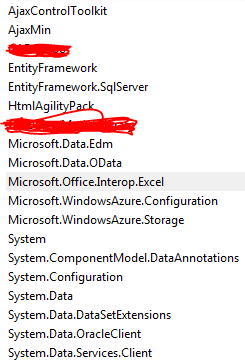
在Visual的早期版本中,这些DLL不会添加到我的项目中。我的猜测是,我的一个引用对这些DLL有依赖关系。据我所读,突出显示的Microsoft.Office.Interop.Excel可能就是那个。有人能证实这一点吗?我还应该指出,VS 2015也总是发布这些DLL,即使我将它们排除在项目之外。如果我删除它们,VS 2015将重新制作它们。
编辑:我已经确认和Office是导致stdole.dll包含的原因。请参阅下面选择的答案以删除stdole.dll。
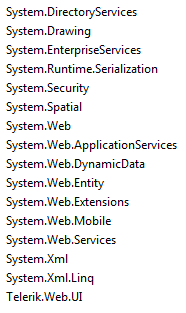
我把定制的推荐信划掉了。如果需要更多的信息,请告诉我。以下是我目前的参考资料:
回答 4
Stack Overflow用户
发布于 2015-09-02 19:58:03
如果您有此选项,请使用Embed类型,并将stdole.dll排除在一起,否则每次移动应用程序(新服务器或开发机器)时都会遇到问题,而stdole.dll没有签名。
问题:有一个需要stdole.dll的引用,stdole.dll现在被自动推送到bin文件夹。
解决方案:
- 查找需要stdole.dll的参考资料(更多关于如何在下面进行此操作)
- 转到它的属性(右击->属性)
- 将“嵌入互操作类型”从false更改为true。
如何找到引用:当您单击引用的属性时,检查是否将"Embed类型“设置为false。为了进一步挖掘,Nick's answer有一些很棒的信息。
引用到目前为止我已经确认使用stdole.dll (可能还有更多的办公程序)
- 办公室
- Excel
- 核心
- 水晶报告(谢谢锂)。正如尼克指出的,您可能没有设置
Embed Interop Types=true的优势) - NetOffice OfficeApi
如果您找到更多,将它们添加到这个列表中,或者在注释中记录它们,我会这样做的。
Hans Passant 强烈反对设置Embed Interop Types=false:What's the difference setting Embed Interop Types true and false in Visual Studio?
Scott还谈到了“嵌入互操作类型”在这里所做的工作:http://www.hanselman.com/blog/CLRAndDLRAndBCLOhMyWhirlwindTourAroundNET4AndVisualStudio2010Beta1.aspx
Stack Overflow用户
发布于 2016-06-23 14:57:54
正如其他人所指出的,stdole.dll是一组Office互操作组件的主互操作程序集。您可以通过执行以下操作来确定将其包含在项目中的原因。
在Visual中,转到Tools > Options > Projects and Solutions > Build and Run。将"MSBuild项目生成输出详细“设置更改为Detailed。现在清理和重建你的项目。
打开输出窗口并搜索stdole。你应该找到这样的一节:
25>  Dependency "stdole, Version=7.0.3300.0, Culture=neutral, PublicKeyToken=b03f5f7f11d50a3a".
25>      Resolved file path is "D:\Program Files (x86)\Microsoft Visual Studio 12.0\Visual Studio Tools for Office\PIA\Common\stdole.dll".
25>      Reference found at search path location "{Registry:Software\Microsoft\.NETFramework,v4.0,AssemblyFoldersEx}".
25>          For SearchPath "D:\Git\FoobarServices\Dependencies\Dependencies".
25>          Considered "D:\Git\FoobarServices\Dependencies\stdole.winmd", but it didn't exist.
25>          Considered "D:\Git\FoobarServices\Dependencies\stdole.dll", but it didn't exist.
25>          Considered "D:\Git\FoobarServices\Dependencies\stdole.exe", but it didn't exist.
25>          For SearchPath "{CandidateAssemblyFiles}".
25>          Considered "Dependencies\CrystalDecisions.CrystalReports.Engine.dll", but its name "CrystalDecisions.CrystalReports.Engine" didn't match.
25>          Considered "Dependencies\CrystalDecisions.Enterprise.Framework.dll", but its name "CrystalDecisions.Enterprise.Framework" didn't match.
25>          Considered "Dependencies\CrystalDecisions.Enterprise.InfoStore.dll", but its name "CrystalDecisions.Enterprise.InfoStore" didn't match.
25>          Considered "Dependencies\CrystalDecisions.ReportSource.dll", but its name "CrystalDecisions.ReportSource" didn't match.
25>          Considered "Dependencies\CrystalDecisions.Shared.dll", but its name "CrystalDecisions.Shared" didn't match.
25>          Considered "Dependencies\CrystalDecisions.Web.dll", but its name "CrystalDecisions.Web" didn't match.
25>          For SearchPath "{TargetFrameworkDirectory}".
25>          Considered "C:\Program Files (x86)\Reference Assemblies\Microsoft\Framework\.NETFramework\v4.0\stdole.winmd", but it didn't exist.
25>          Considered "C:\Program Files (x86)\Reference Assemblies\Microsoft\Framework\.NETFramework\v4.0\stdole.dll", but it didn't exist.
25>          Considered "C:\Program Files (x86)\Reference Assemblies\Microsoft\Framework\.NETFramework\v4.0\stdole.exe", but it didn't exist.
25>          For SearchPath "{Registry:Software\Microsoft\.NETFramework,v4.0,AssemblyFoldersEx}".
25>          Considered AssemblyFoldersEx locations.
25>      Required by "CrystalDecisions.Web, Version=11.5.3700.0, Culture=neutral, PublicKeyToken=692fbea5521e1304, processorArchitecture=MSIL".
25>      Required by "CrystalDecisions.ReportSource, Version=11.5.3700.0, Culture=neutral, PublicKeyToken=692fbea5521e1304, processorArchitecture=MSIL".
25>      Required by "CrystalDecisions.CrystalReports.Engine, Version=11.5.3700.0, Culture=neutral, PublicKeyToken=692fbea5521e1304, processorArchitecture=MSIL".
25>      Required by "CrystalDecisions.Enterprise.InfoStore, Version=11.5.3300.0, Culture=neutral, PublicKeyToken=692fbea5521e1304".
25>      The ImageRuntimeVersion for this reference is "v1.0.3705".
您可以看到Visual搜索程序集的位置以及底部需要它的位置。在我的例子中,它是一堆旧的水晶报告程序集。
有时,您可以像Tony建议的那样,通过依赖项嵌入互操作类型,但并不总是这样。对我来说,水晶报告程序集不支持这一点。
通过将stdole.dll (32 my,数字签名)从C:\Program Files (x86)\Microsoft.NET\Primary Interop Assemblies\复制到项目中的“依赖项”文件夹中,我修复了这个问题(以及提到的那个阴险的问题)。我将文件添加到我的项目中,并向其添加了一个显式引用( added > Browse)。最后,我打开了新引用的属性,并将Embed Interop Types设置为True。
这似乎是一个更好的情况。我不需要担心程序集的未签名版本。
Stack Overflow用户
发布于 2015-09-21 21:29:50
我已经处理这个问题很久了。
每当我从web平台安装任何内容或任何更新时,stdole.dll都会被一个非签名版本所取代。不久前,我向微软报告了这一错误,但却充耳不闻。
我转到C:\Program (x86)\Microsoft.NET\Primary互操作程序集并从这里复制签名版本(22 to ),替换C:\Program (X86)\MicrosoftVisualStudio14.0\ Visual \PIA\Common16KB中的版本,这解决了这个问题。
史考特
https://stackoverflow.com/questions/31970967
复制相似问题
腾讯云开发者

Copyright © 2013 - 2026 Tencent Cloud. All Rights Reserved. 腾讯云 版权所有
深圳市腾讯计算机系统有限公司 ICP备案/许可证号:粤B2-20090059  粤公网安备44030502008569号
腾讯云计算(北京)有限责任公司 京ICP证150476号 | 京ICP备11018762号