
调整分区中任意大小的图像
调整分区中任意大小的图像
提问于 2015-08-12 12:29:49
我试图使一个图像适合在一个div,无论图像大小,但当一个不同大小的图像被上传时,图像不适合或与其他更大的尺寸匹配。
JS JSFiddle演示
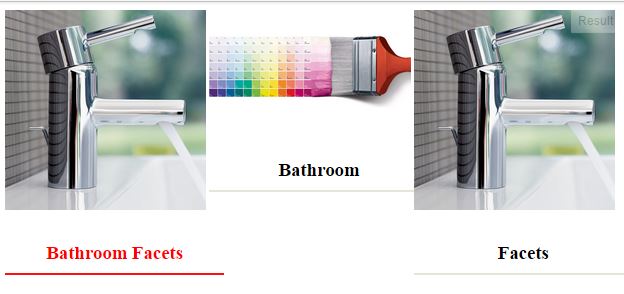
。
HTML:
<div class="wrapper">
<div id="one">
<a  href="http://ironware.in/product-category/faucets/" style="    text-decoration: none;"><img  class="imagewidth" src="http://mangoesandmiles.com/wp-content/uploads/2015/07/grohe-bathroom-faucets-SGjy.jpg"/>
<br>
<h3 class="imagewidth"  id="h11" style="padding: 9px; text-align:center;">Bathroom Facets</h3>
</a>
</div>
<div id="one">
<a    href="http://ironware.in/product-category/faucets/" style="    text-decoration: none;"><img  class="imagewidth" src="http://www.vinodpatel.com.fj/media/catalog/category/paint_swatches.jpg"/>
<br>
<h3 class="imagewidth"  id="h11" style="padding: 9px; text-align:center;">Bathroom </h3>
</a>
</div>
<div id="one">
<a    href="http://ironware.in/product-category/faucets/" style="    text-decoration: none;"><img class="imagewidth" src="http://mangoesandmiles.com/wp-content/uploads/2015/07/grohe-bathroom-faucets-SGjy.jpg"/>
<br>
<h3 class="imagewidth"  id="h11" style="padding: 9px; text-align:center;"> Facets</h3>
</a>
</div>
</div>
CSS:
.wrapper div {

            width: 100%;
            -webkit-box-sizing: border-box;
            -moz-box-sizing: border-box;
            box-sizing: border-box;
            padding-bottom: 8%;
            }

            @media screen and (min-width: 600px) {
            .wrapper {
            height: auto;
            }
            #one {
            width: 33.3333%;
            float: left;

            }

            }


            #one:hover h3 {


            transition: border-color .5s ease-in-out;
            cursor: pointer;

            color:#ff0000;
            border-bottom-color: #ff0000;

            }


            #one h3 {

            color:#000000;
            border-bottom: 2px solid #e7e4da;
            }


            .imagewidth
            {
            width: 98.5%;
            max-width: 100%
            }

            .headding_line
            {
            width: 50px;
            margin-top: 0px;
            margin-bottom: 30px;
            border-top: 2px solid #e7e4da;
}回答 2
Stack Overflow用户
回答已采纳
发布于 2015-08-12 13:37:13
有很多html/css问题,比如重复的ids。你将来还会遇到其他的问题,就像你所知道的。但既然他们不是你提出问题的理由,我就不谈了。
因为您对元素使用了width: 33%,所以您可以给出图像height: 33vw,这很大程度上意味着给出的高度相当于视口宽度的33%。注意:这将扩展我们的图像示例
如果要填充映像,则需要添加另一个容器div:示例
Stack Overflow用户
发布于 2015-08-12 13:29:56
你好,保利,首先,这是我努力实现你想要的
对于图像的高度,有一件事将通过获得as的宽度来自我调整。
如果您想要特定的高度,那么您需要指定应用程序。
请看看它是否适合你。
.wrapperdiv{
	width: 100%;
	-webkit-box-sizing: border-box;
	-moz-box-sizing: border-box;
	box-sizing: border-box;
	padding-bottom: 8%;
}
.one{
    max-width:40%;
}
.one img{
    max-width:40%;
    max-height:auto;
    display:block;
}
.one h3{
    max-width : 40%;
}
@mediascreenand (min-width: 600px){
	.wrapper{
		height: auto;
	}.one{
		width: 33.3333%;
		float: left;
	}
}
.one:hover h3{
	transition: border-color .5s ease-in-out;
	cursor: pointer;
	color: #ff0000;
	border-bottom-color: #ff0000;
}
.one{
    max-width:70%;
}
.one img{
    max-width:70%;
    max-height:auto;
    display:block;
}
.one h3{
    max-width:70%;
	color: #000000;
	border-bottom: 2px solid #e7e4da;
}
.headding_line{
	width: 50px;
	margin-top: 0px;
	margin-bottom: 30px;
	border-top: 2px solid #e7e4da;
}
<div class="wrapper">
    <div class="one">
        <a  href="http://ironware.in/product-category/faucets/" style="    text-decoration: none;">
            <img  class="imagewidth" src="http://3.s3.envato.com/files/17065809/1_skywalker-template-preview.__large_preview.png"/><br>
            <h3 class="imagewidth"  id="h11" style="padding: 9px; text-align:center;">Bathroom Facets</h3>
        </a>
    </div>
    <div class="one">
        <a    href="http://ironware.in/product-category/faucets/" style="    text-decoration: none;">
            <img  class="imagewidth" src="http://www.ahrefmagazine.com/wp-content/uploads/2013/03/thrill.jpg"/><br>
            <h3 class="imagewidth"  id="h11" style="padding: 9px; text-align:center;">Bathroom </h3>
        </a>
    </div>
    <div class="one">
        <a    href="http://ironware.in/product-category/faucets/" style="    text-decoration: none;">
            <img class="imagewidth" src="http://www.ahrefmagazine.com/wp-content/uploads/2013/03/jscover_thumb.jpg"/><br>
            <h3 class="imagewidth"  id="h11" style="padding: 9px; text-align:center;"> Facets</h3>
        </a>
    </div>
</div>
当你问这个问题的时候,我想提出一件事,请在js小提琴中应用适当的代码结构,或者在你给出代码的地方使用适当的代码结构,因为有一件事是,只有当人们为了理解和发现问题而付出最少的努力时,他们才会回答。
无论工作与否,都需要反馈。
页面原文内容由Stack Overflow提供。腾讯云小微IT领域专用引擎提供翻译支持
原文链接:
https://stackoverflow.com/questions/31965281
复制相关文章
相似问题
腾讯云开发者

Copyright © 2013 - 2026 Tencent Cloud. All Rights Reserved. 腾讯云 版权所有
深圳市腾讯计算机系统有限公司 ICP备案/许可证号:粤B2-20090059  粤公网安备44030502008569号
腾讯云计算(北京)有限责任公司 京ICP证150476号 | 京ICP备11018762号