
OpenCV流域分割遗漏部分对象
OpenCV流域分割遗漏部分对象
提问于 2015-08-12 09:30:25
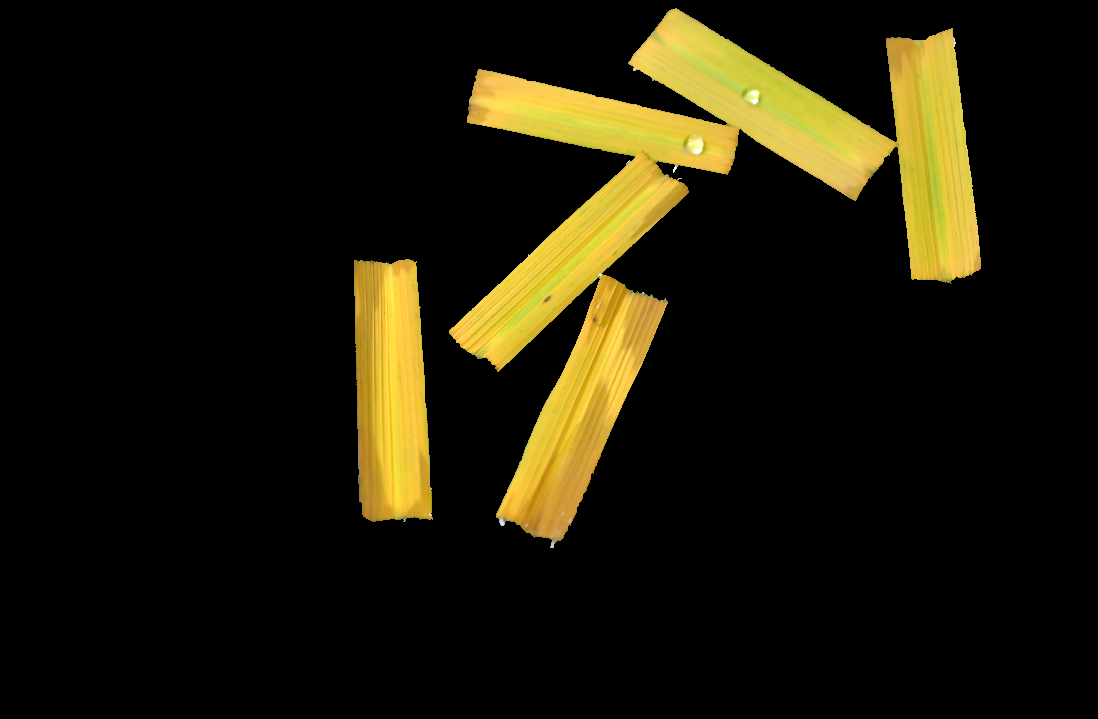
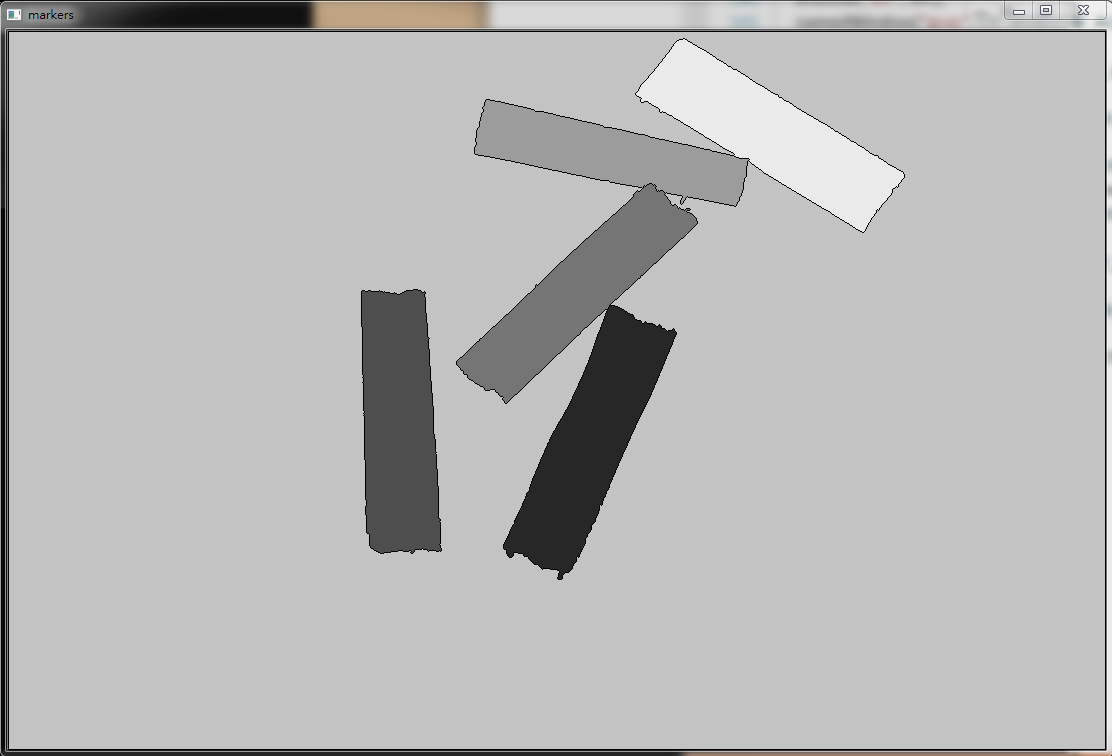
我的代码与这个教程相同。当我在使用cv::watershed()之后看到结果图像时,有一个对象(右上)是我想要找出来的,但它是缺少的。使用cv::drawContours()后,图像中确实有六个标记。这是否正常是因为分水岭算法存在不精确性?
下面是我代码的一部分:
Mat src = imread("result01.png");

Mat gray;
cvtColor(src, gray, COLOR_BGR2GRAY);

Mat thresh;
threshold(gray, thresh, 0, 255, THRESH_BINARY | THRESH_OTSU);

// noise removal
Mat kernel = Mat::ones(3, 3, CV_8UC1);
Mat opening;
morphologyEx(thresh, opening, MORPH_OPEN, kernel, Point(-1, -1), 2);

// Perform the distance transform algorithm
Mat dist_transform;
distanceTransform(opening, dist_transform, CV_DIST_L2, 5);

// Normalize the distance image for range = {0.0, 1.0}
// so we can visualize and threshold it
normalize(dist_transform, dist_transform, 0, 1., NORM_MINMAX);

// Threshold to obtain the peaks
// This will be the markers for the foreground objects
Mat dist_thresh;
threshold(dist_transform, dist_thresh, 0.5, 1., CV_THRESH_BINARY);

Mat dist_8u;
dist_thresh.convertTo(dist_8u, CV_8U);

// Find total markers
vector<vector<Point> > contours;
findContours(dist_8u, contours, CV_RETR_EXTERNAL, CV_CHAIN_APPROX_SIMPLE);

// Create the marker image for the watershed algorithm
Mat markers = Mat::zeros(dist_thresh.size(), CV_32SC1);

// Draw the foreground markers
for (size_t i = 0; i < contours.size(); i++)
    drawContours(markers, contours, static_cast<int>(i), Scalar::all(static_cast<int>(i)+1), -1);

// Perform the watershed algorithm
watershed(src, markers);
原始图像:
watershed后结果
您可以在这里找到原始的、中间的和结果的图像:
回答 2
Stack Overflow用户
回答已采纳
发布于 2015-08-18 10:39:28
在您的示例中,您所考虑的背景与“缺失”对象的标签(5)相同。
您也可以通过将标签(>0)设置为背景来轻松地调整这一点。你可以找到什么是肯定的背景膨胀和否定的thresh图像。然后,在创建标记时,将标签定义为:
0:未知1:背景>1:你的对象
在您的输出映像中,markers将有:
-1:对象之间的边缘0:背景(由watershed提供)1:背景(正如您所定义的)>1:你的对象。
此代码应有助于:
#include <opencv2\opencv.hpp>
#include <vector>

using namespace std;
using namespace cv;

int main()
{
    Mat3b src = imread("path_to_image");

    Mat1b gray;
    cvtColor(src, gray, COLOR_BGR2GRAY);

    Mat1b thresh;
    threshold(gray, thresh, 0, 255, THRESH_BINARY | THRESH_OTSU);

    // noise removal
    Mat1b kernel = getStructuringElement(MORPH_RECT, Size(3,3));
    Mat1b opening;
    morphologyEx(thresh, opening, MORPH_OPEN, kernel, Point(-1, -1), 2);

    Mat1b kernelb = getStructuringElement(MORPH_RECT, Size(21, 21));
    Mat1b background;
    morphologyEx(thresh, background, MORPH_DILATE, kernelb);
    background = ~background;

    // Perform the distance transform algorithm
    Mat1f dist_transform;
    distanceTransform(opening, dist_transform, CV_DIST_L2, 5);

    // Normalize the distance image for range = {0.0, 1.0}
    // so we can visualize and threshold it
    normalize(dist_transform, dist_transform, 0, 1., NORM_MINMAX);

    // Threshold to obtain the peaks
    // This will be the markers for the foreground objects
    Mat1f dist_thresh;
    threshold(dist_transform, dist_thresh, 0.5, 1., CV_THRESH_BINARY);

    Mat1b dist_8u;
    dist_thresh.convertTo(dist_8u, CV_8U);

    // Find total markers
    vector<vector<Point> > contours;
    findContours(dist_8u, contours, CV_RETR_EXTERNAL, CV_CHAIN_APPROX_SIMPLE);

    // Create the marker image for the watershed algorithm
    Mat1i markers(dist_thresh.rows, dist_thresh.cols, int(0));

    // Background as 1
    Mat1i one(markers.rows, markers.cols, int(1));
    bitwise_or(one, markers, markers, background);

    // Draw the foreground markers (from 2 up)
    for (int i = 0; i < int(contours.size()); i++)
        drawContours(markers, contours, i, Scalar(i+2), -1);

    // Perform the watershed algorithm
    Mat3b dbg;
    cvtColor(opening, dbg, COLOR_GRAY2BGR);
    watershed(dbg, markers);

    Mat res;
    markers.convertTo(res, CV_8U);
    normalize(res, res, 0, 255, NORM_MINMAX);

    return 0;
}
结果:

Stack Overflow用户
发布于 2017-07-05 06:56:41
关于流域的emgu cv数据很少。下面是我使用c#对这个问题的翻译。我知道这不是正确的论坛,但是这个答案基普斯突然出现了,对所有的搜索者是这样的:
//Mat3b src = imread("path_to_image");

//cvtColor(src, gray, COLOR_BGR2GRAY);
Image<Gray, byte> gray = smallImage.Convert<Gray, byte>();

//threshold(gray, thresh, 0, 255, THRESH_BINARY | THRESH_OTSU);
Image<Gray, byte> thresh = gray.ThresholdBinaryInv(new Gray(55), new Gray(255));

// noise removal
Mat kernel = CvInvoke.GetStructuringElement(ElementShape.Rectangle, new Size(3, 3), new Point(-1, -1));

//Mat1b opening;
//morphologyEx(thresh, opening, MORPH_OPEN, kernel, Point(-1, -1), 2);
Image<Gray, byte> opening = thresh.MorphologyEx(MorphOp.Open, kernel, new Point(-1, -1), 2, BorderType.Default, new MCvScalar(255));

//Mat1b kernelb = getStructuringElement(MORPH_RECT, Size(21, 21));
Mat kernel1 = CvInvoke.GetStructuringElement(ElementShape.Rectangle, new Size(3, 3), new Point(-1, -1));
//Mat1b background;
//morphologyEx(thresh, background, MORPH_DILATE, kernelb);
Image<Gray, byte> background = thresh.MorphologyEx(MorphOp.Dilate, kernel, new Point(-1, -1), 2, BorderType.Default, new MCvScalar(255));
background = ~background;

//// Perform the distance transform algorithm
//Mat1f dist_transform;
//distanceTransform(opening, dist_transform, CV_DIST_L2, 5);
Image<Gray, float> dist_transform = new Image<Gray, float>(opening.Width, opening.Height);
CvInvoke.DistanceTransform(opening, dist_transform, null, DistType.L2, 5);

//// Normalize the distance image for range = {0.0, 1.0}
//// so we can visualize and threshold it
//normalize(dist_transform, dist_transform, 0, 1., NORM_MINMAX);
CvInvoke.Normalize(dist_transform, dist_transform, 0, 1.0, NormType.MinMax, DepthType.Default);

//// Threshold to obtain the peaks
//// This will be the markers for the foreground objects
//Mat1f dist_thresh;
//threshold(dist_transform, dist_thresh, 0.5, 1., CV_THRESH_BINARY);
Image<Gray, float> dist_thresh = new Image<Gray, float>(opening.Width, opening.Height);
CvInvoke.Threshold(dist_transform, dist_thresh, 0.5, 1.0, ThresholdType.Binary);

//Mat1b dist_8u;
//dist_thresh.convertTo(dist_8u, CV_8U);
Image<Gray, Byte> dist_8u = dist_thresh.Convert<Gray, Byte>();

//// Find total markers
//vector<vector<Point>> contours;
//findContours(dist_8u, contours, CV_RETR_EXTERNAL, CV_CHAIN_APPROX_SIMPLE);
VectorOfVectorOfPoint contours = new VectorOfVectorOfPoint();
CvInvoke.FindContours(dist_8u, contours, null, RetrType.External, ChainApproxMethod.ChainApproxSimple);

//// Create the marker image for the watershed algorithm
//Mat1i markers(dist_thresh.rows, dist_thresh.cols, int(0));
Image<Gray, int> markers = new Image<Gray, int>(dist_thresh.Width, dist_thresh.Height, new Gray(0));

//// Background as 1
//Mat1i one(markers.rows, markers.cols, int(1));
//bitwise_or(one, markers, markers, background);
Image<Gray, int> one = new Image<Gray, int>(markers.Cols, markers.Rows, new Gray(1));
CvInvoke.BitwiseOr(one, markers, markers, background);

//// Draw the foreground markers (from 2 up)
for (int i = 0; i < contours.Size; i++)
//  drawContours(markers, contours, i, Scalar(i + 2), -1);
    CvInvoke.DrawContours(markers, contours, i, new MCvScalar(i + 2));

//// Perform the watershed algorithm
//Mat3b dbg;
//cvtColor(opening, dbg, COLOR_GRAY2BGR);
//watershed(dbg, markers);
Image<Bgr, byte> dbg = new Image<Bgr, byte>(markers.Cols, markers.Rows);
CvInvoke.CvtColor(opening, dbg, ColorConversion.Gray2Bgr);
CvInvoke.Watershed(dbg, markers);

//Mat res;
//markers.convertTo(res, CV_8U);
//normalize(res, res, 0, 255, NORM_MINMAX);
CvInvoke.Normalize(markers, markers, 0, 255, NormType.MinMax);

//return 0;
若要在暗背景下查找光对象,请将ThresholdBinaryInv替换为ThresholdBinary
页面原文内容由Stack Overflow提供。腾讯云小微IT领域专用引擎提供翻译支持
原文链接:
https://stackoverflow.com/questions/31961240
复制相关文章
相似问题
腾讯云开发者

Copyright © 2013 - 2026 Tencent Cloud. All Rights Reserved. 腾讯云 版权所有
深圳市腾讯计算机系统有限公司 ICP备案/许可证号:粤B2-20090059  粤公网安备44030502008569号
腾讯云计算(北京)有限责任公司 京ICP证150476号 | 京ICP备11018762号