
不使用引导表的ICheck
不使用引导表的ICheck
提问于 2015-08-12 05:37:07
我使用iCheck(v1.0.2) jquery插件进行管理LTE模板的复选框。除了引导表之外,iCheck正在正常工作。在检查chrome工具中的元素时,我可以找到由<td>中的插件创建的div,但是它是不可见的。
这是html
   <div class="table-responsive">
     <table class="table table-bordered table-striped table-condensed">
       <thead>
         <tr>
           <th>Functionality</th>
           <th>View</th>
           <th>Add</th>
           <th>Edit</th>
           <th>Delete</th>
         </tr>
       </thead>
       <tbody>
         <tr>
           <td>New Function</td>
           <td><input type="checkbox" class="icheck"></td>
           <td><input type="checkbox" class="icheck"></td>
           <td><input type="checkbox" class="icheck"></td>
           <td><input type="checkbox" class="icheck"></td>
         </tr>
       </tbody>
     </table>
   </div>
Jquery:
   <script>
     $(function () {
       $('.icheck').iCheck();
      });
   </script>
开发工具:
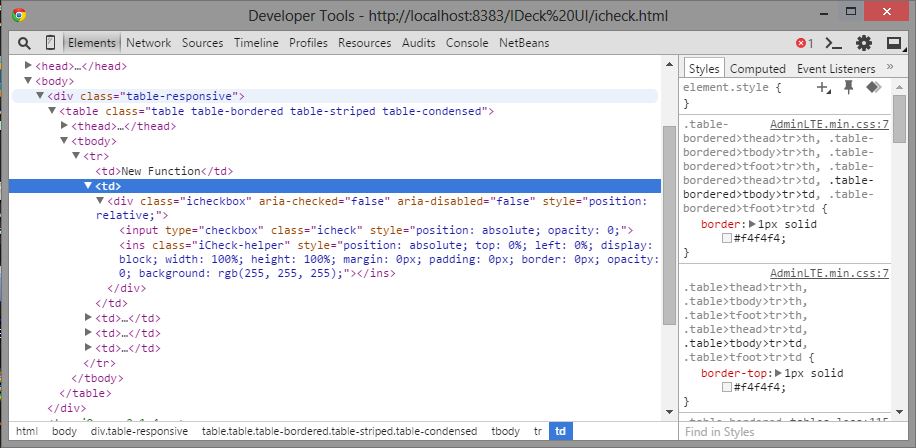
不要考虑控制台错误。是关于favicon.ico的。我怎么解决这个问题?
回答 2
Stack Overflow用户
回答已采纳
发布于 2016-08-09 16:05:33
在使用iCheck的数据时,我在铬上也面临着同样的问题,在搜索了3个小时之后,这是我发现的唯一讨论这个问题的帖子。在研究了周围的情况后,跟踪对我来说是个诀窍。
您需要将相对位置css添加到元素ins。
$('.iCheck-helper').css('position', 'relative');如果您在列中使用它,请在rowCallBack中使用它。
$(nRow).find(':checkbox,:radio').iCheck();
$(nRow).find('.iCheck-helper').css('position', 'relative');
希望这能让一个人过轻松的日子。
Stack Overflow用户
发布于 2015-08-12 06:42:15
给您的icheckbox类width、height和display属性
示例
width:20px, height:20px, display:inline-block;你能这样试试吗?
页面原文内容由Stack Overflow提供。腾讯云小微IT领域专用引擎提供翻译支持
原文链接:
https://stackoverflow.com/questions/31956792
复制相关文章
相似问题
腾讯云开发者

Copyright © 2013 - 2026 Tencent Cloud. All Rights Reserved. 腾讯云 版权所有
深圳市腾讯计算机系统有限公司 ICP备案/许可证号:粤B2-20090059  粤公网安备44030502008569号
腾讯云计算(北京)有限责任公司 京ICP证150476号 | 京ICP备11018762号