
窗体图表标签修改
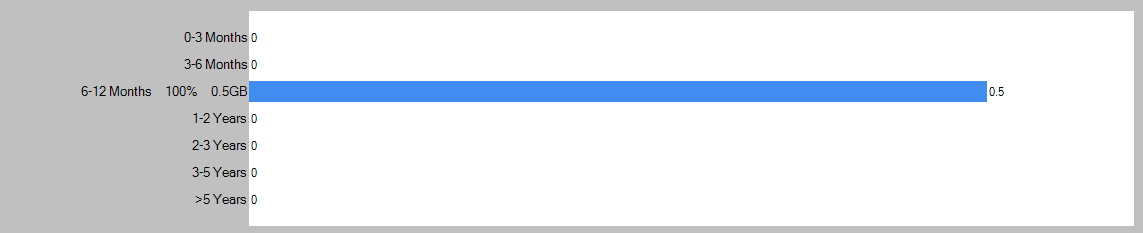
正在创建使用图表的windows窗体应用程序。我想修改图表
- 如何编辑图表区域的地底颜色(屏幕截图中的白色)
- 如何在每个条形图上应用不同的颜色。
- 如何格式化Y轴标签(需要将文件扩展名与左侧对齐,整数值与右侧对齐)
这是我当前的屏幕截图
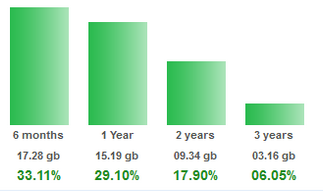
需要像这样更新我的屏幕

是否有可能像这样对齐标签
回答 1
Stack Overflow用户
发布于 2015-08-08 15:35:53
下面是一个示例:
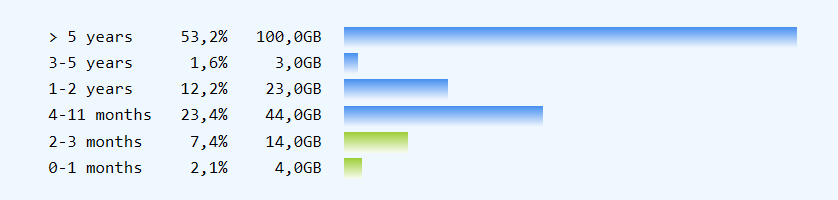
若要对Chart进行样式设置,请使用以下内容:
// prepare:
chart1.Series.Clear();
Series S1 = chart1.Series.Add("S1");
ChartArea CA = chart1.ChartAreas[0];

// style type, font, color, axes
S1.ChartType = SeriesChartType.Bar;
CA.BackColor = Color.AliceBlue;
chart1.BackColor = CA.BackColor;
Font f = new Font("Consolas", 10f);
CA.AxisX.LabelStyle.Font = f;

S1.BackGradientStyle = GradientStyle.TopBottom;
CA.AxisX.MajorGrid.Enabled = false;
CA.AxisX.MajorTickMark.Enabled = false;
CA.AxisX.LineColor = Color.Transparent;

CA.AxisY.Enabled = AxisEnabled.False;
CA.AxisY.MajorGrid.Enabled = false;
CA.AxisY.MajorTickMark.Enabled = false;若要对单个DataPoints进行着色,必须设置它们的Color
S1.Points[0].Color = Color.YellowGreen;
S1.Points[1].Color = Color.YellowGreen;要创建格式化标签,可以创建字符串,并在添加点时使用它们作为(伪)X值:
string label = string.Format("{0,-11}{1, 7:0.0}%{2,8:##0.0}GB  ",
                t.Item1, t.Item2 * 100d / total, t.Item2) + "\u2001\u2001";
int idx = S1.Points.AddXY(label, t.Item2);这里我使用一个Tuple<string, int>来保存我的数据。您将需要使其适应您的数据源。注意,我是如何从总数中计算百分比的。
下面是我为示例数据使用的完整代码:
List<Tuple<string, double>> data = new List<Tuple<string, double>>()
{
    new Tuple<string, double>( "0-1 months", 4 ),
    new Tuple<string, double>( "2-3 months", 14 ),
    new Tuple<string, double>( "4-11 months", 44 ),
    new Tuple<string, double>( "1-2 years", 23 ),
    new Tuple<string, double>( "3-5 years", 3 ),
    new Tuple<string, double>( "> 5 years", 100 ),

};

double total = data.Sum(x => x.Item2);

foreach (Tuple<string, double> t in data)
{
    string label = string.Format("{0,-11}{1, 7:0.0}%{2,8:##0.0}GB",
                   t.Item1, t.Item2 * 100d / total, t.Item2) + "\u2001\u2001";
    int i = S1.Points.AddXY(label, t.Item2);
    S1.Points[i].Font = f;
}
备注:
- 要获得内部字符串对齐,需要使用单间距字体,如
Consolas。 - 还要注意,不能在一个标签内使用不同的字体或样式。
- 我添加了两个M-空间字符来在标签和绘图区域之间创建一个距离。(正常空间不显示!)
更新:
第二个图表图像显示一个SeriesChartType.Column。要插入新行,只需插入一个\n字符并确保有足够的空间。
棘手的部分是有一条线在一个不同的颜色。这是不可能的标签。
相反,每个数据池需要添加两个CustomLabels:第一个显示例如黑线。第二个ForeColor可以有一个不同的\n,在开始时需要和第一个有行的\n一样多。
请注意,CustomLabels位于两个位置之间的中间。所以我现在用实数添加了DataPoints,从0开始,作为它们的X值,然后将CustomLabels放在中间。
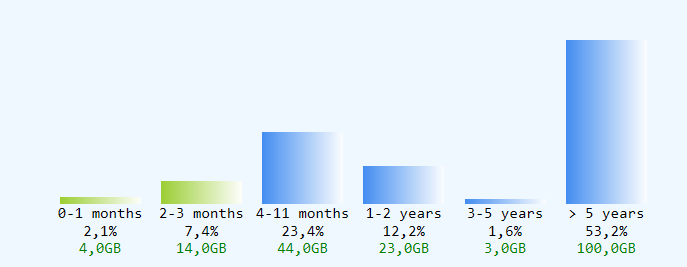
    chart1.Series.Clear();
    Series S1 = chart1.Series.Add("S1");
    S1.ChartType = SeriesChartType.Column;
    ChartArea CA = chart1.ChartAreas[0];
    chart1.Legends.Clear();

    CA.BackColor = Color.AliceBlue;
    chart1.BackColor = Color.AliceBlue;
    Font f = new Font("Consolas", 9f);

    CA.AxisX.LabelStyle.Font = f;

    S1.BackGradientStyle = GradientStyle.LeftRight;
    CA.AxisX.MajorGrid.Enabled = false;
    CA.AxisX.MajorTickMark.Enabled = false;
    CA.AxisX.LineColor = Color.Transparent;

    CA.AxisY.Enabled = AxisEnabled.False;
    CA.AxisY.MajorGrid.Enabled = false;
    CA.AxisY.MajorTickMark.Enabled = false;

    CA.Position.X = 0f;

    List<Tuple<string, double>> data = new List<Tuple<string, double>>()
    {
        new Tuple<string, double>( "0-1 months", 4 ),
        new Tuple<string, double>( "2-3 months", 14 ),
        new Tuple<string, double>( "4-11 months", 44 ),
        new Tuple<string, double>( "1-2 years", 23 ),
        new Tuple<string, double>( "3-5 years", 3 ),
        new Tuple<string, double>( "> 5 years", 100 ),

    };

    double total = data.Sum(x => x.Item2);

    foreach (Tuple<string, double> t in data)
    {
        string label1 = string.Format("{0}\n{1:0.0}%", t.Item1, t.Item2 * 100d / total);
        string label2 = string.Format("\n\n{0:##0.0}GB", t.Item2);
        int i = S1.Points.AddXY(S1.Points.Count, t.Item2);
        S1.Points[i].Font = f;

        DataPoint dp = S1.Points[i];
        int v = (int)dp.YValues[0];
        CustomLabel cl = new CustomLabel();
        cl.Text = label1;
        cl.FromPosition = i - 0.5f;
        cl.ToPosition = i + 0.5f;

        CustomLabel cl2 = new CustomLabel();
        cl2.Text = label2;
        cl2.FromPosition = i -0.5f;
        cl2.ToPosition = i + 0.5f;

        cl2.ForeColor = Color.Green;
        CA.AxisX.CustomLabels.Add(cl);
        CA.AxisX.CustomLabels.Add(cl2);

    }
    S1.Points[0].Color = Color.YellowGreen;
S1.Points[1].Color = Color.YellowGreen;https://stackoverflow.com/questions/31893852
复制相似问题
腾讯云开发者

Copyright © 2013 - 2026 Tencent Cloud. All Rights Reserved. 腾讯云 版权所有
深圳市腾讯计算机系统有限公司 ICP备案/许可证号:粤B2-20090059  粤公网安备44030502008569号
腾讯云计算(北京)有限责任公司 京ICP证150476号 | 京ICP备11018762号