
使用MGCB处理字体时路径无效
我在玩Monogame,不能添加字体。当使用MonoGame管道工具添加字体时,我无法再构建我的项目了。
Visual停止,但有以下错误:
dem“C:\Program (x86)\MSBuild\MonoGame\v3.0\Tools\MGCB.exe”/@:"C:\dev\Mini\Mini\Content\Content.mgcb“/platform:Windows /platform:Windows /quiet”wurde mit dem Code 1““FontDescriptionProcessor”出乎意料
(对不起,是德语,但我想你能理解这个问题;)
当我执行错误抛出命令时,我得到一个更多的帮助错误:
/outputDir:"C:\dev\Mini\Mini\Content\bin\Windows“/intermediateDir:"C:\dev\Mini\Mini\Content\obj\Windows”C:\dev\Mini\Mini\Content>"C:\Program (x86)\MSBuild\MonoGame\v3.0\Tools\MGCB.exe“/@:"C:\dev\Mini\Mini\Content\Content.mgcb”/platform:Windows /platform:Windows/intermediateDir:“C:\dev\Mini\Mini\Content\obj\Windows”Build启动2015年8月23日:15:43 跳过C:/dev/Mini/Mini/Content/Game/Character.PNG跳过C:/dev/Mini/Mini/Content/SplashScreen/splashScreenGame.png跳过C:/dev/Mini/Mini/Content/ C:/dev/Mini/Mini/Content/fonts/default.spritefont: /背景。Mini C:/dev/Mini/Mini/Content/fonts/default.spritefont C:/dev/Mini/Mini/Content/fonts/default.spritefont:错误:处理器“FontDescriptionProcessor”意外失败!System.ArgumentException: Illegales Zeichen im Pfad.bei System.IO.Path.CheckInvalidPathChars(字符串路径,布尔checkAdditional) bei System.IO.Path.IsPathRooted(字符串路径) ( bei Microsoft.Xna.Framework.Content.Pipeline.Processors.FontDescriptionProcessor.FindFontFileFromFontName(String fontName,String fontDirectory) bei Microsoft.Xna.Framework.Content.Pipeline.Processors.FontDescriptionProcessor.Process(FontDescription输入,ContentProcessorContext上下文) bei Microsoft.Xna.Framework.Content.Pipeline.ContentProcessor`2.Microsoft.Xna.Framework.Content.Pipeline.IContentProcessor.Process(Object输入,跳过C:/dev/Mini/Mini/ ContentProcessorContext /Game.xml 生成3成功,1失败。 时间过了00:00:00.19。
我知道路径C:/dev/Mini/Mini/Content/fonts/default.spritefont是无效的,但我没有看到任何无效字符。.spritefont文件是使用MonoGame工具生成的,而不是导入的。我错过了什么吗?
我在Windows 10上,MonoGame管道工具在3.5.0.465版本上,MGCB.exe也有3.5.0.465版本。
编辑:当我自己检查路径时,一切看起来都很好,并且将整个项目移动到另一个硬盘驱动器一点帮助都没有。
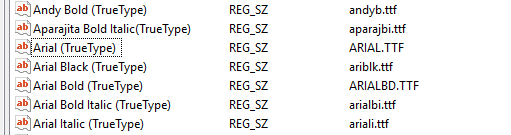
Edit2:好的。看起来这不是我的字体路径。它是从注册表加载的路径。registryKey.GetValue(current).ToString();方法中的行FindFontFileFromFontName返回ARIAL.TTF\00\0\0\0\0\0。我将调查和更新这个问题或作出答复。
回答 2
Stack Overflow用户
发布于 2015-08-07 22:16:01
经过测试,我找到了一个解决方案(或者我发现了问题.):我的注册表中的一些字体路径被破坏了。带有大写日期值的字体正在抛出错误。当您遇到类似的问题时,请查看您在"SOFTWARE\\Microsoft\\Windows NT\\CurrentVersion\\Fonts"l下的注册表,检查所选字体或将其更改为另一种字体。我希望这个解决办法也能帮到你。(如果有人知道,为什么我的注册表数据被破坏了,请告诉我。)
Stack Overflow用户
发布于 2017-11-30 21:31:26
我犯了这个错误,因为spritefont文件只是一个字体元数据定义文件,而不是我在Windows中手动安装TTF字体文件的实际字体,所以构建成功了,因为可以找到字体压缩到二进制文件中。
https://stackoverflow.com/questions/31886866
复制相似问题
腾讯云开发者

Copyright © 2013 - 2026 Tencent Cloud. All Rights Reserved. 腾讯云 版权所有
深圳市腾讯计算机系统有限公司 ICP备案/许可证号:粤B2-20090059  粤公网安备44030502008569号
腾讯云计算(北京)有限责任公司 京ICP证150476号 | 京ICP备11018762号