
为什么为所有四方添加约束会导致错误?
为什么为所有四方添加约束会导致错误?
提问于 2015-08-06 09:44:02
更新
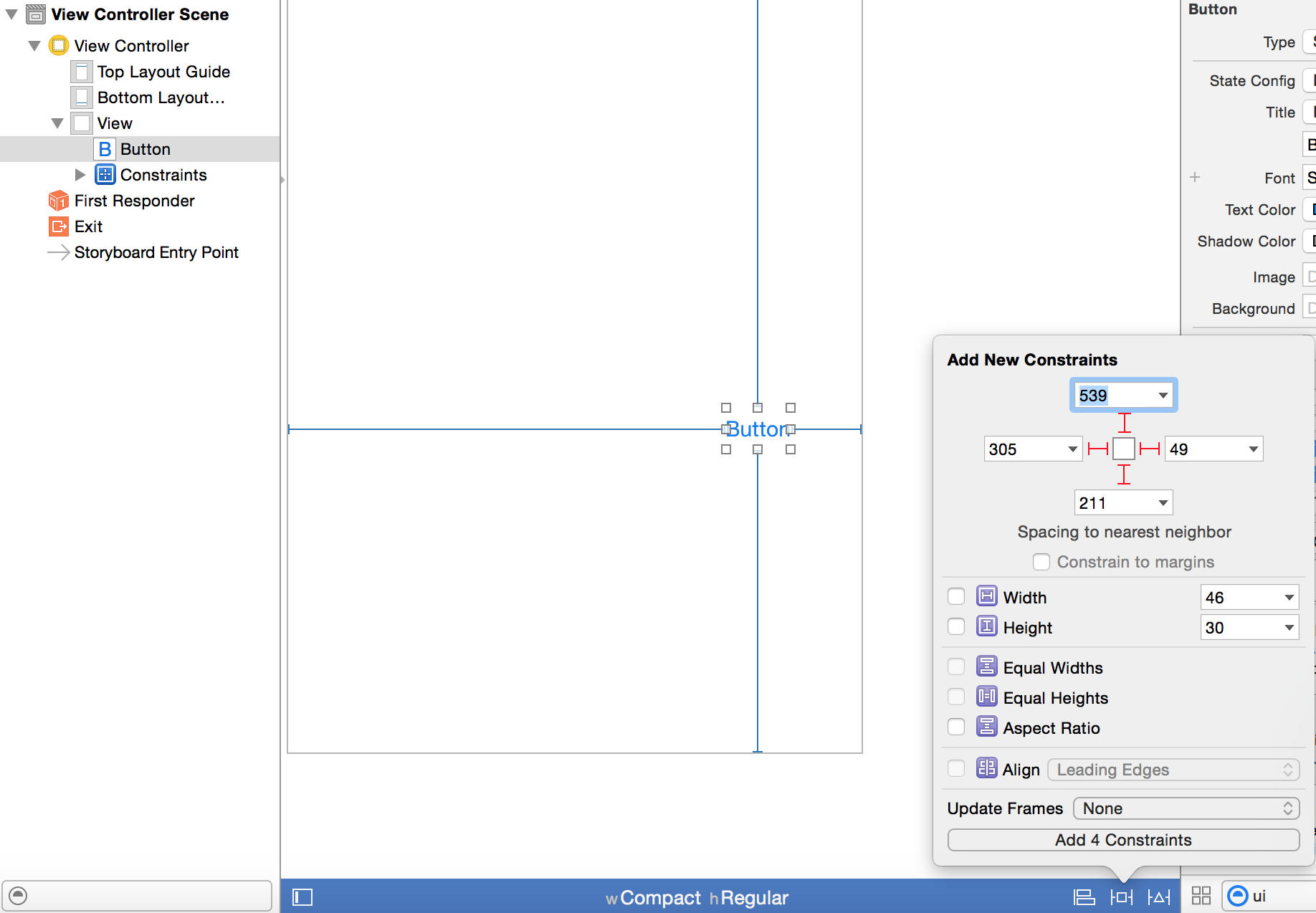
在编辑XIB文件时,我在视图中添加了一个按钮到我想要的位置,然后点击右下角的引脚图标,然后按下按钮的所有四面,没有选中“限制页边距”,因为这正是我想要放置按钮的确切位置,而且我不希望它移动。
但我有一个错误,上面写着“不能同时满足约束。”为什么会发生这种事?
Unable to simultaneously satisfy constraints.
Probably at least one of the constraints in the following list is one you don't want. Try this: (1) look at each constraint and try to figure out     which you don't expect; (2) find the code that added the unwanted constraint or constraints and fix it. (Note: If you're seeing NSAutoresizingMaskLayoutConstraints that you don't understand, refer to the documentation for the UIView property translatesAutoresizingMaskIntoConstraints)
(
"<_UILayoutSupportConstraint:0x9f494b0 V:[_UILayoutGuide:0x9f40370(20)]>",
"<_UILayoutSupportConstraint:0x9f3b6c0 V:|-(0)-[_UILayoutGuide:0x9f40370]   (Names: '|':UIView:0x9f3feb0 )>",
"<_UILayoutSupportConstraint:0x9f418e0 V:[_UILayoutGuide:0x9f407c0(0)]>",
"<_UILayoutSupportConstraint:0x9f18010 _UILayoutGuide:0x9f407c0.bottom == UIView:0x9f3feb0.bottom>",
"<NSLayoutConstraint:0x9f40f10 V:[UIButton:0x9f40f40'Button']-(211)-[_UILayoutGuide:0x9f407c0]>",
"<NSLayoutConstraint:0x9f47ab0 V:[_UILayoutGuide:0x9f40370]-(539)-[UIButton:0x9f40f40'Button']>",
"<NSLayoutConstraint:0xa157b10 'UIView-Encapsulated-Layout-Height' V:[UIView:0x9f3feb0(568)]>"
)

Will attempt to recover by breaking constraint
Make a symbolic breakpoint at UIViewAlertForUnsatisfiableConstraints to catch this in the debugger.
The methods in the UIConstraintBasedLayoutDebugging category on UIView listed in <UIKit/UIView.h> may also be helpful.回答 2
Stack Overflow用户
发布于 2015-08-06 10:30:56
Autolayout技术使用superview处理对象和对象之间的关系,它们将如何在屏幕上绘制。正如您提到的,您正试图通过所有方面强制对象,将其设置为特定的位置,您可以尝试通过应用特定的约束来思考对象将如何在屏幕上绘制。
如果要将宽度和高度固定的对象放置在屏幕中心的所有方向,则可以尝试
在容器中对齐->水平和垂直中心.(否则,如果不满意的约束条件,即使它们也会使您的应用程序崩溃)
希望这能帮到你。
Stack Overflow用户
发布于 2015-08-06 19:38:35
如果您有一个高度或宽度分配给按钮,它将与您添加的约束冲突。如果你想要它总是在一个特定的x,y和特定的大小,你应该钉在顶部和左边的宽度和高度。如果你想要它的动态调整大小,你应该钉所有4面。
页面原文内容由Stack Overflow提供。腾讯云小微IT领域专用引擎提供翻译支持
原文链接:
https://stackoverflow.com/questions/31852330
复制相关文章
相似问题
腾讯云开发者

Copyright © 2013 - 2026 Tencent Cloud. All Rights Reserved. 腾讯云 版权所有
深圳市腾讯计算机系统有限公司 ICP备案/许可证号:粤B2-20090059  粤公网安备44030502008569号
腾讯云计算(北京)有限责任公司 京ICP证150476号 | 京ICP备11018762号