
QJSEngine计算结果不包含函数
我正在将QScriptEngine代码迁移到QJSEngine,遇到了一个问题,在评估脚本之后,我无法调用函数:
#include <QCoreApplication>
#include <QtQml>

int main(int argc, char *argv[])
{
    QCoreApplication a(argc, argv);

    QJSEngine engine;
    QJSValue evaluationResult = engine.evaluate("function foo() { return \"foo\"; }");

    if (evaluationResult.isError()) {
        qWarning() << evaluationResult.toString();
        return 1;
    }

    if (!evaluationResult.hasProperty("foo")) {
        qWarning() << "Script has no \"foo\" function";
        return 1;
    }

    if (!evaluationResult.property("foo").isCallable()) {
        qWarning() << "\"foo\" property of script is not callable";
        return 1;
    }

    QJSValue callResult = evaluationResult.property("foo").call();
    if (callResult.isError()) {
        qWarning() << "Error calling \"foo\" function:" << callResult.toString();
        return 1;
    }

    qDebug() << "Result of call:" << callResult.toString();

    return 0;
}
此脚本的输出如下:
Script has no "activate" function当我使用QScriptEngine时,可以调用相同的函数
scriptEngine->currentContext()->activationObject().property("foo").call(scriptEngine->globalObject());为什么函数不作为评估结果的属性存在,我如何称呼它?
回答 1
Stack Overflow用户
发布于 2015-08-04 17:33:59
该代码将导致将foo()作为全局范围中的函数声明进行计算。由于您没有调用它,因此产生的QJSValue是undefined。通过在浏览器中打开JavaScript控制台并写入相同的行,您可以看到相同的行为:

您不能调用函数foo() of undefined,因为它不存在。您能做的就是通过全局对象调用它:
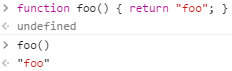
这与您的C++代码所看到的相同。因此,要访问和调用foo()函数,需要通过QJSEngine的globalObject()函数访问它。
#include <QCoreApplication>
#include <QtQml>

int main(int argc, char *argv[])
{
    QCoreApplication a(argc, argv);

    QJSEngine engine;
    QJSValue evaluationResult = engine.evaluate("function foo() { return \"foo\"; }");

    if (evaluationResult.isError()) {
        qWarning() << evaluationResult.toString();
        return 1;
    }

    if (!engine.globalObject().hasProperty("foo")) {
        qWarning() << "Script has no \"foo\" function";
        return 1;
    }

    if (!engine.globalObject().property("foo").isCallable()) {
        qWarning() << "\"foo\" property of script is not callable";
        return 1;
    }

    QJSValue callResult = engine.globalObject().property("foo").call();
    if (callResult.isError()) {
        qWarning() << "Error calling \"foo\" function:" << callResult.toString();
        return 1;
    }

    qDebug() << "Result of call:" << callResult.toString();

    return 0;
}
此代码的输出是:
Result of call: "foo"这与您发布的使用QScriptEngine的行大致相同。
这种方法的好处是,您不需要触摸脚本就可以让它正常工作。
缺点是,如果您计划重用同一个JavaScript来调用多个脚本,那么以这种方式编写QJSEngine代码可能会导致问题,特别是如果其中的函数具有相同的名称。具体来说,您评估的对象将永远停留在全局命名空间中。
QScriptEngine以QScriptContext的形式为这个问题提供了一个解决方案:在您评估代码之前,先创建一个新的上下文,然后再使用pop()。然而,QJSEngine.
解决这个问题的方法之一就是为每个脚本创建一个新的QJSEngine。我还没试过,我也不确定它会有多贵。
文档看起来可能暗示了另一种方法,但我不太明白它如何处理每个脚本的多个函数。
在与同事交谈后,我了解了一种使用作为接口的对象解决问题的方法。
#include <QCoreApplication>
#include <QtQml>

int main(int argc, char *argv[])
{
    QCoreApplication a(argc, argv);

    QJSEngine engine;
    QString code = QLatin1String("( function(exports) {"
        "exports.foo = function() { return \"foo\"; };"
        "exports.bar = function() { return \"bar\"; };"
    "})(this.object = {})");

    QJSValue evaluationResult = engine.evaluate(code);
    if (evaluationResult.isError()) {
        qWarning() << evaluationResult.toString();
        return 1;
    }

    QJSValue object = engine.globalObject().property("object");
    if (!object.hasProperty("foo")) {
        qWarning() << "Script has no \"foo\" function";
        return 1;
    }

    if (!object.property("foo").isCallable()) {
        qWarning() << "\"foo\" property of script is not callable";
        return 1;
    }

    QJSValue callResult = object.property("foo").call();
    if (callResult.isError()) {
        qWarning() << "Error calling \"foo\" function:" << callResult.toString();
        return 1;
    }

    qDebug() << "Result of call:" << callResult.toString();

    return 0;
}
此代码的输出是:
Result of call: "foo"您可以在我刚才链接到的文章中详细了解这种方法。以下是它的总结:
- 声明一个对象,每当您定义需要“导出”到C++的东西时,就可以向其添加属性。
- “模块函数”将其接口对象作为参数(
exports),允许函数外部的代码创建它并将其存储在变量((this.object = {}))中。
然而,正如该条所述,这种方法仍然使用全局范围:
用于浏览器的JavaScript模块通常使用前面的模式。该模块将声明一个全局变量,并将其代码包装在一个函数中,以便拥有自己的私有命名空间。但是,如果多个模块碰巧声明相同的名称,或者希望加载两个版本的模块时,这种模式仍然会导致问题。
如果你想更进一步的话,就跟着这篇文章走到底。不过,只要您使用的是唯一的对象名称,就可以了。
下面是一个如何改变“真实生活”脚本以适应此解决方案的示例:
在此之前
function activate(thisEntity, withEntities, activatorEntity, gameController, activationTrigger, activationContext) {
    gameController.systemAt("WeaponComponentType").addMuzzleFlashTo(thisEntity, "muzzle-flash");
}

function equipped(thisEntity, ownerEntity) {
    var sceneItemComponent = thisEntity.componentOfType("SceneItemComponentType");
    sceneItemComponent.spriteFileName = ":/sprites/pistol-equipped.png";

    var physicsComponent = thisEntity.componentOfType("PhysicsComponentType");
    physicsComponent.width = sceneItemComponent.sceneItem.width;
    physicsComponent.height = sceneItemComponent.sceneItem.height;
}

function unequipped(thisEntity, ownerEntity) {
    var sceneItemComponent = thisEntity.componentOfType("SceneItemComponentType");
    sceneItemComponent.spriteFileName = ":/sprites/pistol.png";

    var physicsComponent = thisEntity.componentOfType("PhysicsComponentType");
    physicsComponent.width = sceneItemComponent.sceneItem.width;
    physicsComponent.height = sceneItemComponent.sceneItem.height;
}

function destroy(thisEntity, gameController) {
}
之后
( function(exports) {
    exports.activate = function(thisEntity, withEntities, activatorEntity, gameController, activationTrigger, activationContext) {
        gameController.systemAt("WeaponComponentType").addMuzzleFlashTo(thisEntity, "muzzle-flash");
    }

    exports.equipped = function(thisEntity, ownerEntity) {
        var sceneItemComponent = thisEntity.componentOfType("SceneItemComponentType");
        sceneItemComponent.spriteFileName = ":/sprites/pistol-equipped.png";

        var physicsComponent = thisEntity.componentOfType("PhysicsComponentType");
        physicsComponent.width = sceneItemComponent.sceneItem.width;
        physicsComponent.height = sceneItemComponent.sceneItem.height;
    }

    exports.unequipped = function(thisEntity, ownerEntity) {
        var sceneItemComponent = thisEntity.componentOfType("SceneItemComponentType");
        sceneItemComponent.spriteFileName = ":/sprites/pistol.png";

        var physicsComponent = thisEntity.componentOfType("PhysicsComponentType");
        physicsComponent.width = sceneItemComponent.sceneItem.width;
        physicsComponent.height = sceneItemComponent.sceneItem.height;
    }

    exports.destroy = function(thisEntity, gameController) {
    }
})(this.Pistol = {});Car脚本可以具有相同名称的函数(activate、destroy等)而不影响Pistol的。
在QT5.12中,QJSEngine支持适当的JavaScript模块:
对于更大的功能,您可能希望将代码和数据封装到模块中。模块是一个包含脚本代码、变量等的文件,并使用导出语句来描述其面向应用程序其余部分的接口。在导入语句的帮助下,模块可以引用其他模块的功能。这允许以一种安全的方式从较小的连接构建块构建脚本应用程序。相反,使用pollute ()的方法存在这样的风险,即来自一个pollute()调用的内部变量或函数意外地污染了全局对象并影响随后的评估。
所需要做的就是将文件重命名为具有.mjs扩展名,然后将代码转换如下:
export function activate(thisEntity, withEntities, activatorEntity, gameController, activationTrigger, activationContext) {
    gameController.systemAt("WeaponComponentType").addMuzzleFlashTo(thisEntity, "muzzle-flash");
}

export function equipped(thisEntity, ownerEntity) {
    var sceneItemComponent = thisEntity.componentOfType("SceneItemComponentType");
    sceneItemComponent.spriteFileName = ":/sprites/pistol-equipped.png";

    var physicsComponent = thisEntity.componentOfType("PhysicsComponentType");
    physicsComponent.width = sceneItemComponent.sceneItem.width;
    physicsComponent.height = sceneItemComponent.sceneItem.height;
}

export function unequipped(thisEntity, ownerEntity) {
    var sceneItemComponent = thisEntity.componentOfType("SceneItemComponentType");
    sceneItemComponent.spriteFileName = ":/sprites/pistol.png";

    var physicsComponent = thisEntity.componentOfType("PhysicsComponentType");
    physicsComponent.width = sceneItemComponent.sceneItem.width;
    physicsComponent.height = sceneItemComponent.sceneItem.height;
}

export function destroy(thisEntity, gameController) {
}
调用这些函数之一的C++如下所示:
QJSvalue module = engine.importModule("pistol.mjs");
QJSValue function = module.property("activate");
QJSValue result = function.call(args);https://stackoverflow.com/questions/31815727
复制相似问题
腾讯云开发者

Copyright © 2013 - 2026 Tencent Cloud. All Rights Reserved. 腾讯云 版权所有
深圳市腾讯计算机系统有限公司 ICP备案/许可证号:粤B2-20090059  粤公网安备44030502008569号
腾讯云计算(北京)有限责任公司 京ICP证150476号 | 京ICP备11018762号