
如何生成传真后可可靠读取的代码39
我的应用程序正在生成一个代码39条形码,但是一个客户在他们的文档管理系统中有问题,他们在扫描和重新打印打印后识别条形码。
我还使用在线条形码阅读器测试了它,它确认了它们的最终文档上的条形码是不可读的。
是否有一种最好的条形码可供使用,在其他地方打印、扫描和重新打印后,效果最好?
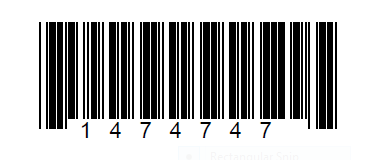
下面是PDF中的原始条形码,直接来自应用程序:
这是一个条形码,一旦它被打印,扫描和重印:
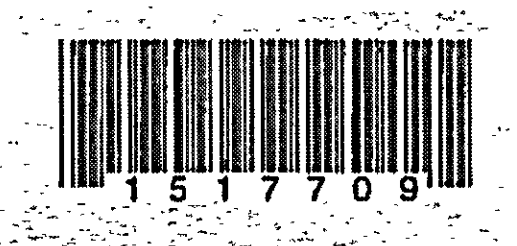
使用在线条形码阅读器进行测试,结果如下:
很抱歉,我们无法在上传的图像中找到任何条形码。
我使用GNU条形码生成条形码:
$ barcode -h
barcode: Options:
   -i <arg>     input file (strings to encode), default is stdin
   -o <arg>     output file, default is stdout
   -b <arg>     string to encode (use input file if missing)
   -e <arg>     encoding type (default is best fit for first string)
   -u <arg>     unit ("mm", "in", ...) used to decode -g, -t, -p
   -g <arg>     geometry on the page: [<wid>x<hei>][+<margin>+<margin>]
   -t <arg>     table geometry: <cols>x<lines>[+<margin>+<margin>]
   -m <arg>     internal margin for each item in a table: <xm>[,<ym>]
   -n           "numeric": avoid printing text along with the bars
   -c           no Checksum character, if the chosen encoding allows it
   -E           print one code as eps file (default: multi-page ps)
   -P           create PCL output instead of postscript
   -p <arg>     page size (refer to the man page)

Known encodings are (synonyms appear on the same line):
        "ean", "ean13", "ean-13", "ean8", "ean-8"
        "upc", "upc-a", "upc-e"
        "isbn"
        "39", "code39"
        "128c", "code128c"
        "128b", "code128b"
        "128", "code128"
        "128raw"
        "i25", "interleaved 2 of 5"
        "cbr", "codabar"
        "msi"
        "pls", "plessey"
"code93", "93"回答 1
Stack Overflow用户
发布于 2015-08-04 16:21:00
代码39是一种低数据密度条形码,它可以容忍宽的X维(窄条的宽度)和高分辨的窄宽比(最高可达1:3)。就条码符号而言,这使得它更适合在低分辨率、高噪音的介质上传输。
代码39标准允许使用模43校验数字,这减少了误读的可能性。我注意到扫描图像(虽然在源映像中)中没有出现这种情况,所以您的系统可能会被升级以适应这种情况。
您提供的图像最重要的问题是,狭小的大部分空间的宽度过小,导致条形码的损坏。在源图像的情况下,这是由于过度的“打印增长”(油墨传播)造成的像素-放牧。在扫描图像的情况下,这被夸大了,因为所选择的X维不足以经受由端到端过程引入的成像缺陷。
为了演示打印增长的效果,我将您的扫描图像与相同数据的更清晰的呈现叠加在一起:
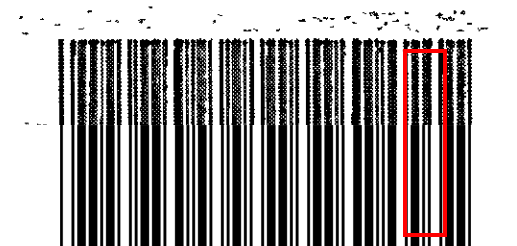
你可以观察到,在图像的右边,两个相邻的窄条之间的狭小空间已经从图像中压缩出来,形成了一个单一的宽条。
要从源头上改进事物,您可以尝试以下方法:
- 确保执行条形码生成,以使符号的X维设置为输出设备本机分辨率的倍数--这一过程有时被称为“网格拟合”,从而避免像素掠入。
- 补偿油墨传播,修改GNU条形码库,以减去一个小的,固定的数量从条宽,以兼容您的打印和扫描过程。
- 最大限度的窄宽比例的酒吧和空间1:3。
- 最大限度地利用你的X维。
迁移到另一个线性条形码符号不太可能有帮助,因为同样的问题可能会在更大程度上影响它。
更多关于高质量条形码生成的信息在this answer中给出.
https://stackoverflow.com/questions/31806061
复制相似问题
腾讯云开发者

Copyright © 2013 - 2026 Tencent Cloud. All Rights Reserved. 腾讯云 版权所有
深圳市腾讯计算机系统有限公司 ICP备案/许可证号:粤B2-20090059  粤公网安备44030502008569号
腾讯云计算(北京)有限责任公司 京ICP证150476号 | 京ICP备11018762号