
EasyHook给定的32位库不存在,用户库不导出正确的运行。
EasyHook给定的32位库不存在,用户库不导出正确的运行。
提问于 2015-08-01 14:24:24
如果我这样做了:
 try
        {
            try
            {
                Config.Register(
                    "anydescription",
                    "myprogram.exe",
                    "inject.dll");
            }
            catch (ApplicationException ex)
            {
            }

            RemoteHooking.IpcCreateServer<interfaceppp>(ref ChannelName, WellKnownObjectMode.SingleCall);
            RemoteHooking.Inject(pid, "inject.dll", "inject.dll", ChannelName);

        }
        catch (Exception ExtInfo)
        {
        }
我知道这个错误:
STATUS_INVALID_PARAMETER_4:给定的32位库不存在!
我使用的是具有管理员权限的VS。在bin文件夹中,我有所有需要的文件AFAIK:
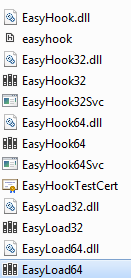
我添加了easyhook.dll、easyload32和64作为参考(为什么是这两个新文件?)没有见过任何关于它们的文档)。谢谢!
PD:尝试了同样的结果:
 System.EnterpriseServices.Internal.Publish publish = new System.EnterpriseServices.Internal.Publish();
            publish.GacInstall("EasyHook.dll");
            publish.GacInstall("EasyHook32.dll");
            publish.GacInstall("EasyHook64.dll");
            publish.GacInstall("EasyLoad32.dll");
publish.GacInstall("EasyLoad64.dll");回答 3
Stack Overflow用户
发布于 2016-01-20 17:27:47
我也有过同样的问题,但还是有64位。
从GAC中移除我的程序集和EasyHook解决了这个问题。
gacutil /uf EasyHook
gacutil /uf EasyLoad64
gacutil /uf MyAssemblyStack Overflow用户
发布于 2015-08-02 00:32:28
我不知道为什么它以前不起作用。很明显,问题是找不到一些程序集。在互联网上阅读之后,我看到了一个没有Config.Register函数的例子。使用最新版本(2.7),您不需要在GAC中注册程序集。我刚刚评论了这个功能,它起了作用。
Stack Overflow用户
发布于 2020-06-25 20:00:23
如果使用easy钩子2.7,则不需要调用Config.Register。因此,按照其他答案告诉你的那样进行:
从代码中删除以下行:
Config.Register(
    "anydescription",
    "myprogram.exe",
    "inject.dll");
从gac中删除以前注册的程序集:
gacutil /uf EasyHook
gacutil /uf EasyLoad64
gacutil /uf inject
谢谢大家。我花了相当长的时间才知道你需要两者兼得。
页面原文内容由Stack Overflow提供。腾讯云小微IT领域专用引擎提供翻译支持
原文链接:
https://stackoverflow.com/questions/31762879
复制相关文章
相似问题
腾讯云开发者

Copyright © 2013 - 2026 Tencent Cloud. All Rights Reserved. 腾讯云 版权所有
深圳市腾讯计算机系统有限公司 ICP备案/许可证号:粤B2-20090059  粤公网安备44030502008569号
腾讯云计算(北京)有限责任公司 京ICP证150476号 | 京ICP备11018762号