
用最小CSS代码实现
用最小CSS代码实现
提问于 2015-08-01 08:02:31
我想用最小的CSS代码来实现图片..。我该怎么办?
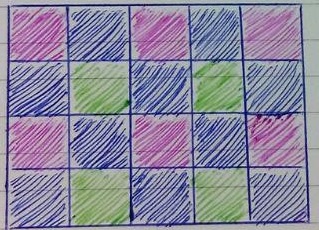
回答 3
Stack Overflow用户
回答已采纳
发布于 2015-08-01 08:22:57
没有javascript,您可以这样做
<style>
    .row {
        width: 250px;
    }
    .divSquare {
        width: 50px;
        height: 50px;
        float: left;
    }
    .red {
        background-color: red;
    }
    .blue {
        background-color: blue;
    }
    .green {
        background-color: green;
    }
</style>

<html>
<head>
    <title></title>
</head>
<body>
    <div class="row">
        <div class="divSquare red"></div>
        <div class="divSquare blue"></div>
        <div class="divSquare red"></div>
        <div class="divSquare blue"></div>
        <div class="divSquare red"></div>
    </div>
    <div class="row">
        <div class="divSquare blue"></div>
        <div class="divSquare green"></div>
        <div class="divSquare blue"></div>
        <div class="divSquare green"></div>
        <div class="divSquare blue"></div>
    </div>
    <div class="row">
        <div class="divSquare red"></div>
        <div class="divSquare blue"></div>
        <div class="divSquare red"></div>
        <div class="divSquare blue"></div>
        <div class="divSquare red"></div>
    </div>
    <div class="row">
        <div class="divSquare blue"></div>
        <div class="divSquare green"></div>
        <div class="divSquare blue"></div>
        <div class="divSquare green"></div>
        <div class="divSquare blue"></div>
    </div>
</body>

</html>Stack Overflow用户
发布于 2015-08-01 08:57:14
最低CSS?我认为,由于您不能少于任何CSS,没有CSS的解决方案将是您的绝对最小值。
所以,这是过去可怕的网络编程的好时光的产物;)
<table width="250" height="200" border="0">
  <tr>
    <td>
      <table width="50" height="50" bgcolor="#ff00ff"></table>
    </td>
    <td>
      <table width="50" height="50" bgcolor="#0000ff"></table>
    </td>
    <td>
      <table width="50" height="50" bgcolor="#ff00ff"></table>
    </td>
    <td>
      <table width="50" height="50" bgcolor="#0000ff"></table>
    </td>
    <td>
      <table width="50" height="50" bgcolor="#ff00ff"></table>
    </td>
  </tr>
  <tr>
    <td>
      <table width="50" height="50" bgcolor="#0000ff"></table>
    </td>
    <td>
      <table width="50" height="50" bgcolor="#00ff00"></table>
    </td>
    <td>
      <table width="50" height="50" bgcolor="#0000ff"></table>
    </td>
    <td>
      <table width="50" height="50" bgcolor="#00ff00"></table>
    </td>
    <td>
      <table width="50" height="50" bgcolor="#0000ff"></table>
    </td>
  </tr>
  <tr>
    <td>
      <table width="50" height="50" bgcolor="#ff00ff"></table>
    </td>
    <td>
      <table width="50" height="50" bgcolor="#0000ff"></table>
    </td>
    <td>
      <table width="50" height="50" bgcolor="#ff00ff"></table>
    </td>
    <td>
      <table width="50" height="50" bgcolor="#0000ff"></table>
    </td>
    <td>
      <table width="50" height="50" bgcolor="#ff00ff"></table>
    </td>
  </tr>
  <tr>
    <td>
      <table width="50" height="50" bgcolor="#0000ff"></table>
    </td>
    <td>
      <table width="50" height="50" bgcolor="#00ff00"></table>
    </td>
    <td>
      <table width="50" height="50" bgcolor="#0000ff"></table>
    </td>
    <td>
      <table width="50" height="50" bgcolor="#00ff00"></table>
    </td>
    <td>
      <table width="50" height="50" bgcolor="#0000ff"></table>
    </td>
  </tr>
</table>
Stack Overflow用户
发布于 2015-08-01 20:15:50
使用线性梯度。
body {
  background:
              linear-gradient(45deg, blue 25%, rgba(0,0,0,0) 26%), linear-gradient(225deg, blue 25%, rgba(0,0,0,0) 26%),
              linear-gradient(45deg, green 25%, rgba(0,0,0,0) 26%), linear-gradient(225deg, green 25%, rgba(0,0,0,0) 26%),
              linear-gradient(45deg, magenta 25%, rgba(0,0,0,0) 26%), linear-gradient(225deg, magenta 25%, rgba(0,0,0,0) 26%),
              linear-gradient(45deg, blue 25%, rgba(0,0,0,0) 26%), linear-gradient(225deg, blue 25%, rgba(0,0,0,0) 26%);

  background-position: 0 0,    25px 25px, 25px 50px, 100px 75px,
                       0 25px, 25px 50px, 25px 75px, 100px 100px;
  background-size: 50px 50px;
}
页面原文内容由Stack Overflow提供。腾讯云小微IT领域专用引擎提供翻译支持
原文链接:
https://stackoverflow.com/questions/31759685
复制相关文章
相似问题
腾讯云开发者

Copyright © 2013 - 2026 Tencent Cloud. All Rights Reserved. 腾讯云 版权所有
深圳市腾讯计算机系统有限公司 ICP备案/许可证号:粤B2-20090059  粤公网安备44030502008569号
腾讯云计算(北京)有限责任公司 京ICP证150476号 | 京ICP备11018762号