
在Linux中使用ACS ACR1252U USB NFC读卡器
我使用的是通过USB连接的ACS ACR1252U读卡器(http://www.acs.com.hk/en/products/342/acr1252u-usb-nfc-reader-iii-nfc-forum-certified-reader/),老实说,我不知道如何让它工作。我在谷歌上搜索了很多东西,但没有运气。我用的是Debian的变体。以下是我所做的事情:
我使用dmesg获得以下信息:
[ 7173.059710] usb 1-1.3: new full-speed USB device number 6 using dwc_otg
[ 7173.160500] usb 1-1.3: not running at top speed; connect to a high speed hub
[ 7173.163114] usb 1-1.3: New USB device found, idVendor=072f, idProduct=223b
[ 7173.163147] usb 1-1.3: New USB device strings: Mfr=1, Product=2, SerialNumber=0
[ 7173.163168] usb 1-1.3: Product: ACR1252 Dual Reader
[ 7173.163186] usb 1-1.3: Manufacturer: ACS
我使用了以下Python代码来获得有关这些设备的更多细节:
#!/usr/bin/python

import sys
import usb.core

# find USB devices
dev = usb.core.find(find_all=True)


# loop through devices, printing vendor and product ids in decimal and hex
for cfg in dev:
    print cfg
    sys.stdout.write('Decimal VendorID=' + str(cfg.idVendor) + ' & ProductID=' + str(cfg.idProduct) + '\n')
    sys.stdout.write('Hexadecimal VendorID=' + hex(cfg.idVendor) + ' & ProductID=' + hex(cfg.idProduct) + '\n\n')
此特定设备的输出为:
DEVICE ID 072f:223b on Bus 001 Address 004 =================
 bLength                :   0x12 (18 bytes)
 bDescriptorType        :    0x1 Device
 bcdUSB                 :  0x200 USB 2.0
 bDeviceClass           :    0x0 Specified at interface
 bDeviceSubClass        :    0x0
 bDeviceProtocol        :    0x0
 bMaxPacketSize0        :   0x40 (64 bytes)
 idVendor               : 0x072f
 idProduct              : 0x223b
 bcdDevice              :  0x100 Device 1.0
 iManufacturer          :    0x1 ACS
 iProduct               :    0x2 ACR1252 Dual Reader
 iSerialNumber          :    0x0
 bNumConfigurations     :    0x1
  CONFIGURATION 1: 200 mA ==================================
   bLength              :    0x9 (9 bytes)
   bDescriptorType      :    0x2 Configuration
   wTotalLength         :   0xb1 (177 bytes)
   bNumInterfaces       :    0x2
   bConfigurationValue  :    0x1
   iConfiguration       :    0x0
   bmAttributes         :   0x80 Bus Powered
   bMaxPower            :   0x64 (200 mA)
    INTERFACE 0: Smart Card ================================
     bLength            :    0x9 (9 bytes)
     bDescriptorType    :    0x4 Interface
     bInterfaceNumber   :    0x0
     bAlternateSetting  :    0x0
     bNumEndpoints      :    0x3
     bInterfaceClass    :    0xb Smart Card
     bInterfaceSubClass :    0x0
     bInterfaceProtocol :    0x0
     iInterface         :    0x4 ACR1252 Dual Reader PICC
      ENDPOINT 0x1: Bulk OUT ===============================
       bLength          :    0x7 (7 bytes)
       bDescriptorType  :    0x5 Endpoint
       bEndpointAddress :    0x1 OUT
       bmAttributes     :    0x2 Bulk
       wMaxPacketSize   :   0x40 (64 bytes)
       bInterval        :    0x0
      ENDPOINT 0x81: Bulk IN ===============================
       bLength          :    0x7 (7 bytes)
       bDescriptorType  :    0x5 Endpoint
       bEndpointAddress :   0x81 IN
       bmAttributes     :    0x2 Bulk
       wMaxPacketSize   :   0x40 (64 bytes)
       bInterval        :    0x0
      ENDPOINT 0x84: Interrupt IN ==========================
       bLength          :    0x7 (7 bytes)
       bDescriptorType  :    0x5 Endpoint
       bEndpointAddress :   0x84 IN
       bmAttributes     :    0x3 Interrupt
       wMaxPacketSize   :   0x40 (64 bytes)
       bInterval        :    0xa
    INTERFACE 1: Smart Card ================================
     bLength            :    0x9 (9 bytes)
     bDescriptorType    :    0x4 Interface
     bInterfaceNumber   :    0x1
     bAlternateSetting  :    0x0
     bNumEndpoints      :    0x3
     bInterfaceClass    :    0xb Smart Card
     bInterfaceSubClass :    0x0
     bInterfaceProtocol :    0x0
     iInterface         :    0x5 ACR1252 Dual Reader SAM
      ENDPOINT 0x2: Bulk OUT ===============================
       bLength          :    0x7 (7 bytes)
       bDescriptorType  :    0x5 Endpoint
       bEndpointAddress :    0x2 OUT
       bmAttributes     :    0x2 Bulk
       wMaxPacketSize   :   0x40 (64 bytes)
       bInterval        :    0x0
      ENDPOINT 0x82: Bulk IN ===============================
       bLength          :    0x7 (7 bytes)
       bDescriptorType  :    0x5 Endpoint
       bEndpointAddress :   0x82 IN
       bmAttributes     :    0x2 Bulk
       wMaxPacketSize   :   0x40 (64 bytes)
       bInterval        :    0x0
      ENDPOINT 0x83: Interrupt IN ==========================
       bLength          :    0x7 (7 bytes)
       bDescriptorType  :    0x5 Endpoint
       bEndpointAddress :   0x83 IN
       bmAttributes     :    0x3 Interrupt
       wMaxPacketSize   :   0x40 (64 bytes)
       bInterval        :    0xa
Decimal VendorID=1839 & ProductID=8763
Hexadecimal VendorID=0x72f & ProductID=0x223b
我安装了PyUSB,我可以使用一些示例代码来检测设备,但没有什么能像在接近时读取NFC卡那样(尽管有嗡嗡声,这使我相信USB设备本身工作正常)。
我还安装了libacsccid1包,它说它支持这个设备https://github.com/acshk/acsccid,但我不知道如何使用它。
除此之外,我不知道还能做些什么。任何帮助都将不胜感激。我的项目的目标是根据检测到的NFC标记的值来控制GPIO输出。
-- Update
我做了更多的工作,虽然我仍然无法工作,但我有更多的数据。具体来说,我正在研究这个问题:http://www.digitalmihailo.com/usb-programming-with-python-on-linux-pyusb-version/
从数据表中,我可以确认它是一个USB2.0全速设备:
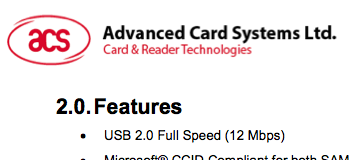
为了测试,我只想发出蜂鸣器的声音。下面是该设备用于此功能的API文档的屏幕截图:
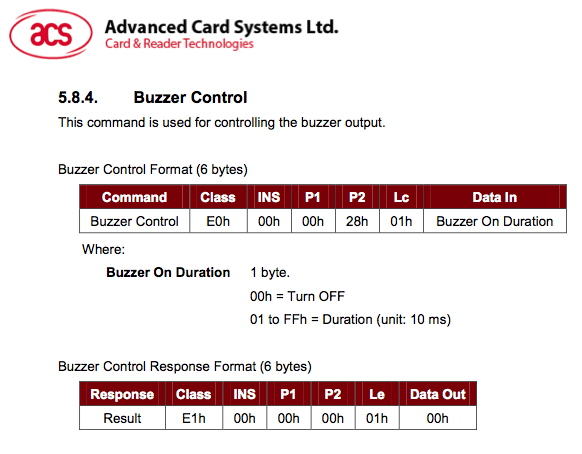
因此,用于我的设备的http://www.digitalmihailo.com/usb-programming-with-python-on-linux-pyusb-version/的简化版本应该是:
#!/usr/bin/python

import os
import sys
import time

import usb.core
import usb.util


# According to what I've read, full speed USB is 64 byte packet size.
packet_len = 64

# Packing a request.
# Packets are 64 bytes long, most of the commands are 4 bytes long. So up to 18
# can be batched into a packet. For example command with bytes [0x94, 0x0, 0x0, 0x0] is getting firmware id
def pack_request(*arguments):
    packet = [0x0] * packet_len
    i = 0
    for arg in arguments:
        packet[i] = arg
        i += 1
    #packet[0:4] = [0x94, 0x0, 0x0, 0x0] #get firmware id
    return ''.join([chr(c) for c in packet])


def main():
    #Updated for the ACS ACR1252U
    dev = usb.core.find(idVendor=0x72f, idProduct=0x223b)

    # was it found?
    if dev is None:
        raise ValueError('Device not found')

    try:
        dev.detach_kernel_driver(0)
    except: # this usually mean that kernel driver has already been dettached
        pass

    # ACS ACR1252U only has 1 configuration
    dev.set_configuration()

    # Interface 0: Dual Reader PICC. This is what we want
    # Interface 1: Dual Reader SAM
    try:
        dev.set_interface_altsetting(0)
    except usb.core.USBError:
        print 'Error setting interface!'
        pass

    # According to the API, to sound the buzzer we must send:
    #
    # Class: 0xe0
    # INS: 0x00
    # P1: 0x00
    # P2: 0x28
    # Lc: 0x01
    # DataIn (duration): 0xff (for 255 * 10ms = 2.55 seconds)
    raw = pack_request(0xe0, 0x00, 0x00, 0x28, 0x01, 0xff)

    #send the packet
    # Params are (endpoint, data, timeout)
    #
    # According to the script output:
    # ENDPOINT 0x01: Bulk OUT
    dev.write(endpoint=0x01, data=raw)
    #done


if __name__ == '__main__':
  main()
当我运行这个的时候什么都不会发生..。没有蜂鸣器,没有错误信息。这里有什么问题吗?
谢谢!
回答 1
Stack Overflow用户
发布于 2015-08-06 20:35:26
出于好奇,我打开了Info.plist (在/usr/lib/pcsc/drivers/ifd-acsccid.bundle/Contents/中),注意到我的设备没有列出。
因此,我继续在ifdVendorID (0x072F)、ifdProductID (0x223B)和ifdFriendlyName (ACS ACR1252U双PICC-SAM )数组中添加了我的信息,并运行了pcscd -fd。
只有在这一步之后,pcsc_scan才真正检测到我的设备,其他设备也开始或多或少地工作了。最后,我没有直接使用USB,而是使用了pyscard (http://pyscard.sourceforge.net/)库。
这会让蜂鸣器正常工作:
def sound_buzzer(reps):

    #NOTE: This function only works if a card is present!

    try:
        hresult, hcontext = SCardEstablishContext(SCARD_SCOPE_USER)
        assert hresult == SCARD_S_SUCCESS

        hresult, readers = SCardListReaders(hcontext, [])

        assert len(readers) > 0

        reader = readers[0]

        hresult, hcard, dwActiveProtocol = SCardConnect(hcontext, reader, SCARD_SHARE_SHARED, SCARD_PROTOCOL_T0 | SCARD_PROTOCOL_T1)

        while reps > 0:

            buzzer = [0xE0, 0x00, 0x00, 0x28, 0x01, 0x0F] # 0x0F = 15 * 10ms
            hresult, response = SCardControl(hcard, SCARD_CTL_CODE(3500), buzzer)
            sleep(0.15)
            reps = reps - 1

    except Exception, e:
        #print 'Exception: '+ str(e)
        pass

returnhttps://stackoverflow.com/questions/31730218
复制相似问题
腾讯云开发者

Copyright © 2013 - 2026 Tencent Cloud. All Rights Reserved. 腾讯云 版权所有
深圳市腾讯计算机系统有限公司 ICP备案/许可证号:粤B2-20090059  粤公网安备44030502008569号
腾讯云计算(北京)有限责任公司 京ICP证150476号 | 京ICP备11018762号