
RecyclerView从右到左增长元素
RecyclerView从右到左增长元素
提问于 2015-07-30 16:06:42
我在水平方向使用RecyclerView,New从左到右。滚动就是很长时间。如何改变这个方向?
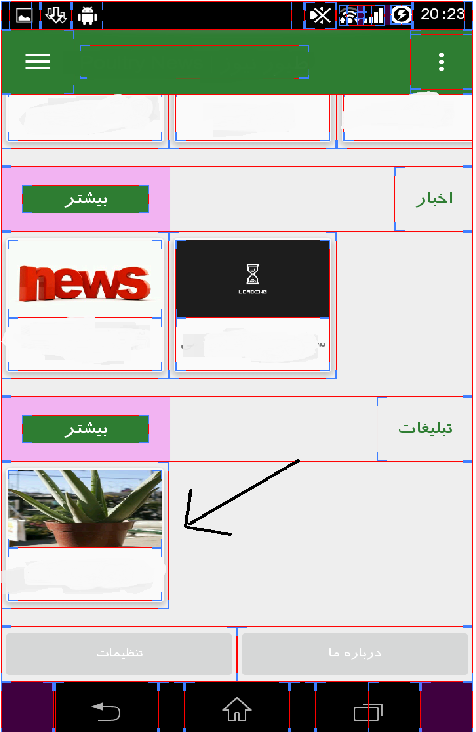
Xml代码:
 <android.support.v7.widget.RecyclerView
                    android:id="@+id/rc3"
                    android:layout_gravity="right"
                    android:layout_width="fill_parent"
                    android:layout_height="wrap_content" />
和Java:
    RecyclerView rc1 = (RecyclerView) findViewById(R.id.rc1);
    AdapterMainPrice mainPrice = new AdapterMainPrice(StructPrice.getThreePrice());
    rc1.setHasFixedSize(false);
    LinearLayoutManager llm = new LinearLayoutManager(G.context);
    llm.setOrientation(LinearLayoutManager.HORIZONTAL);
    rc1.setLayoutManager(llm);
    rc1.setAdapter(mainPrice);
适配器:
公共类AdapterMainPrice扩展RecyclerView.Adapter {
private List<StructPrice> prices;

public AdapterMainPrice(List<StructPrice> catList) {
    this.prices = catList;

}


@Override
public int getItemCount() {
    return prices.size();
}


@Override
public void onBindViewHolder(NewsViewHolder ghazaViewHolder, int position) {

    StructPrice price = prices.get(position);
    ghazaViewHolder.vTitle.setText(price.getProductName());
    Glide.with(G.context)
            .load(price.getProductPic())
            .placeholder(R.drawable.loading_spinner)
            .crossFade()
            .into(ghazaViewHolder.Vimg);
    ghazaViewHolder.cardView.startAnimation(ghazaViewHolder.animation);
}

@Override
public NewsViewHolder onCreateViewHolder(ViewGroup viewGroup, int i) {
    View itemView = LayoutInflater.
            from(viewGroup.getContext()).
            inflate(R.layout.adapter_item_main, viewGroup, false);
    return new NewsViewHolder(itemView);
}

public static class NewsViewHolder extends RecyclerView.ViewHolder {
    protected TextView vTitle;
    protected ImageView Vimg;
    protected Animation animation;
    protected CardView cardView;

    public NewsViewHolder(View v) {
        super(v);
        vTitle = (TextView) v.findViewById(R.id.mainRCtv);
        Vimg = (ImageView) v.findViewById(R.id.mainRCimg);
        animation = AnimationUtils.loadAnimation(G.context, R.anim.fadein);
        cardView = (CardView) v.findViewById(R.id.mainRCCard);
    }


}回答 9
Stack Overflow用户
回答已采纳
发布于 2015-10-28 11:00:26
非常简单,只需为您的setReverseLayout(真)调用LayoutManager:
LinearLayoutManager layoutManager = new LinearLayoutManager(this, LinearLayoutManager.HORIZONTAL, true);
        layoutManager.setReverseLayout(true);
它在其文件中作了解释:
 /**
 * Used to reverse item traversal and layout order.
 * This behaves similar to the layout change for RTL views. When set to true, first item is
 * laid out at the end of the UI, second item is laid out before it etc.
 *
 * For horizontal layouts, it depends on the layout direction.
 * When set to true, If {@link android.support.v7.widget.RecyclerView} is LTR, than it will
 * layout from RTL, if {@link android.support.v7.widget.RecyclerView}} is RTL, it will layout
 * from LTR.
 *
 * If you are looking for the exact same behavior of
 * {@link android.widget.AbsListView#setStackFromBottom(boolean)}, use
 * {@link #setStackFromEnd(boolean)}
 */
public void setReverseLayout(boolean reverseLayout) {
    assertNotInLayoutOrScroll(null);
    if (reverseLayout == mReverseLayout) {
        return;
    }
    mReverseLayout = reverseLayout;
    requestLayout();
}Stack Overflow用户
发布于 2017-09-20 07:33:56
就用这个吧:
android:layoutDirection="rtl"(仅此而已:
Stack Overflow用户
发布于 2016-11-09 12:28:08
找出该怎么做,你要做的就是设定好
LinearLayoutManager.setStackFromEnd(真);
  LinearLayoutManager linearLayoutManager = new LinearLayoutManager(getActivity());
                linearLayoutManager.setOrientation(LinearLayoutManager.HORIZONTAL);
linearLayoutManager.setStackFromEnd(true);页面原文内容由Stack Overflow提供。腾讯云小微IT领域专用引擎提供翻译支持
原文链接:
https://stackoverflow.com/questions/31728837
复制相关文章
相似问题
腾讯云开发者

Copyright © 2013 - 2026 Tencent Cloud. All Rights Reserved. 腾讯云 版权所有
深圳市腾讯计算机系统有限公司 ICP备案/许可证号:粤B2-20090059  粤公网安备44030502008569号
腾讯云计算(北京)有限责任公司 京ICP证150476号 | 京ICP备11018762号