
我怎么才能在我的边界上得到一支箭呢?
我怎么才能在我的边界上得到一支箭呢?
提问于 2015-07-30 10:56:36
我试过无数种东西,我就快到了.
我有一条边框,我想要一支箭向上射出(在我做完这件事后,我会对两边和底部做同样的事情)。以下是我到目前为止所拥有的:
<Grid>
    <Grid.RowDefinitions>
        <RowDefinition Height="Auto" />
        <RowDefinition />
    </Grid.RowDefinitions>
    <Polygon Points="5,0 10,10, 0,10" Stroke="Black" Fill="White" Grid.Row="0" HorizontalAlignment="Center" Margin="0,0,0,-2" Panel.ZIndex="10" StrokeThickness="2" StrokeDashArray="1 0"  />
    <Border Background="#00000000" BorderBrush="Black" BorderThickness="2" CornerRadius="10" Grid.Row="1">
多边形创建一个完美的箭头,但是三角形的底部边框是黑色的,我希望它是白色的。不知道如何使它变成白色,看上去就像白色BG流进箭头的血。以下是目前为止的情况:
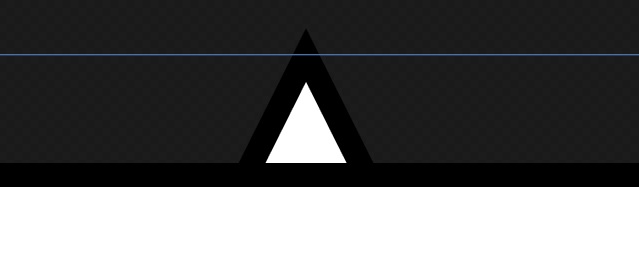
我想摆脱它下面的黑线。如果我应该尝试一种完全不同的方法,我会感兴趣:)
回答 4
Stack Overflow用户
回答已采纳
发布于 2015-07-30 11:33:33
这有点棘手。将三角形封装在Grid中,ClipToBounds设置为true。然后将另一个负底部Margin -2添加到该Grid中。
<Grid>
    <Grid.RowDefinitions>
        <RowDefinition Height="Auto" />
        <RowDefinition />
    </Grid.RowDefinitions>
    <Grid Grid.Row="0" Height="10" ClipToBounds="True" Margin="0,0,0,-2">
        <Polygon Points="5,0 10,10, 0,10" Stroke="Black" Fill="White" HorizontalAlignment="Center"
                 Margin="0,0,0,-2" Panel.ZIndex="10" StrokeThickness="2" StrokeDashArray="1 0"  />
    </Grid>
    <Border Background="#00000000" BorderBrush="Black" BorderThickness="2" CornerRadius="10" Grid.Row="1">
</Grid>您可能希望使您的三角形更大,因为它的一部分将隐藏在Grid之外。
Stack Overflow用户
发布于 2015-07-30 11:28:37
这样行吗?
<Grid>
    <Grid.RowDefinitions>
        <RowDefinition Height="Auto" />
        <RowDefinition />
    </Grid.RowDefinitions>
    <Border Background="#00000000" BorderBrush="Black" BorderThickness="2" CornerRadius="10" Grid.Row="1" Margin="0,-2,0,0"/>
    <Grid HorizontalAlignment="Center">
        <Polygon Points="5,0 10,10, 0,10" Stroke="Black" Fill="White" Grid.Row="0" Margin="0,0,0,0" Panel.ZIndex="10" StrokeThickness="2" StrokeDashArray="1 0"  />
        <Polygon Points="1,10, 9,10" Stroke="White" Grid.Row="0"  Margin="0,0,0,0" Panel.ZIndex="10" StrokeThickness="2" StrokeDashArray="1 0"/>
    </Grid>
</Grid>Stack Overflow用户
发布于 2015-07-30 12:58:51
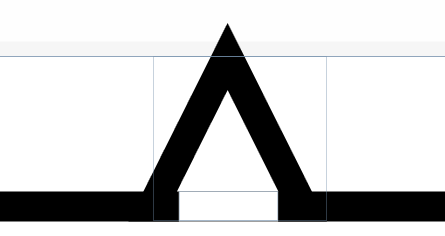
你想要这样的东西吗?
<Grid>
        <Grid.RowDefinitions>
            <RowDefinition Height="110*" />
            <RowDefinition Height="201*" />
        </Grid.RowDefinitions>


        <Grid>

            <Grid>
                <Grid.RowDefinitions>
                    <RowDefinition Height="Auto" />
                    <RowDefinition />
                </Grid.RowDefinitions>
                <Border Background="#00000000" BorderBrush="Black" BorderThickness="2" CornerRadius="10" Grid.Row="1" Margin="0,-2,0,0"/>
                <Grid HorizontalAlignment="Center">
                    <Grid.ColumnDefinitions>
                        <ColumnDefinition Width="1.75" />
                        <ColumnDefinition Width="*" />
                        <ColumnDefinition Width="3.25" />
                    </Grid.ColumnDefinitions>
                    <Grid.RowDefinitions>
                        <RowDefinition Height="9" />
                        <RowDefinition Height="2" />
                    </Grid.RowDefinitions>
                    <Polygon Points="5,0 10,10, 0,10" Stroke="Black" Fill="White"  StrokeThickness="2" StrokeDashArray="1 0" Grid.RowSpan="2" Grid.ColumnSpan="3" />

                    <Grid Grid.Row="1" Grid.Column="1">
                        <Rectangle Fill="White" Stroke="White" ></Rectangle>
                    </Grid>
                </Grid>
            </Grid>
        </Grid>

</Grid>页面原文内容由Stack Overflow提供。腾讯云小微IT领域专用引擎提供翻译支持
原文链接:
https://stackoverflow.com/questions/31721890
复制相关文章
相似问题
腾讯云开发者

Copyright © 2013 - 2026 Tencent Cloud. All Rights Reserved. 腾讯云 版权所有
深圳市腾讯计算机系统有限公司 ICP备案/许可证号:粤B2-20090059  粤公网安备44030502008569号
腾讯云计算(北京)有限责任公司 京ICP证150476号 | 京ICP备11018762号