
在Windows 10中,没有通过OneGet/PackageManagement安装巧克力包装?
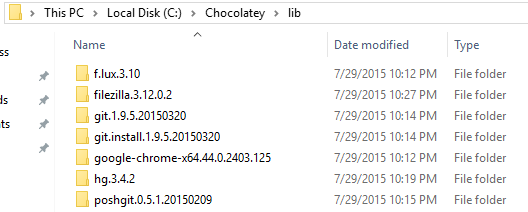
我正试着用一颗巧克力,但它似乎一点用也没有。包上写着它已经安装了,没有警告或通知。它将包安装在目录中,但不运行安装脚本,因此应用程序没有实际安装。注意到这是Windows10 (Powershell 5)。
Get-PackageProvider –Name Chocolatey -ForceBootstrap
Set-PackageSource -Name chocolatey -Trusted
Install-package filezilla -Verbose -Force -ProviderName chocolatey
收益率

回答 2
Stack Overflow用户
发布于 2015-07-30 16:50:57
答案是,我不会使用OneGet巧克力供应商,除非你听到官方宣布它是最新的,不再使用2014年4月发布的早期CTP预览版(不是一个错误)。
在那之前,你应该继续使用正式的巧克力客户端。
Stack Overflow用户
发布于 2021-08-04 10:08:27
正如注释中提到的那样,我还试图通过在Set-ExecutionPolicy Unrestricted中运行PowerShell来解决这个问题,但禁止的TLS/SSL安全协议仍然存在问题。
然后(作为提到过)我尝试了CMD-> %SystemRoot%\System32\WindowsPowerShell\v1.0\PowerShell.exe
然后在PowerShell中:
> Set-ExecutionPolicy Bypass -Scope Process -Force; [System.Net.ServicePoin tManager]::SecurityProtocol = [System.Net.ServicePointManager]::SecurityProtocol -bor 3072; iex ((New-Object System.Net. WebClient).DownloadString('https://chocolatey.org/install.ps1'))
TLS/SSL SecurityProtocol不再有问题。
https://stackoverflow.com/questions/31714804
复制相似问题
腾讯云开发者

Copyright © 2013 - 2026 Tencent Cloud. All Rights Reserved. 腾讯云 版权所有
深圳市腾讯计算机系统有限公司 ICP备案/许可证号:粤B2-20090059  粤公网安备44030502008569号
腾讯云计算(北京)有限责任公司 京ICP证150476号 | 京ICP备11018762号