
我想我的电脑已经安装了python 2,我安装了python 3。
我的计算机上运行着windows 8,我想我同时下载了python 2和3,或者我的计算机是用python 2构建的,我还下载了python 3。现在,当我在空闲中运行我的代码时,代码可以正常工作,但是当我保存程序并双击保存文件时,它会运行,但它不像以前在空闲状态下运行的那样工作。
有人能解释一下我目前可能面临的问题吗?
我只想让我的程序在空闲和双击保存的文件时都能完美地运行。
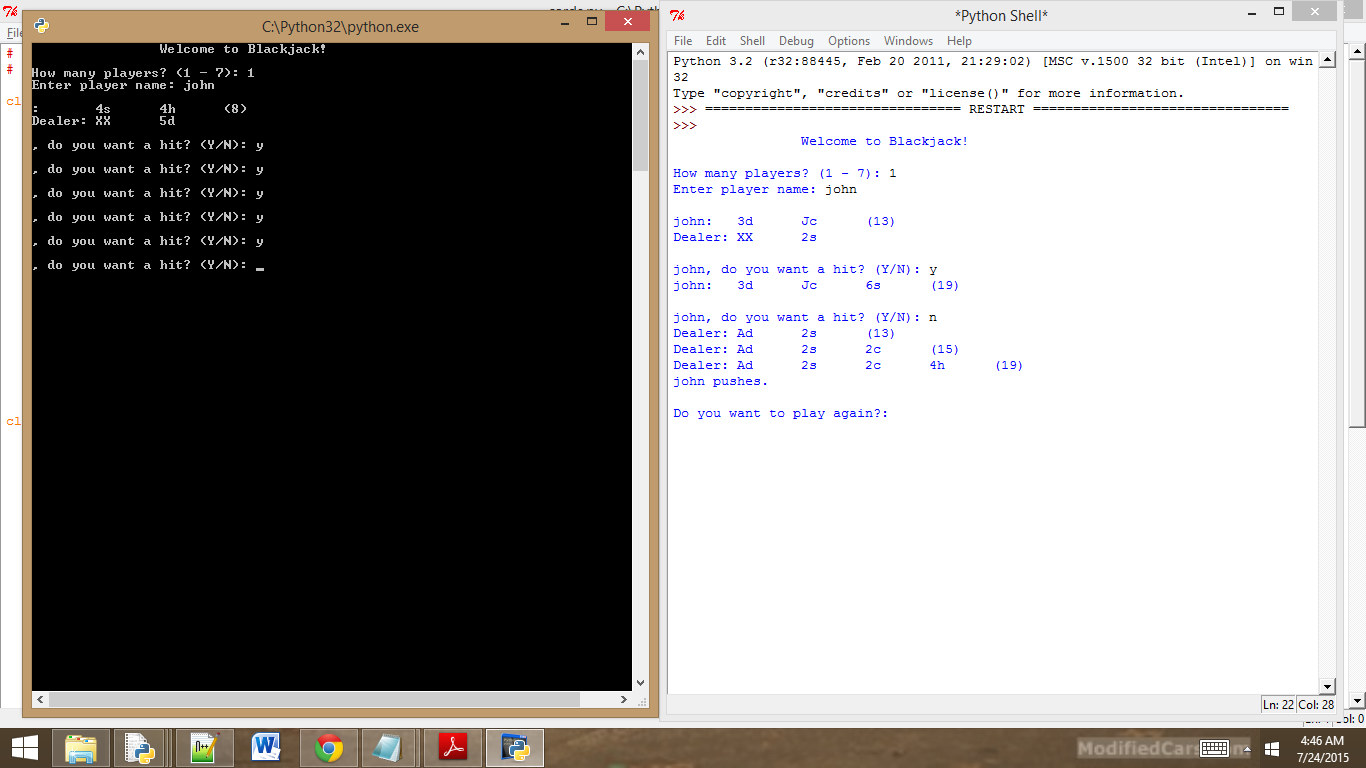
我尝试了阿南德·S·库马尔的建议,但我不确定我知道自己在做什么。
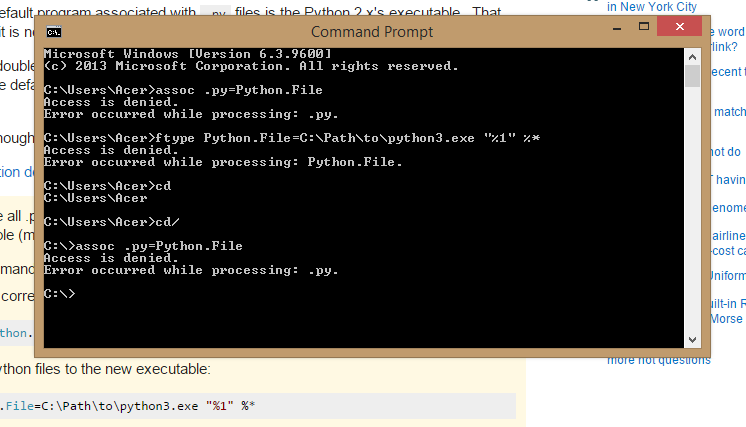
这里是我在CMD管理员中输入的内容,但是输出仍然与上面的第一张图片相同。
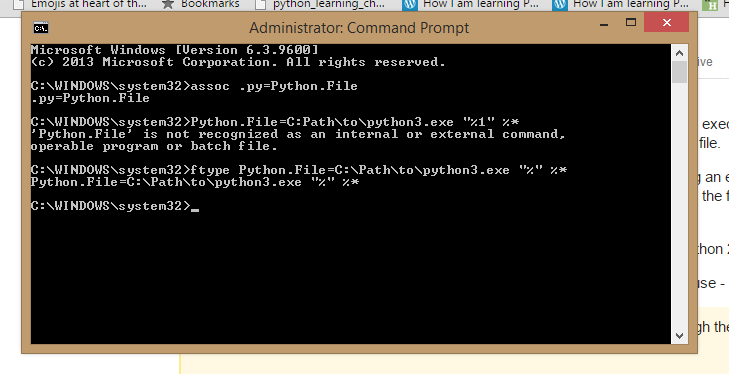
这是密码
游戏模块:
# Games
# Demonstrates module creation

class Player(object):
    """ A player for a game. """
    def __init__(self, name, score = 0):
        self.name = name
        self.score = score

    def __str__(self):
        rep = self.name + ":\t" + str(self.score)
        return rep

def ask_yes_no(question):
    """Ask a yes or no question."""
    response = None
    while response not in("y", "n"):
        response = input(question).lower()
    return response

def ask_number(question, low, high):
    """Ask for a number within a range."""
    response = None
    while response not in range(low, high):
        response = int(input(question))
    return response

if __name__ == "__main__":
    print("You ran this module directly (and did not 'import' it).")
    input("\n\nPress the enter key to exit.")
卡片模块:
# Cards Module
# Basic classes for a game with playing cards

class Card(object):
    """ A playing card. """
    RANKS = ["A", "2", "3", "4", "5", "6", "7", "8", "9", "10", "J", "Q", "K"]
    SUITS = ["c", "d", "h", "s"]

    def __init__(self, rank, suit, face_up = True):
        self.rank = rank
        self.suit = suit
        self.is_face_up = face_up

    def __str__(self):
        if self.is_face_up:
            rep = self.rank + self.suit
        else:
            rep = "XX"
        return rep

    def flip(self):
        self.is_face_up = not self.is_face_up

class Hand(object):
    """A hand of playing cards."""
    def __init__(self):
        self.cards = []

    def __str__(self):
        if self.cards:
            rep = ""
            for card in self.cards:
                rep += str(card) +  "\t"
        else:
            rep = "<empty>"
        return rep

    def clear(self):
        self.cards = []

    def add(self, card):
        self.cards.append(card)

    def give(self, card, other_hand):
        self.cards.remove(card)
        other_hand.add(card)

class Deck(Hand):
    """ A deck of playing card. """
    def populate(self):
        for suit in Card.SUITS:
            for rank in Card.RANKS:
                self.add(Card(rank, suit))

    def shuffle(self):
        import random
        random.shuffle(self.cards)

    def deal(self, hands, per_hand = 1):
        for rounds in range(per_hand):
            for hand in hands:
                if self.cards:
                    top_card = self.cards[0]
                    self.give(top_card, hand)
                else:
                    print("Can't continue deal. Out of cards!")

if __name__ == "__main__":
    print("This is a module with classes for playing cards.")
    input("\n\nPress the enter key to exit.")
然后主要代码:
# Blackjack
# From 1 to 7 players compete against a dealer

# Daghan pakog wa nasabtan ani so balikan pa nako ni!

import cards, games

class BJ_Card(cards.Card):
    """ A Blackjack Card. """
    ACE_VALUE = 1

    @property
    def value(self):
        if self.is_face_up:
            v = BJ_Card.RANKS.index(self.rank) + 1 # unsaon pag kabalo sa self.rank xia.
            if v > 10:
                v = 10
        else:
            v = None
        return v

class BJ_Deck(cards.Deck):
    """ A Blackjack Deck. """
    def populate(self):
        for suit in BJ_Card.SUITS:
            for rank in BJ_Card.RANKS:
                self.cards.append(BJ_Card(rank, suit)) # kay naa may __init__ sa BJ_Card


class BJ_Hand(cards.Hand):
    """ A Blackjack Hand. """
    def __init__(self, name):
        super(BJ_Hand, self).__init__()
        self.name = name

    def __str__(self):
        rep = self.name + ":\t" + super(BJ_Hand, self).__str__()
        if self.total:
            rep += "(" + str(self.total) + ")"
        return rep

    @property
    def total(self):
        # if a card in the hand has value of None, then total is None
        for card in self.cards:
            if not card.value:
                return None

        # add up card values, treat each ACE as 1
        t= 0
        for card in self.cards:
            t += card.value #-->? tungod sa @ property pwede na xa .value ra
                            #--> Libog  ning diri dapita, unsaon pag kabalo nga self.rank xia


        # determine if hand contains an ACE
        contains_ace = False
        for card in self.cards:
            if card.value == BJ_Card.ACE_VALUE:
                contains_ace = True

        # if hand contains Ace and total is low enough, treat Ace as 11
        if contains_ace and t <= 11:
            # add only 10 since we've already added 1 for the Ace
            t += 10

        return t

    def is_busted(self):
        return self.total > 21

class BJ_Player(BJ_Hand):
    """ A Blackjack Player. """
    def is_hitting(self):
        response = games.ask_yes_no("\n" + self.name + ", do you want a hit? (Y/N): ")
        return response == "y"

    def bust(self):
        print(self.name, "busts.")
        self.lose()

    def lose(self):
        print(self.name, "losses.")

    def win(self):
        print(self.name, "wins.")

    def push(self):
        print(self.name, "pushes.")

class BJ_Dealer(BJ_Hand):
    """ A Blackjack Dealer. """
    def is_hitting(self):
        return self.total < 17

    def bust(self):
        print(self.name, "busts.")

    def flip_first_card(self):
        first_card = self.cards[0]
        first_card.flip()


class BJ_Game(object):
    """ A Blackjack Game. """
    def __init__(self, names):
        self.players = []
        for name in names:
            player = BJ_Player(name)
            self.players.append(player)

        self.dealer = BJ_Dealer("Dealer")

        self.deck = BJ_Deck()
        self.deck.populate()
        self.deck.shuffle()

    @property
    def still_playing(self):
        sp = []
        for player in self.players:
            if not player.is_busted():
                sp.append(player)
        return sp

    def __additional_cards(self, player):
        while not player.is_busted() and player.is_hitting():
            self.deck.deal([player])
            print(player)
            if player.is_busted():
                player.bust()

    def play(self):
        # deal initial 2 cards to everyone
        self.deck.deal(self.players + [self.dealer], per_hand =2)
        self.dealer.flip_first_card()   # hide dealer's first card
        for player in self.players:
            print(player)
        print(self.dealer)

        # deal additional cards to playeres
        for player in self.players:
            self.__additional_cards(player)

        self.dealer.flip_first_card()   # reveal dealer's first

        if not self.still_playing:
            # since all players have busted, just show the dealer's hand
            print(self.dealer)

        else:
            # deal additional cards to dealer
            print(self.dealer)
            self.__additional_cards(self.dealer)

            if self.dealer.is_busted():
                # everyone still playing wins
                for player in self.still_playing:
                    player.win()
            else:
                # compare each player still playing to dealer
                for player in self.still_playing:
                    if player.total > self.dealer.total:
                        player.win()
                    elif player.total < self.dealer.total:
                        player.lose()
                    else:
                        player.push()

    # remove everyone's cards
        for player in self.players: # dapat inside ra xia sa class kay kung dili. self is not defined.
            player.clear()
        self.dealer.clear()

def main():
    print("\t\tWelcome to Blackjack!\n")

    names = []
    number = games.ask_number("How many players? (1 - 7): ", low = 1, high = 8)
    for i in range(number):
        name = input("Enter player name: ")
        names.append(name)

    print()

    game = BJ_Game(names)

    again = None
    while again != "n":
        game.play()
        again = games.ask_yes_no("\nDo you want to play again?: ")

main()
input("\n\nPress the enter key to exit.")
如果你不明白的话,请不要介意这些评论。顺便说一下,那是我的第一种语言。
回答 3
Stack Overflow用户
发布于 2015-07-29 12:45:03
我从未试图通过双击保存文件来运行Python程序,但我可以指出如何在命令行或Python中运行程序的方向。
首先,Windows不是Python 2或3附带的,您可以通过直接访问Python文件的安装位置来检查您的版本。默认情况下,它们将位于C驱动器中。设置了环境路径之后,还可以通过Python检查Python的哪个版本。
在这里中,您可以找到设置环境以从命令行运行Python的步骤。这也将帮助你建立你的环境。实际上,当您在命令行中键入' Python‘时,您要告诉Windows在哪里可以找到python库。设置好环境后,可以在命令行或Python中运行文件。关于如何做到这一点,请看埃斯夸洛氏的答案。
Stack Overflow用户
发布于 2015-07-29 06:00:46
最有可能的是,与.py文件相关的默认程序是Python2.x的可执行文件。当双击python文件时,这可能是它不能正确运行的原因。
因为当您双击一个文件(或者在命令提示符中运行它而没有给出一个可执行文件)时,windows将获取与.py文件关联的默认程序,并使用该可执行文件运行该文件。
在您的例子中,即使安装了Python 3,它仍然可能指向Python 2。
在python 安装文档中,若要更改Python文件的默认可执行文件,请使用-
您还可以让所有.py脚本使用pythonw.exe执行,例如通过通常的工具来设置它(可能需要管理权限):
- 启动命令提示符。
- 将正确的文件组与.py脚本关联: assoc .py=Python.File
- 将所有Python文件重定向到新的可执行文件: ftype Python.File=C:\Path\to\python3.exe "%1“%*
使用上述方法将.py文件重定向到Python3。
Stack Overflow用户
发布于 2015-07-29 12:01:44
您可以尝试将assosiation更改为:
python.file="C:\Windows\py.exe" "%L" %*或者将"C:\Windows“部分设置为任何位置-- Python3.exe。
Python3 (至少对于Python3)似乎指定文件名应该在宽字符形式上;因此使用了%L修饰符。
顺便说一下。您也可以在cmd中使用ftype (而不是在资源管理器中查看)。未经测试,所以要小心:
ftype python.file=="C:\Windows\py.exe" "%L" %*https://stackoverflow.com/questions/31692156
复制相似问题
腾讯云开发者

Copyright © 2013 - 2026 Tencent Cloud. All Rights Reserved. 腾讯云 版权所有
深圳市腾讯计算机系统有限公司 ICP备案/许可证号:粤B2-20090059  粤公网安备44030502008569号
腾讯云计算(北京)有限责任公司 京ICP证150476号 | 京ICP备11018762号