
谷歌在Internet 9和10中没有显示地图的方向
谷歌在Internet 9和10中没有显示地图的方向
提问于 2015-07-28 18:31:37
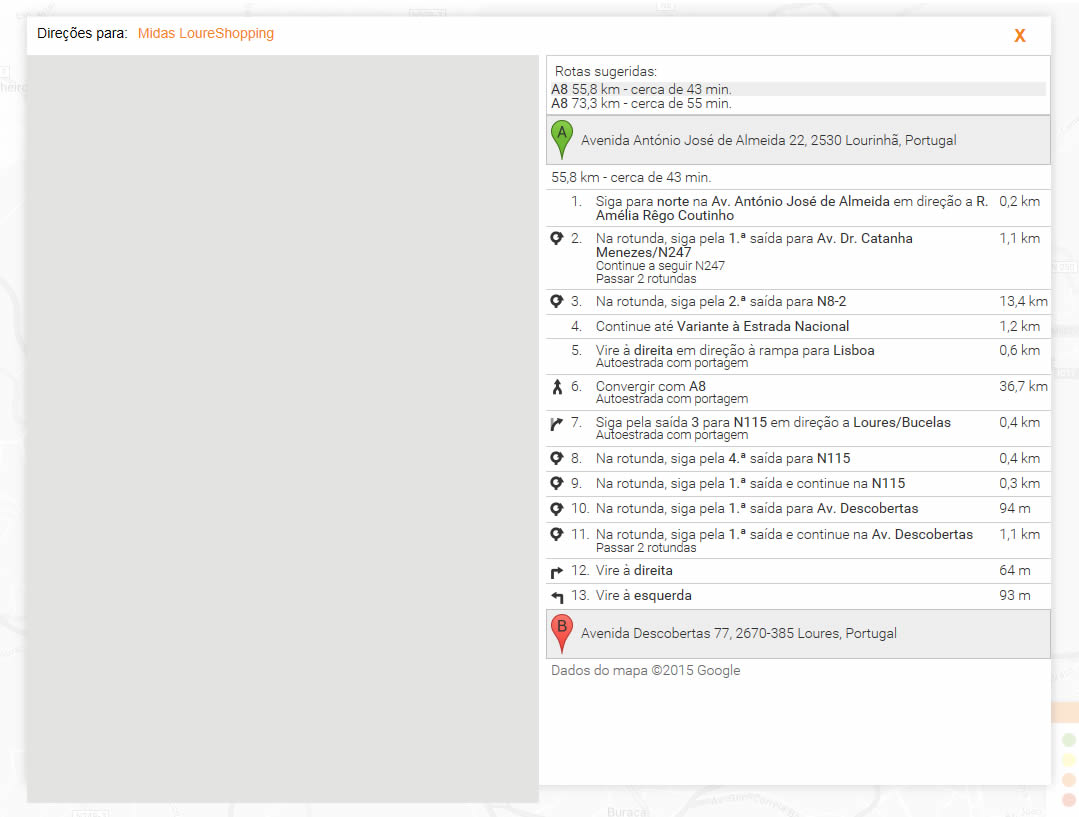
在Internet 9和10中显示Google的方向图有一个大问题(版本11很好)。
HTML是:
<div id="dtl-directions-ctn" class="directions-ctn">
    <table style="width: 100%; height: 100%;">
        <tr class="header-ctn">
            <td>
                <table style="width: 100%;">
                    <tr>
                        <td class="title">Direções para: </td>
                        <td id="dtl-directions-partner-name" class="name lp-clr-orange"></td>
                        <td id="dtl-directions-close-btn" class="close-ctn lp-clr-orange">X</td>
                    </tr>
                </table>
            </td>
        </tr>
        <tr>
            <td>
                <table style="width: 100%; height: 100%;">
                    <tr style="height: 100%">
                        <td id="dtl-directions-map-canvas" class="dtl-map-ctn"></td>
                        <td id="dtl-directions-panel" class="directions-panel"></td>
                    </tr>
                </table>
            </td>
        </tr>
    </table>
</div>
联合来文:
var _locationLatitude = $("#sch-location-latitude-fld").val();
var _locationLongitude = $("#sch-location-longitude-fld").val();
var _partnerLatitude = $("#dtl-partner-latitude-fld").val();
var _partnerLongitude = $("#dtl-partner-longitude-fld").val();

var _directionsService = new google.maps.DirectionsService();
var _directionsDisplay = new google.maps.DirectionsRenderer();

var _map = new google.maps.Map(document.getElementById('dtl-directions-map-canvas'));

_directionsDisplay.setMap(_map);
_directionsDisplay.setPanel(document.getElementById('dtl-directions-panel'));

var start = new google.maps.LatLng(_locationLatitude, _locationLongitude);
var end = new google.maps.LatLng(_partnerLatitude, _partnerLongitude);

var request = {
    origin: start,
    destination: end,
    travelMode: google.maps.TravelMode.DRIVING,
    provideRouteAlternatives: true
};

_directionsService.route(request, function (response, status) {

    if (status == google.maps.DirectionsStatus.OK) {
        _directionsDisplay.setDirections(response);
    }
});
};
Css:
/* Directions */
.directions-ctn {
    display: none;
    width: 100%;
    height: 100%;
    background-color: #fff;
    position: absolute;
    margin: auto;
    top: 0;
    left: 0;
    bottom: 0;
    right: 0;
    z-index: 3;
    /*overflow: hidden;*/
    max-width: 1024px;
    max-height: 768px;
    box-shadow: 0 0 17px rgba(96,96,96,0.3);
}

.directions-ctn .header-ctn {
    height: 5%;
}

.directions-ctn .header-ctn .title {
    float: left;
    padding: 10px;
}

.directions-ctn .header-ctn .name {
    float: left;
    padding-top: 10px;
}

.directions-ctn .header-ctn .close-ctn {
    width: 6%;
    float: right;
    text-align: center;
    font-weight: bold;
    font-size: 1.3em;
    padding: 10px;
    cursor: pointer;
}

.directions-ctn .directions-panel {
    width: 50%;
    height: 100%;
    display: inline-block;
    vertical-align: top;
    overflow-y: auto;
    padding-left: 7px;
}

.directions-ctn .directions-panel .adp-placemark {
    margin: 0;
}

.directions-ctn .directions-panel .adp-placemark td {
    padding: 4px;
    vertical-align: middle;
}

.directions-ctn .directions-panel .adp-summary {
    padding: 5px 3px 5px 5px;
}

.directions-ctn .directions-panel .adp-legal {
    padding: 5px 0 5px 5px;
}

.directions-ctn .dtl-map-ctn {
    width: 50%;
    height: 100%;
    display: inline-block;
    vertical-align: top;
    margin-right: -4px;
}

.directions-ctn .directions-panel img, .directions-ctn .dtl-map-ctn img {
    max-width: none; /* we need to overide the img { max-width: 100%; } to display the controls correctly */
}我试图将Height: 100%插入到映射容器的所有父级中,但它不起作用。
您可以在http://lp-qa.izigo.pt的第一个下拉菜单中看到一个活动示例,在"Onde?“中选择"Pneus”?(意思是在哪里?)放置"Lisboa“并选择第一个选项,在搜索之后,单击一个标记,然后选择"Obter Dire es”(获取说明)。
左边的地图不会出现在IE9和IE10中。
下面是发生的事情:
我把高度从100%改为固定的:
.directions-ctn .dtl-map-ctn {
    width: 50%;
    /*height: 100%;*/
    height: 748px;
    display: inline-block;
    vertical-align: top;
    margin-right: -4px;
}回答 3
Stack Overflow用户
回答已采纳
发布于 2015-07-31 09:13:18
不要使用td作为映射容器。相反,在td内放一个div并设置固定的高度。
HTML更改:
<td class="dtl-map-ctn"><div id="dtl-directions-map-canvas"></div></td>CSS变化:
#dtl-directions-map-canvas {
    height: 470px;
}Stack Overflow用户
发布于 2015-07-31 16:40:20
Thor回答的另一种选择是在html顶部加上一个元标记和一个有效的DOC类型。这将使IE、v9和10类似边缘,从而得到一个简单的修复。在页面的顶部尝试这样的方法:
<!DOCTYPE html>
<meta http-equiv="X-UA-Compatible" content="IE=edge" />有关遗留模式的更多信息,请转到这里
Stack Overflow用户
发布于 2015-08-04 12:07:32
使用固定宽度和高度的iframe
<iframe src="#" width="500" height="400"/>页面原文内容由Stack Overflow提供。腾讯云小微IT领域专用引擎提供翻译支持
原文链接:
https://stackoverflow.com/questions/31684425
复制相关文章
相似问题
腾讯云开发者

Copyright © 2013 - 2026 Tencent Cloud. All Rights Reserved. 腾讯云 版权所有
深圳市腾讯计算机系统有限公司 ICP备案/许可证号:粤B2-20090059  粤公网安备44030502008569号
腾讯云计算(北京)有限责任公司 京ICP证150476号 | 京ICP备11018762号