
在派生IronPython类中与Windows窗体控件交互
我正在学习如何结合使用IronPython和C#。我想将一个简单的windows表单合并到我的应用程序中,所以我决定将其中一个放在单独的C#项目中,并将其编译成我在project中引用的dll。我希望创建引用的windows窗体类的子类,以便在python中创建事件处理程序。现在我有了第一步:
import clr
import sys
import threading
import random
import time


clr.AddReference('System.Drawing')
clr.AddReference('System.Windows.Forms')
clr.AddReference('CustomForm')

from System.Drawing import *
from System.Windows.Forms import *
from System.IO import *
from System import EventHandler
from CustomForm import *
from threading import Lock, Semaphore, Thread
from Queue import PriorityQueue


#Set up some global variables
NUM_DOCTORS = 3
MAX_CAPACITY = 10
PRIORITY_HIGH = 1
PRIORITY_MEDIUM = 2
PRIORITY_LOW = 3
PRIORITY_NONE = -1

#TODO: Fix all print statements once form can be referenced

class MyForm(Form1):

    def __init__(self):
        # Create child controls and initialize form
        super(MyForm, self).__init__()
        self.InitializeComponent()
        self.input_button.Click += self.input_button_Click
        print "Here right now"
        self.admin = None
        self.started = False

    def setAdmin(self, ad):
        self.admin = ad

    def input_button_Click(self, sender, e):
        print "hello click"
        if not self.started:
            self.admin.start()
            self.started = not self.started

        name = self.input_box.Text
        #acquire the lock here, can't do it in the method or it will block
        self.admin.lock.acquire()
        self.admin.addPatient(name)
        self.admin.lock.release()
        print "is this working?"
        self.input_box.Clear()


class Patient():

    def __init__(self, patient_name):
        #set up the severity of the illness
        self.name = patient_name
        #set up illness -> random time from 1-60 seconds
        self.illness = random.randint(1,60)
        self.priority = random.randint(1,3)


    def getIllness(self):
        return self.illness

    def getName(self):
        return self.name

    def getPriority(self):
        return self.priority


class Doctor(Thread):

    def __init__(self, administrator, patient = None):
        self.curr_patient = patient
        self.admin = administrator

    def healPatient(self):
        sleep_time = self.curr_patient.getIllness()
        #heal the patient by sleeping with how long it takes to cure illness
        time.sleep(sleep_time)


    def setPatient(self, patient):
        self.curr_patient = patient

    def run(self):
        #grab a patient, heal them, and report the results
        self.curr_patient = self.admin.getPatientFromQueue()
        healPatient()
        self.admin.reportResults(self.curr_patient)


class Administrator(Thread):

    def __init__(self, form):
        self.num_doctors = NUM_DOCTORS
        self.lock = Lock()
        self.patient_queue = PriorityQueue()
        self.hospital_status = []
        self.parent = form
        self.waiting_room = []
        #potential replacement for pq.qsize()
        self.num_patients = 0

    def run(self):
        #first time
        for i in range(NUM_DOCTORS):
            d = Doctor(self)
            d.start()
            num_doctors -= 1


    def getPatientFromQueue(self):
        #grab a patient from the queue safely
        if self.patient_queue.qsize() >= 1:
            return patient_queue.get()
        else:
            return None


    def reportResults(self, patient):
        #update master list
        with self.lock:
            self.hospital_status.remove(patient)
            self.admitPatient()
            #change this for outcome
            self.parent.status_box.Text += "\n" + patient.getName() + " is released"
            printStatus()
            self.num_doctors += 1

            while self.num_doctors < 0:
                d = Doctor(self)
                d.start()
                self.num_docters -= 1


    def addPatient(self, name):
        #add a patient if possible
        p = Patient(name)
        if len(self.hospital_status) < MAX_CAPACITY:
            self.hospital_status.append(p)
            self.patient_queue.put((p, p.getPriority()))
            self.parent.status_box.Text += "\nPlease come in."
        else:
            #check the waiting list
            self.waiting_room.append(p)
            self.parent.status_box.Text += "\nPlease take a seat in the waiting room."

    def admitPatient(self):
        #check the waiting room -> admit patient if there otherwise do nothing
        if len(self.waiting_room) > 0:
            p = self.waiting_room.pop()
            self.addPatient(p)


    def printStatus(self):
        #only called when lock is had
        for p in self.hospital_status:
            self.parent.status_box.Text += p.getName() + "-Priority-" + p.getPriority()
            #print p.getName() + "-Priority-" + p.getPriority()


Application.EnableVisualStyles()
Application.SetCompatibleTextRenderingDefault(False)

form = MyForm()
admin = Administrator(form)
form.admin = admin


Application.Run(form)
其中,我自己的表单是Form1,由python类MyForm继承。当我运行它时,我在C#中创建的表单显示正确,但是我找不到我应该如何与控件交互。该表格显示如下:
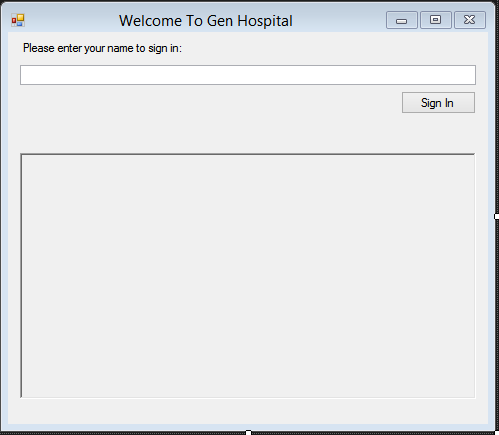
我希望能够听到按钮按下并从顶部的文本框中阅读。状态将在较大的富文本框中打印。我真的很感谢你的任何意见。提前感谢!
更新1:我想我的问题的答案就像找到了什么,here。我已经将组件和方法的访问修饰符更改为公共的,现在它们出现了。如果我的问题解决了,我会更新这个。
更新2:我现在可以看到这些组件,但我不太确定我应该如何与它们交互。我是否应该将它们绑定到MyForm的python ()函数中的变量?
更新3:我似乎已经很好地引用了这些组件(似乎如此),但现在我注意到事件处理似乎已经停止。我已经包含了更多我正在使用的代码。请原谅任何潜在的问题,线程逻辑等,因为我还没有通过,并可以自己解决它。我似乎无法理解的是事件处理。一如既往,我会非常感谢您的任何意见和事先的感谢!
回答 1
Stack Overflow用户
发布于 2015-07-31 21:45:24
以下是对我起作用的东西:
- 我制作了一个Windows (名为
FormProject),它看起来与屏幕截图中的完全一样。我将输入文本框称为input_box、按钮input_button和状态文本框output_box。这些控件中的每一个都是完全被动的(在C#中没有订阅事件)。 - I通过访问Design中的每个控件属性,并选择
Modifiers = Public(默认为Private),使所有这些控件成为公共。确保窗体的类也是公共的. - 我将该项目构建为DLL,因为您已经知道如何做。
- 我编写了以下IronPython代码:(在与
FormProject项目相同的解决方案中,这个代码位于一个单独的项目中,但我确信您已经拥有的任何设置都运行得很好)
记住,你的CustomForm是我的FormProject。
import clr
import sys

clr.AddReference('System.Windows.Forms')
clr.AddReferenceToFileAndPath('C:/Full/Path/To/Compiled/FormProject.dll')

from System.Windows.Forms import *
from FormProject import *

class MyForm(Form1):
    def __init__(self):
        super(MyForm, self).__init__()
        self.input_button.Click += self.input_button_Click

    def input_button_Click(self, sender, e):
        self.output_box.Text += "Status: Tried to sign in with Name: \"" + self.input_box.Text + "\"\r\n"


Application.EnableVisualStyles()
Application.SetCompatibleTextRenderingDefault(False)

form = MyForm()
Application.Run(form)我不知道为什么在MyForm构造函数中尝试调用self.InitializeComponent(),因为(1) Form1.InitializeComponent()是私有的,因此派生类无法访问;(2)调用super(MyForm, self).__init__()已经通过了Form1的构造函数,后者调用Form1.InitializeComponent。因此,在我的代码中,我只删除了它(我的代码工作得很好)。
如果运行此Python代码,单击按钮应将文本添加到输出框(根据输入框的文本),说明我编写了一个事件处理程序并订阅了控件的事件,所有内容都是用Python编写的。
我希望这能帮到你!
https://stackoverflow.com/questions/31656219
复制相似问题
腾讯云开发者

Copyright © 2013 - 2026 Tencent Cloud. All Rights Reserved. 腾讯云 版权所有
深圳市腾讯计算机系统有限公司 ICP备案/许可证号:粤B2-20090059  粤公网安备44030502008569号
腾讯云计算(北京)有限责任公司 京ICP证150476号 | 京ICP备11018762号