
HoughLinesP没有检测到OpenCV android的线路
HoughLinesP没有检测到OpenCV android的线路
提问于 2015-07-27 08:14:46
我正在使用安卓的OpenCV 3.0。我有一个图像,在其中,我想检测角度的手在圆形刻度盘。为此,我正在研制HoughLinesP以检测手。这是密码。
Mat imgSource = new Mat(), imgCirclesOut = new Mat(),imgLinesOut=new Mat();
//grey opencv
Imgproc.cvtColor(Image, imgSource, Imgproc.COLOR_BGR2GRAY);
Imgproc.GaussianBlur( imgSource, imgSource, new Size(9, 9), 2, 2 );

int threshold = 0;
int minLineSize = 0;
int lineGap = 0;

Imgproc.HoughLinesP(imgSource, imgLinesOut, 1, Math.PI/180, threshold, minLineSize, lineGap);
for( int j = 0; i < imgLinesOut.cols(); i++ )
{
    double[] vec=imgLinesOut.get(0,j);
    Point pt1, pt2;
    pt1=new Point(vec[0],vec[1]);
    pt2=new Point(vec[2],vec[3]);
    Imgproc.line( Image, pt1, pt2, new Scalar(0,0,255), 3, Core.LINE_AA,0);
}
但结果是
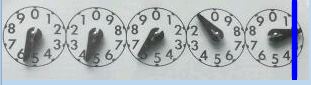
我需要的是这些圆圈的角度。对此问题的任何帮助都将受到高度赞赏。感谢ADvance
编辑我已经用以下内容更新了我的代码
 Mat imgSource = new Mat(), imgCirclesOut = new Mat(),imgLinesOut=new Mat();

 Imgproc.GaussianBlur( Image, imgSource, new Size(5, 5), 2, 2 );
 int threshold = 20;
 int minLineSize = 0;
 int lineGap = 10;
 Imgproc.Canny(imgSource, imgSource, 70, 100);
 Imgproc.HoughLinesP(imgSource, imgLinesOut, 1, Math.PI/180, threshold, minLineSize, lineGap);
for( int j = 0; j < imgLinesOut.cols(); j++ )
{
    double[] vec=imgLinesOut.get(0,j);

    Point pt1, pt2;
    pt1=new Point(vec[0],vec[1]);
    pt2=new Point(vec[2],vec[3]);

    Imgproc.line( imgSource, pt1, pt2, new Scalar(0,0,255), 3, Core.LINE_AA,0);
}正如@Micka所建议的,不需要灰度图像(我删除了cvtcolor)。我还将GuassianBlur大小的值降为5。我也在图像上加上了Canny的边缘。
产生的模糊图像是
回答 2
Stack Overflow用户
回答已采纳
发布于 2015-07-30 09:47:08
在这样小的图像中,检测直线可能是一个问题,因为你需要几个点才能正确地填充Hough累加器。
我建议采用另一种方法:
- 分段每个圆圈(拨号)
- 提取最大的黑点(手)
下面是这个想法的简单实现。代码是用C++编写的,但是您可以轻松地移植到Java,或者至少可以用作引用。
#include "opencv2/opencv.hpp"
using namespace cv;

int main(int, char**)
{
    Mat1b img = imread("path_to_image", IMREAD_GRAYSCALE);

    Mat3b res;
    cvtColor(img, res, COLOR_GRAY2BGR);

    // Find dials
    vector<Vec3f> circles;
    HoughCircles(img, circles, CV_HOUGH_GRADIENT, 1, img.cols/10, 400, 40);

    // For each dial
    for (int i = 0; i < circles.size(); ++i)
    {

        // Segment the dial
        Mat1b dial(img.size(), uchar(255));
        Mat1b mask(img.size(), uchar(0));
        circle(mask, Point(circles[i][0], circles[i][1]), circles[i][2], Scalar(255), CV_FILLED);
        img.copyTo(dial, mask);

        // Apply threshold and open
        Mat1b bin;
        threshold(dial, bin, 127, 255, THRESH_BINARY_INV);
        Mat kernel = getStructuringElement(MORPH_ELLIPSE, Size(5,5));
        morphologyEx(bin, bin, MORPH_OPEN, kernel);

        // Get min area rect
        vector<Point> points;
        findNonZero(bin, points);
        RotatedRect r = minAreaRect(points);

        // Draw min area rect
        Point2f pts[4];
        r.points(pts);
        for (int j = 0; j < 4; ++j) {
            line(res, pts[j], pts[(j + 1) % 4], Scalar(0, 255, 0), 1);
        }
    }

    imshow("Result", res);
    waitKey();

    return 0;
}
从这张图片开始:
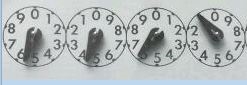
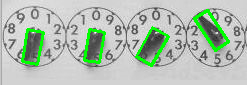
我在这里找到了手:
Stack Overflow用户
发布于 2015-07-27 10:37:54
for( int j = 0; j < imgLinesOut.size(); j++ )这将给出遍历该向量的vector.To的大小。
页面原文内容由Stack Overflow提供。腾讯云小微IT领域专用引擎提供翻译支持
原文链接:
https://stackoverflow.com/questions/31648041
复制相关文章
相似问题
腾讯云开发者

Copyright © 2013 - 2026 Tencent Cloud. All Rights Reserved. 腾讯云 版权所有
深圳市腾讯计算机系统有限公司 ICP备案/许可证号:粤B2-20090059  粤公网安备44030502008569号
腾讯云计算(北京)有限责任公司 京ICP证150476号 | 京ICP备11018762号