
GroupBox内部边缘
我将label和label2的利润率设置为零,相对于内部groupBox2。从图片中可以看出,label位于groupBox2的边框,而label2则有额外的边距。
GroupBox的内部边际是多少?
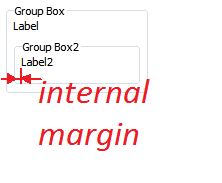
GroupBox {
    id: groupBox1
    x: 5
    y: 302
    width: 142
    height: 90
    checked: false
    flat: false
    title: qsTr("Group Box")

    Label {
        id: label
        text: qsTr("Label")
        anchors.top: parent.top
        anchors.topMargin: 0
        anchors.left: groupBox2.left
        anchors.leftMargin: 0
    }

    GroupBox {
        id: groupBox2
        y: 16
        height: 45
        anchors.bottom: parent.bottom
        anchors.bottomMargin: 0
        anchors.right: parent.right
        anchors.rightMargin: 0
        anchors.left: parent.left
        anchors.leftMargin: 0
        title: qsTr("Group Box2")

        Label {
            id: label2
            text: qsTr("Label2")
            anchors.left: parent.left
            anchors.leftMargin: 0
        }
    }
}回答 1
Stack Overflow用户
发布于 2015-07-26 22:26:00
GroupBox具有定义内部边距的样式,其大小取决于程序运行的平台。
查看qt安装目录中的GroupBox样式,例如/path_to_installation/Qt5.5.0/5.5/Src/qtquickcontrols/src/controls/Styles/Base/GroupBoxStyle.qml,不同平台的子目录中也有自定义样式:Desktop/GroupBoxStyle.qml、WinRT/PC/GroupBoxStyle.qml、iOS/GroupBoxStyle.qml等。
这是Base/GroupBoxStyle.qml的一部分
/*! The margin from the content item to the groupbox. */
padding {
    top: (control.title.length > 0 || control.checkable ? TextSingleton.implicitHeight : 0) + 10
    left: 8
    right: 8
    bottom: 6
}因此,在您的情况下,左边距可能设置为8。
GroupBox具有无文档的属性style,可用于设置自定义样式。GroupBox.style和GroupBoxStyle.qml被标记为内部的,所以在更新Qt时要小心,它们可以在以后的Qt版本中进行更改,而无需警告,使用它的代码可能会停止工作。
因此,要设置不同的页边距大小,可以将GroupBoxStyle.qml复制到项目中,并按如下方式使用:
GroupBox {
    style: GroupBoxStyle {
        padding.left: 0 //your desired padding value
    }
}https://stackoverflow.com/questions/31627267
复制相似问题
腾讯云开发者

Copyright © 2013 - 2026 Tencent Cloud. All Rights Reserved. 腾讯云 版权所有
深圳市腾讯计算机系统有限公司 ICP备案/许可证号:粤B2-20090059  粤公网安备44030502008569号
腾讯云计算(北京)有限责任公司 京ICP证150476号 | 京ICP备11018762号