
在android中探索fitsSystemWindows和透明状态栏
在android中探索fitsSystemWindows和透明状态栏
提问于 2015-07-25 06:02:48
好心地假设一切都是为目标而设,而minSDK vesion只是棒棒糖。
我想要什么
我正在尝试实现一个类似于下面的play商店屏幕的活动。
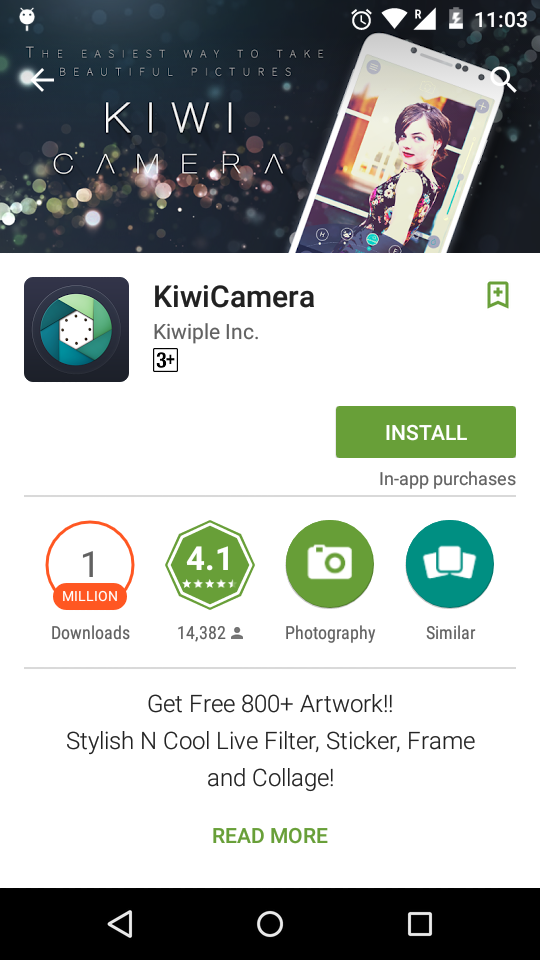
我把注意力集中在英雄形象上。如你所见,1.英雄形象被画在状态栏后面。(完全透明。2.其余内容绘制在状态栏下面。(例如,工具栏/ActionBar) 3.当滚动状态栏时,状态栏是彩色的。
我做了什么,
我使用过来自ScrimInsetsFrameLayout的GoogleIO应用程序。把我的英雄形象围绕在这个版面上。添加了适当的造型在我的主题。这就是我得到的
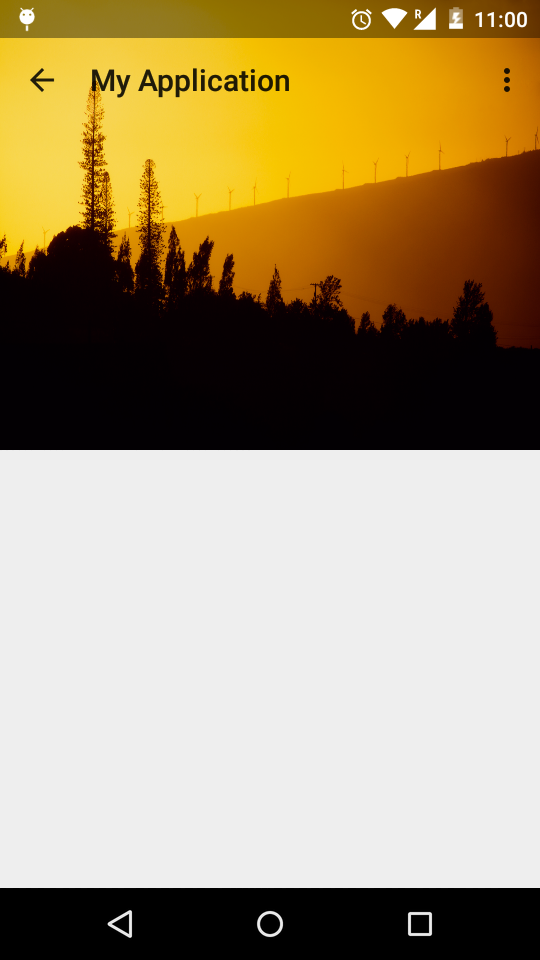
帮助我需要
- 我仍然对fitsSystemWindows标签感到困惑。当我把这个设置为“真”的英雄形象布局,什么都没有发生。也就是说,状态栏是透明的,但是图像是在状态栏下面绘制的。如果设置为"false",我将得到上述结果。是否有明确的文章解释这个标签的用法和幕后。
- 我将ScrimInsetFrameLayout上的“ScrimInsetFrameLayout”设置为透明。此外,在主题中,我将状态栏的颜色设置为透明。但对图像仍有保护作用。如何使状态栏完全透明。
请帮助我的指针或演示项目。另外,如果我不清楚或需要更多的信息,请告诉我。
回答 2
Stack Overflow用户
发布于 2015-10-12 10:38:00
这对我有用。
layout.xml
<android.support.design.widget.CoordinatorLayout xmlns:android="http://schemas.android.com/apk/res/android"
        xmlns:app="http://schemas.android.com/apk/res-auto"
        android:layout_width="match_parent"
        android:layout_height="match_parent"
        android:fitsSystemWindows="true">

        <android.support.design.widget.AppBarLayout
            android:id="@+id/appbar"
            android:layout_width="match_parent"
            android:layout_height="@dimen/detail_backdrop_height"
            android:fitsSystemWindows="true"
            android:theme="@style/ThemeOverlay.AppCompat.Dark.ActionBar">

            <android.support.design.widget.CollapsingToolbarLayout
                android:id="@+id/collapsing_toolbar"
                android:layout_width="match_parent"
                android:layout_height="match_parent"
                android:fitsSystemWindows="true"
                app:contentScrim="?attr/colorPrimary"
                app:expandedTitleMarginEnd="64dp"
                app:expandedTitleMarginStart="48dp"
                app:layout_scrollFlags="scroll|exitUntilCollapsed">

                <ImageView
                    android:id="@+id/backdrop"
                    android:layout_width="match_parent"
                    android:layout_height="match_parent"
                    android:fitsSystemWindows="true"
                    android:scaleType="centerCrop"
                    app:layout_collapseMode="parallax" />

                <android.support.v7.widget.Toolbar
                    android:id="@+id/parallax_toolbar"
                    android:layout_width="match_parent"
                    android:layout_height="?attr/actionBarSize"
                    app:layout_collapseMode="pin"
                    app:popupTheme="@style/ThemeOverlay.AppCompat.Light" />

            </android.support.design.widget.CollapsingToolbarLayout>

        </android.support.design.widget.AppBarLayout>

        <FrameLayout
            android:id="@+id/fragmentContainer"
            android:layout_width="match_parent"
            android:layout_height="match_parent"
            app:layout_behavior="@string/appbar_scrolling_view_behavior" />

</android.support.design.widget.CoordinatorLayout>并在statusBarColor v-21处设置透明颜色的styles.xml属性。
Stack Overflow用户
发布于 2016-09-20 13:20:47
将以下行添加到不希望工具栏重叠的视图中:
app:layout_behavior="@string/appbar_scrolling_view_behavior"页面原文内容由Stack Overflow提供。腾讯云小微IT领域专用引擎提供翻译支持
原文链接:
https://stackoverflow.com/questions/31623503
复制相关文章
相似问题
腾讯云开发者

Copyright © 2013 - 2026 Tencent Cloud. All Rights Reserved. 腾讯云 版权所有
深圳市腾讯计算机系统有限公司 ICP备案/许可证号:粤B2-20090059  粤公网安备44030502008569号
腾讯云计算(北京)有限责任公司 京ICP证150476号 | 京ICP备11018762号