
将以用户为中心的内容与新内容放在一起。
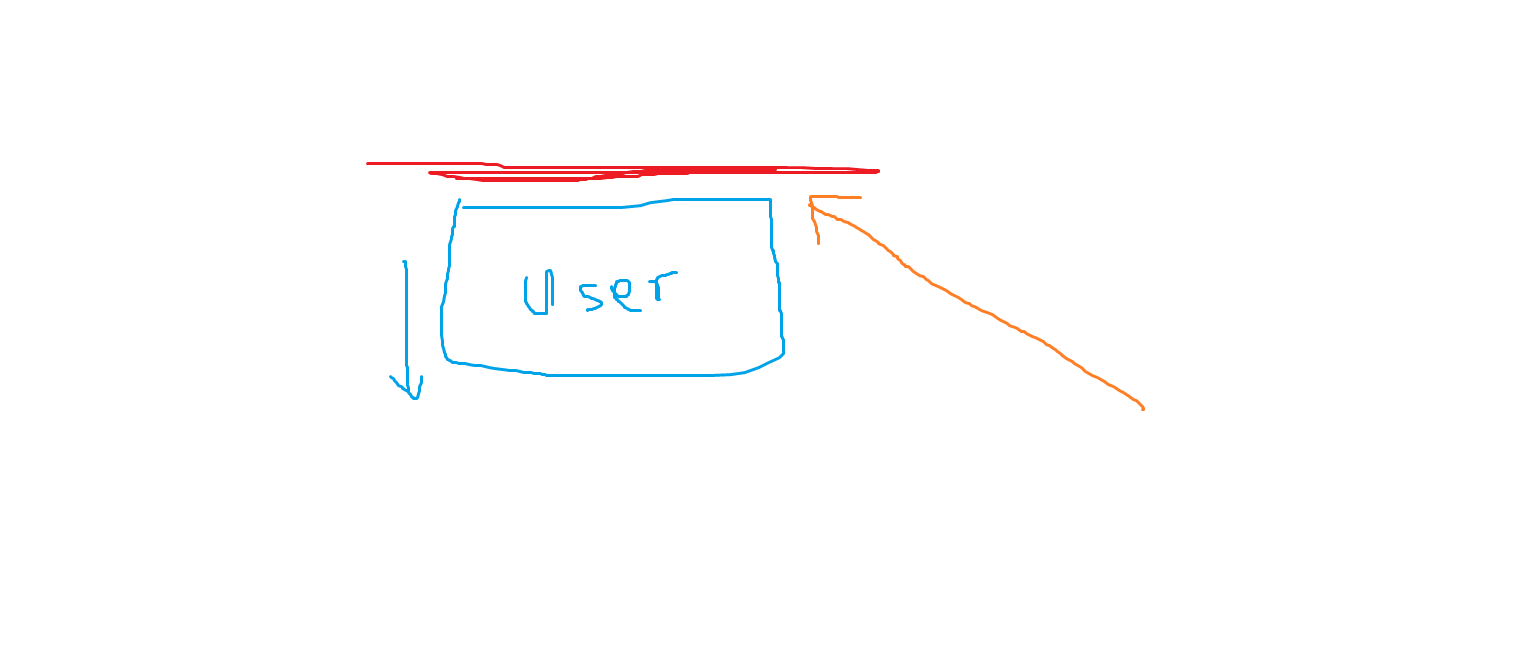
用户正在查看蓝色内容并对其进行操作。然后进行AJAX调用,并将一些新的橙色内容添加到页面顶部。但是,由于蓝色内容已经位于页面顶部,所以蓝色内容必须向下移动,以适应新的橙色内容。
我希望能够迫使蓝色内容停留在原来的位置,并让窗口将橙色+窗口顶部向上推。
我能充分解释我自己吗?我会搜索这个,但我甚至不知道从哪里开始搜索关键字。
回答 2
Stack Overflow用户
发布于 2015-07-24 15:24:33
你可以通过滚动橙色元素的高度来实现这一点。为此:
- 使用
window.scrollBy()滚动窗口。 - 使用
outerHeight()获取元素的高度。
下面是一个演示(我添加了一堆模拟内容,以便滚动可用):
function addOrange() {
    // here you would do the AJAX call and get the orange content
    var orange = '<p id="orange">And I am orange!</p>';
    $("#blue").before(orange);
    window.scrollBy(0, $("#orange").outerHeight());
}* { margin:0; padding:0; border:0; }
button { background:#4488cc; padding:8px 16px; color:white; }
#blue { color:blue; }
#orange { color:orange; }<script src="https://ajax.googleapis.com/ajax/libs/jquery/1.11.1/jquery.min.js"></script>
<p>Mock text, just for filling...</p>
<p>Mock text, just for filling...</p>
<p>Mock text, just for filling...</p>
<p>Mock text, just for filling...</p>
<p>Mock text, just for filling...</p>
<p>Mock text, just for filling...</p>
<p>Mock text, just for filling...</p>
<p>Mock text, just for filling...</p>
<p>Mock text, just for filling...</p>
<p>Mock text, just for filling...</p>
<p>Mock text, just for filling...</p>
<p>Mock text, just for filling...</p>
<p>Mock text, just for filling...</p>
<p>Mock text, just for filling...</p>
<p>Mock text, just for filling...</p>
<p>Mock text, just for filling...</p>
<p>Mock text, just for filling...</p>
<p id="blue">I am blue</p>
<p><button onclick="addOrange()">Add text with AJAX</button></p>
<p>Mock text, just for filling...</p>
<p>Mock text, just for filling...</p>
<p>Mock text, just for filling...</p>
<p>Mock text, just for filling...</p>
<p>Mock text, just for filling...</p>
<p>Mock text, just for filling...</p>
<p>Mock text, just for filling...</p>
<p>Mock text, just for filling...</p>
<p>Mock text, just for filling...</p>
<p>Mock text, just for filling...</p>
<p>Mock text, just for filling...</p>
<p>Mock text, just for filling...</p>
<p>Mock text, just for filling...</p>
<p>Mock text, just for filling...</p>
<p>Mock text, just for filling...</p>
<p>Mock text, just for filling...</p>
<p>Mock text, just for filling...</p>
<p>Mock text, just for filling...</p>
<p>Mock text, just for filling...</p>
<p>Mock text, just for filling...</p>
<p>Mock text, just for filling...</p>
<p>Mock text, just for filling...</p>
<p>Mock text, just for filling...</p>
<p>Mock text, just for filling...</p>
<p>Mock text, just for filling...</p>
<p>Mock text, just for filling...</p>
<p>Mock text, just for filling...</p>
<p>Mock text, just for filling...</p>
<p>Mock text, just for filling...</p>
<p>Mock text, just for filling...</p>
<p>Mock text, just for filling...</p>
<p>Mock text, just for filling...</p>
<p>Mock text, just for filling...</p>
<p>Mock text, just for filling...</p>
<p>Mock text, just for filling...</p>
以上解决方案的一个问题是,如果没有滚动操作(例如:元素位于屏幕顶部,其他内容不填充屏幕),它就无法工作。
解决这一问题的方法之一是在身体中添加一个margin-bottom来弥补这一点。就像这样:
function addOrange() {

    // add margin to the body to force scrolling if there isn't enough content to scroll
    if ($("html").height() < $(window).innerHeight()) {
        $("body").css("margin-bottom", $(window).innerHeight() );
    }

    // here you would do the AJAX call and get the orange content
    var orange = '<p id="orange">And I am orange!</p>';
    $("#blue").before(orange);
    window.scrollBy(0, $("#orange").outerHeight());
}* { margin:0; padding:0; border:0; }
button { background:#4488cc; padding:8px 16px; color:white; }
#blue { color:blue; }
#orange { color:orange; }<script src="https://ajax.googleapis.com/ajax/libs/jquery/1.11.1/jquery.min.js"></script>
<p id="blue">I am blue</p>
<p><button onclick="addOrange()">Add text with AJAX</button></p>
您也可以在这个JSFiddle上看到它。
Stack Overflow用户
发布于 2015-07-24 15:10:01
假设您有一个内容包装器(假设是一个<div>),并且"blue content“包装在包装器内的它自己的容器中,您可能需要进行AJAX调用,将”橙色内容“存储在一个变量中,然后在内容包装器上使用prepend()方法将您的新内容插入到"blue content”之上的第一个子容器中。
一个简单的例子:
<div class="wrapper">
  <div id="blue-content">
    <p>This is blue content</p>
  </div>
</div>

//save your AJAX result into a variable to use
var ajaxResult;
var $orangeContent = '<div id="orange-content">' + ajaxResult + '</div>';
$('div.wrapper').prepend($orangeContent);
$('body,html').animate({scrollTop:$orangeContent.offset().top}, 'slow');这很可能都在一个函数中,因此它按顺序执行,但这取决于您如何实现它。您将看到我添加了animate()位,这样一旦窗口被添加到包装器上,窗口就会滚动到橙色内容。
这是一个非常基本的例子,但应该会引导你朝着正确的方向前进。
祝好运!
https://stackoverflow.com/questions/31611908
复制相似问题
腾讯云开发者

Copyright © 2013 - 2026 Tencent Cloud. All Rights Reserved. 腾讯云 版权所有
深圳市腾讯计算机系统有限公司 ICP备案/许可证号:粤B2-20090059  粤公网安备44030502008569号
腾讯云计算(北京)有限责任公司 京ICP证150476号 | 京ICP备11018762号