
在景观模式下打印页面时,应在何处破页?
在景观模式下打印页面时,应在何处破页?
提问于 2015-07-22 10:05:34
我有一个产品列表,每个产品都有这样一个复选框:
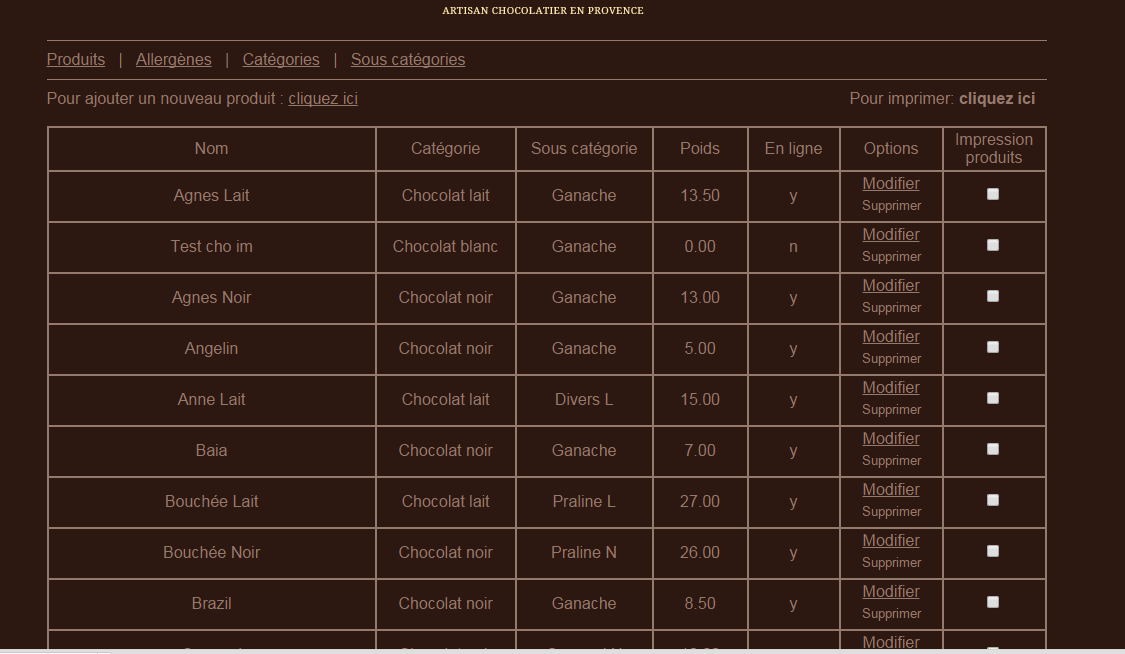
我的任务是打印选定的产品(由用户选择,所以我永远不知道有多少要打印)在景观模式。为此,我可以使用CSS、JavaScript、jQuery (任何插件)和PHP。
结果应该是这样的:
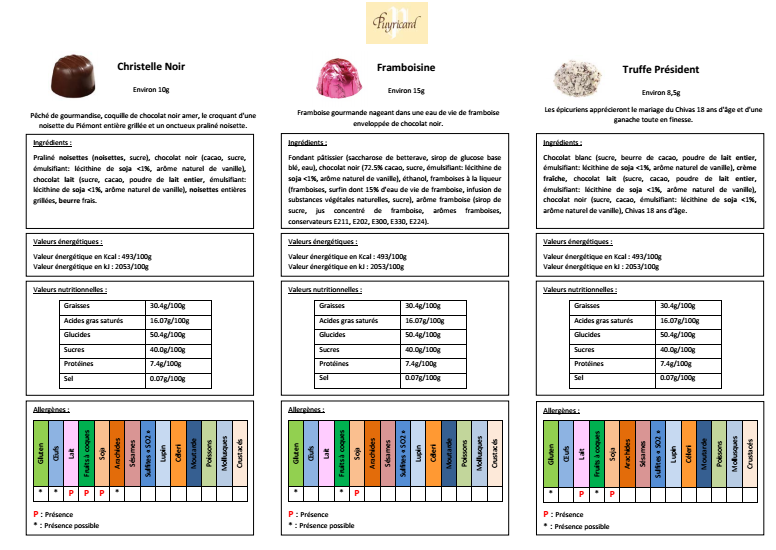
我有一种情况,因为有些产品的描述(或其他物品)长了两倍,而且在第二页打印:(
我的问题:
- 我使用的是
@media print{ @page {size: landscape} },还是使用CSS2或CSS3,或者可能是响应表?(如果有3个产品,我需要3列,如果有1,我需要2列,否则只需要1列)。 - 你知道这种情况下的算法吗?
- 如果不是,什么时候我应该使用分页,当产品有太多的项目(是不是太长)?
你对这个谜有什么建议吗?我正在做这样的事情:
@media all {
    .page-break { display: none; }
}

@media print {
    .page-break { display: block; page-break-before: always; }
}

<h1>Page Title</h1>
<!-- content block -->
<!-- content block -->
<div class="page-break"></div>
<!-- content block -->
<!-- content block -->
<div class="page-break"></div>
<!-- content block -->
<!-- content -->
但是,如果我的专栏太长,什么时候才能翻开页面呢?
回答 1
Stack Overflow用户
回答已采纳
发布于 2015-07-22 12:52:44
由于您不知道用户将选择哪些产品,因此您必须使用JavaScript动态添加分页符,并且每次客户端选择/取消选择产品时解析文档,这样它们仍然符合您的需要。
一种方法是:
- 最初,在每个产品之后都会有一个分隔符div (带有分页),并且它将被隐藏。
- 每次用户检查/取消检查一个产品时:
1. Hide all the visible separators (if any). You could do this by adding/removing a `visible` class using JavaScript. That class would be defined like this:@media {.页面中断{显示:无;}}@媒体打印{.页面中断.可见{显示:块;分页后:始终;}}
2.遍历产品清单,以确定选择哪一种产品。
3.在每3个选定的元素之后,获取下一个分隔符并将visible类添加到其中。
下面是一个简单的演示,展示了它的工作原理:
<!doctype html>
<html>
    <head>
        <title>test</title>
        <script src="http://code.jquery.com/jquery-1.11.3.min.js"></script>
        <script src="http://code.jquery.com/jquery-migrate-1.2.1.min.js"></script>
        <style type="text/css">
            * { margin:0; padding:0; border:0; }
            .product { width:30%; display:inline-block; }
            .separator { page-break-after:always; display:none; }
            @media print {
                .separator.visible { display: block; page-break-after: always; }
                .product { display:none; }
                .product.visible { display:inline-block; }
            }
        </style>
        <script>
        function recalculateSeparators() {

            var x = 0;

            // reset the print visibility
            $(".separator").removeClass("visible");
            $(".product").removeClass("visible");

            // traverse the list of products
            $(".product").each(function() {

                // if the checkbox is selected for that product
                if ($(this).find("input:checked").length) {

                    // indicate that the product will be visible for print
                    $(this).addClass("visible");

                    // if it's the third element, make the next separator visible too
                    if (++x % 3 == 0) {
                        $(this).next(".separator").addClass("visible");
                    }
                }
            });
        }
        </script>
    </head>
    <body>
        <div class="product"><input type="checkbox" onclick="recalculateSeparators()" /> Product A</div>
        <div class="separator"></div>
        <div class="product"><input type="checkbox" onclick="recalculateSeparators()" /> Product B</div>
        <div class="separator"></div>
        <div class="product"><input type="checkbox" onclick="recalculateSeparators()" /> Product C</div>
        <div class="separator"></div>
        <div class="product"><input type="checkbox" onclick="recalculateSeparators()" /> Product D</div>
        <div class="separator"></div>
        <div class="product"><input type="checkbox" onclick="recalculateSeparators()" /> Product E</div>
        <div class="separator"></div>
        <div class="product"><input type="checkbox" onclick="recalculateSeparators()" /> Product F</div>
        <div class="separator"></div>
        <div class="product"><input type="checkbox" onclick="recalculateSeparators()" /> Product G</div>
        <div class="separator"></div>
        <div class="product"><input type="checkbox" onclick="recalculateSeparators()" /> Product H</div>
        <div class="separator"></div>
        <div class="product"><input type="checkbox" onclick="recalculateSeparators()" /> Product I</div>
        <div class="separator"></div>
        <div class="product"><input type="checkbox" onclick="recalculateSeparators()" /> Product J</div>
        <div class="separator"></div>
        <div class="product"><input type="checkbox" onclick="recalculateSeparators()" /> Product K</div>
        <div class="separator"></div>
        <div class="product"><input type="checkbox" onclick="recalculateSeparators()" /> Product L</div>
        <div class="separator"></div>
    </body>
</html>页面原文内容由Stack Overflow提供。腾讯云小微IT领域专用引擎提供翻译支持
原文链接:
https://stackoverflow.com/questions/31560028
复制相关文章
相似问题
腾讯云开发者

Copyright © 2013 - 2026 Tencent Cloud. All Rights Reserved. 腾讯云 版权所有
深圳市腾讯计算机系统有限公司 ICP备案/许可证号:粤B2-20090059  粤公网安备44030502008569号
腾讯云计算(北京)有限责任公司 京ICP证150476号 | 京ICP备11018762号