
用波浪动画制作CAShapeLayer动画
用波浪动画制作CAShapeLayer动画
提问于 2015-07-20 14:41:39
下面我有附图,我想实现下面的动画。我试过水波动画,但不知道如何像上面那样控制动画。。
我有CAShapeLayer,我必须在其中实现这个动画。

Init代码
UIBezierPath *leftPath = [UIBezierPath bezierPath];
// Set the starting point of the shape.
[leftPath moveToPoint:CGPointMake(0,self.bounds.size.height/2)];
// Draw the lines.


[leftPath addLineToPoint:CGPointMake(0,self.bounds.size.height/2)];
[leftPath addLineToPoint:CGPointMake(self.bounds.size.width,self.bounds.size.height/2)];


leftLayer.path = leftPath.CGPath;
leftLayer.strokeColor = [[UIColor whiteColor] CGColor];
leftLayer.fillColor = nil;
leftLayer.borderWidth = 3.0f;
leftLayer.lineCap = kCALineCapRound;
leftLayer.lineJoin = kCALineJoinRound;

leftLayer.borderColor=[UIColor blackColor].CGColor;
[self.layer addSublayer:leftLayer];
动画代码
-(void)animateCureve{

CABasicAnimation *pathAnimation = [CABasicAnimation animationWithKeyPath:@"path"];
pathAnimation.duration = 3.5;
pathAnimation.timingFunction = [CAMediaTimingFunction functionWithName:kCAMediaTimingFunctionEaseInEaseOut];
pathAnimation.fromValue = (id)leftLayer.path;
pathAnimation.toValue = (id)[self wavePath].CGPath;
pathAnimation.removedOnCompletion=NO;
[leftLayer addAnimation:pathAnimation forKey:@"path"];
}
曲线路径
- (UIBezierPath *)wavePath {
//set start and end accordingly

UIBezierPath *startPath = [UIBezierPath bezierPath];
[startPath moveToPoint:CGPointMake(0, self.bounds.size.height/2)];
[startPath addCurveToPoint:CGPointMake(self.bounds.size.width, self.bounds.size.height/2) controlPoint1:CGPointMake(50, self.bounds.size.height/2+0)  controlPoint2:CGPointMake(self.bounds.size.width/2, 20) ];


return startPath;
}回答 1
Stack Overflow用户
发布于 2015-07-20 15:02:07
仔细看一下框架,它看上去就像一条沿路径移动的浅二次曲线。您可以尝试的是为曲线的开始和结束定义一个范围,例如开始和结束,然后在中间添加控制点。然后把两端的直线加进去。我很快就写到:
CGFloat start;
CGFloat end;
CGFloat heightOfQuad;
CGFloat mid = (start + end)/2;

UIBezierPath *path = [UIBezierPath bezierPath];
[path moveToPoint:CGPointMake(start, 0)];
[path addQuadCurveToPoint:CGPointMake(end, 0) controlPoint:CGPointMake(mid, heightOfQuad)];

UIBezierPath *startPath = [UIBezierPath bezierPath];
[startPath moveToPoint:CGPointMake(0, 0)];
[startPath addLineToPoint:CGPointMake(start, 0)];

UIBezierPath *endPath = [UIBezierPath bezierPath];
[endPath moveToPoint:CGPointMake(end, 0)];
[endPath addLineToPoint:CGPointMake(lengthOfViewHere, 0)];

[startPath appendPath:path];
[startPath appendPath:endPath];
*我还没有测试过,但你可以试一试
更新:
- (UIBezierPath *)wavePath {

    CGFloat mid = (self.start + self.end)/2;
    CGFloat y = self.frame.size.height;

    UIBezierPath *curvePath = [UIBezierPath bezierPath];
    [curvePath moveToPoint:CGPointMake(self.start, y)];
    [curvePath addQuadCurveToPoint:CGPointMake(self.end, y) controlPoint:CGPointMake(mid, y - waveHeight)];

    UIBezierPath *startPath = [UIBezierPath bezierPath];
    [startPath moveToPoint:CGPointMake(0, y)];
    [startPath addLineToPoint:CGPointMake(self.start, y)];

    UIBezierPath *endPath = [UIBezierPath bezierPath];
    [endPath moveToPoint:CGPointMake(self.end, y)];
    [endPath addLineToPoint:CGPointMake(self.frame.size.width, y)];

    [startPath appendPath:curvePath];
    [startPath appendPath:endPath];

    return startPath;
}
- (void)setWavePosition:(CGFloat)wavePosition {

    //from 0.0 to 1.0
    _wavePosition = wavePosition;

    //set start and end accordingly
    CGFloat waveCoordinate = wavePosition * self.frame.size.width;
    self.start = waveCoordinate - waveWidth/2;
    self.end = waveCoordinate + waveWidth/2;

    self.path = [self wavePath].CGPath;
    [self setNeedsDisplay];
}
在播放了一些之后,上面的代码在视图宽度为200.0的情况下生成位置为0.5、waveHeight为5.0和waveWidth为150.0的代码:
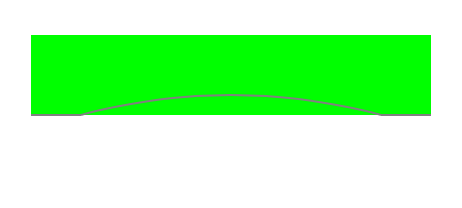
您需要做的就是设置wavePosition,然后wavePath将返回新的路径。
页面原文内容由Stack Overflow提供。腾讯云小微IT领域专用引擎提供翻译支持
原文链接:
https://stackoverflow.com/questions/31519415
复制相关文章
相似问题
腾讯云开发者

Copyright © 2013 - 2026 Tencent Cloud. All Rights Reserved. 腾讯云 版权所有
深圳市腾讯计算机系统有限公司 ICP备案/许可证号:粤B2-20090059  粤公网安备44030502008569号
腾讯云计算(北京)有限责任公司 京ICP证150476号 | 京ICP备11018762号