
android工作室中的单元测试
android工作室中的单元测试
提问于 2015-07-17 03:36:30
我正在使用最新版本的android工作室gradle插件1.2.3。我无法理解如何在其中创建单元测试;所有可用的答案都是针对旧版本的android。帮帮我。
回答 1
Stack Overflow用户
发布于 2015-07-17 05:25:52
首先,单元测试需要不同的文件夹结构。androidTest自动生成用于检测测试的androidTest文件夹,但不能将单元测试放在其中。因此,您必须创建一个"test“文件夹:
- src
  -- androidTest //for instrumentation tests
  -- main        //source code
-- test //for unit tests在测试中使用相同的包结构,就像要测试的类一样。
您可以在android设备测试和单元测试之间切换Android studio的构建变体。
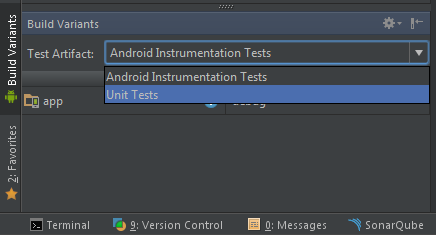
根据您的选择测试或androidTest文件夹将显示在您的项目选项卡。
最后,必须将junit添加到gradle中的依赖项中:
dependencies {
  testCompile 'junit:junit:4.12'
}
例如,测试文件夹中的测试类可以如下所示:
package package.of.class.to.test

import org.junit.Before;
import org.junit.Test;
...
import static org.junit.Assert.assertEquals;
import static org.junit.Assert.assertThat;

public class TestSomething{

  @Before
  public void setup(){
    // test setup
  }

  @Test
  public void testSomething(){
    // your unit tests like these simple examples
    assertThat(anyBooleanResult, is(expectedBooleanResult));
    assertEquals(anyIntResult, expectedIntResult);
  }
}要获得更多信息,您还可以查看this thread。
页面原文内容由Stack Overflow提供。腾讯云小微IT领域专用引擎提供翻译支持
原文链接:
https://stackoverflow.com/questions/31468012
复制相关文章
相似问题
腾讯云开发者

Copyright © 2013 - 2026 Tencent Cloud. All Rights Reserved. 腾讯云 版权所有
深圳市腾讯计算机系统有限公司 ICP备案/许可证号:粤B2-20090059  粤公网安备44030502008569号
腾讯云计算(北京)有限责任公司 京ICP证150476号 | 京ICP备11018762号