
无法抓取谷歌广告
无法抓取谷歌广告
提问于 2015-07-15 15:15:40
我正在尝试刮一个网站,并希望从谷歌AdSense获得网址和图片。但我似乎没有得到谷歌广告的任何细节。
在这里我想要
如果我们搜索“冰箱”在谷歌,那么我们会得到一些广告,我需要去取。或者一些博客,显示Google广告的网站,比如图片。
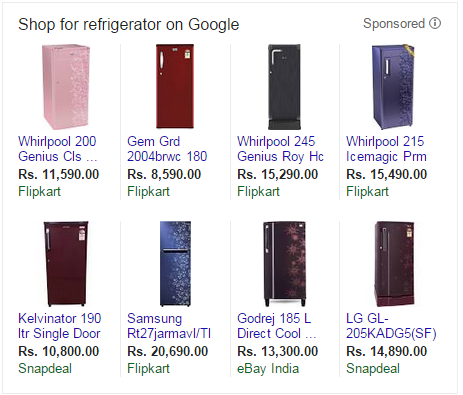

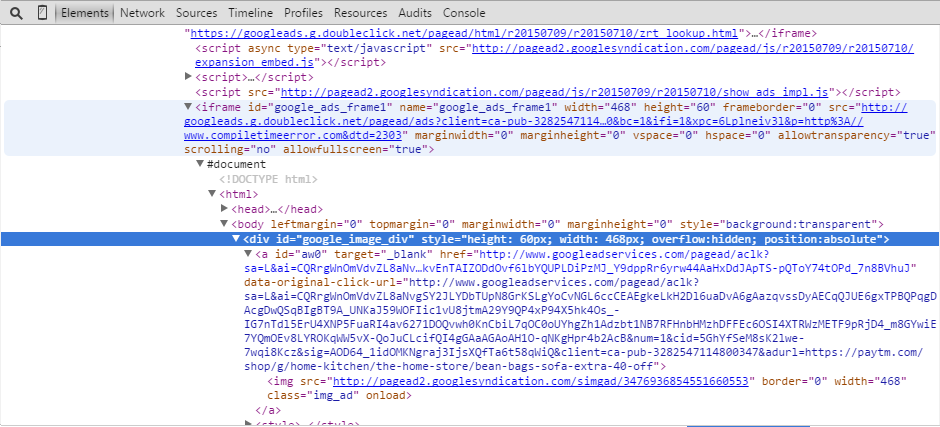
但是当我检查时,我可以找到相关的div和url,但是当我点击url时,我只得到静态的html数据。
这是我需要获取的代码
下面是我用Selenium编写的脚本Python。
from contextlib import closing
from selenium.webdriver import Firefox # pip install selenium
import time
from selenium.common.exceptions import TimeoutException
from selenium.webdriver.support.ui import WebDriverWait
from selenium.webdriver.support import expected_conditions as EC

url = "http://www.compiletimeerror.com/"

# use firefox to get page with javascript generated content
with closing(Firefox()) as browser:
    browser.get(url) # load page
    delay = 10 # seconds
try:
    WebDriverWait(browser, delay).until(EC.presence_of_element_located(browser.find_element_by_xpath("(//div[@class='pla-unit'])[0]")))
    print "Page is ready!"
    Element=browser.find_element(By.ID,value="google_image_div")
    print Element
    print Element.text
except TimeoutException:
    print "Loading took too much time!"
但我还是找不到数据。请给我任何参考或提示。
回答 2
Stack Overflow用户
发布于 2015-07-20 16:56:30
您需要首先选择包含要使用的元素的框架。
select_frame("id=google_ads_frame1");注意:我不确定python语法。但它应该是类似的东西。
Stack Overflow用户
发布于 2015-07-20 17:26:54
在选择您的switch_to.frame变量(未经测试)之前,使用Selenium的browser方法将您的iframe定向到html中的iframe:
from contextlib import closing
from selenium.webdriver import Firefox # pip install selenium
import time
from selenium.common.exceptions import TimeoutException
from selenium.webdriver.support.ui import WebDriverWait
from selenium.webdriver.support import expected_conditions as EC

url = "http://www.compiletimeerror.com/"

# use firefox to get page with javascript generated content
with closing(Firefox()) as browser:
    browser.get(url) # load page
    delay = 10 # seconds
try:
    WebDriverWait(browser, delay).until(EC.presence_of_element_located(browser.find_element_by_xpath("(//div[@class='pla-unit'])[0]")))
    print "Page is ready!"
    browser.switch_to.frame(browser.find_element_by_id('google_ads_frame1'))
    element=browser.find_element(By.ID,value="google_image_div")
    print element
    print element.text
except TimeoutException:
    print "Loading took too much time!"
http://elementalselenium.com/tips/3-work-with-frames
关于Python最佳实践的说明:在声明局部变量时使用小写(元素与元素)。
页面原文内容由Stack Overflow提供。腾讯云小微IT领域专用引擎提供翻译支持
原文链接:
https://stackoverflow.com/questions/31434363
复制相关文章
相似问题
腾讯云开发者

Copyright © 2013 - 2026 Tencent Cloud. All Rights Reserved. 腾讯云 版权所有
深圳市腾讯计算机系统有限公司 ICP备案/许可证号:粤B2-20090059  粤公网安备44030502008569号
腾讯云计算(北京)有限责任公司 京ICP证150476号 | 京ICP备11018762号