
从数组中快速填充excel单元格
从数组中快速填充excel单元格
提问于 2015-07-15 03:42:05
我从外部数据工具生成数组,现在希望使用数组中的数据填充单元格。我写了以下代码。
With ThisWorkbook.Worksheets("Data")
   Lastrow = .Cells(.Rows.count, 2).End(xlUp).Row
   For i = LBound(Price) To UBound(Price)
   .Cells((Lastrow + 1), 1) = Price(i)
   .Cells((Lastrow + 1), 2) = Quantity(i)
   Lastrow = Lastrow + 1
   Next i
End With
所有的数组都是相同长度的,我有大约25个奇数数组可以处理。代码运行良好,但我面临的问题是速度。我花了大约5-6个小时来填充表格,一次用大约3000块作为数组的长度。请推荐你最好的方法。谢谢。
回答 5
Stack Overflow用户
回答已采纳
发布于 2015-07-15 04:28:25
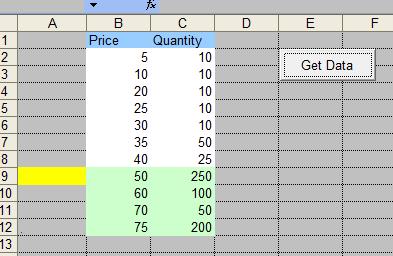
根据您的问题,您有不同数据(例如价格、数量、SomeOtherArray)的数组数目(25)。根据我上面的评论。
Option Explicit

Public Sub GetData()
Dim ws As Worksheet
Dim LastRow As Long
Dim arrPrice As Variant
Dim arrQty As Variant

Set ws = Sheets(3)
'-- starts at zero index
arrPrice = Array(50, 60, 70, 75)
arrQty = Array(250, 100, 50, 200)

'-- change columns as per your needs
LastRow = ws.Range("B" & ws.Rows.Count).End(xlUp).Row
'-- UBound + 1 is because the array starts at zero index above
ws.Range("B1").Offset(LastRow).Resize(UBound(arrPrice)+1).Value = Application.Transpose(arrPrice)
ws.Range("B1").Offset(LastRow, 1).Resize(UBound(arrQty)+1).Value = Application.Transpose(arrQty)

End Sub
Stack Overflow用户
发布于 2015-07-15 03:53:54
下面是一个示例,说明如何在不循环的情况下填充数组到范围:
Sub PopulateFromArray()
    Dim MyArr As Variant
    MyArr = Array("Hello", "World", "This is some", "Text")
    Range("A1").Resize(UBound(MyArr) + 1, 1).Formula = Application.Transpose(MyArr)
End Sub
我们使用调整大小来调整范围的大小,以便使用数组的上边界填充。我们在它中添加一个,因为它是选项基数0。我们转换数组,因为根据数组的性质,数据会穿过,我们需要它向下移动。如果我们想跨列而不是行,我们需要像这样双转位:
Application.Transpose(Application.Transpose(MyArr))Stack Overflow用户
发布于 2015-07-15 03:56:28
With ThisWorkbook.Worksheets("Data")
   NextRow = .Cells(.Rows.count, 2).End(xlUp).Row + 1
   num = UBound(Price) - LBound(Price)
   .Range(.Cells(NextRow, 1), .Cells(NextRow + num, 1)) = Application.Transpose(Price)
   .Range(.Cells(NextRow, 2), .Cells(NextRow + num, 2)) = Application.Transpose(Quantity)
End With页面原文内容由Stack Overflow提供。腾讯云小微IT领域专用引擎提供翻译支持
原文链接:
https://stackoverflow.com/questions/31421109
复制相关文章
相似问题
腾讯云开发者

Copyright © 2013 - 2026 Tencent Cloud. All Rights Reserved. 腾讯云 版权所有
深圳市腾讯计算机系统有限公司 ICP备案/许可证号:粤B2-20090059  粤公网安备44030502008569号
腾讯云计算(北京)有限责任公司 京ICP证150476号 | 京ICP备11018762号