
如何编译Cogl hello示例
我的环境是Fedora 21,我玩了http://www.cogl3d.org/hello.html的hello教程,它显示:
构建示例 如果将上述代码保存到名为hello.c的文件中,则可以按以下方式编译该示例: gcc -o你好hello.c
pkg-config --cflags --libs cogl2 glib-2.0
但是在哪里可以找到cogl2库呢?
如果我不包括cogl库:
[xiaobai@xiaobai cogl]$ gcc -o hello hello.c `pkg-config --cflags --libs glib-2.0`
hello.c:1:23: fatal error: cogl/cogl.h: No such file or directory
 #include <cogl/cogl.h>
                       ^
compilation terminated.
[xiaobai@xiaobai cogl]$ 我试过dnf search cogl,但只有cogl,没有cogl2:
[xiaobai@xiaobai cogl]$ dnf search cogl
[sudo] password for xiaobai:
================================================================= N/S Matched: cogl ==================================================================
cogl.x86_64 : A library for using 3D graphics hardware to draw pretty pictures
cogl.i686 : A library for using 3D graphics hardware to draw pretty pictures
cogl-doc.noarch : Documentation for cogl
cogl-devel.x86_64 : cogl development environment
cogl-devel.i686 : cogl development environment
[xiaobai@xiaobai cogl]$
我还搜索cogl.h,也没有这样的cogl2:
[xiaobai@xiaobai yum]$ dnf provides */cogl.h
cogl-devel-1.18.2-9.fc21.x86_64 : cogl development environment
Repo        : @System

cogl-devel-1.18.2-9.fc21.i686 : cogl development environment
Repo        : fedora

cogl-devel-1.18.2-9.fc21.x86_64 : cogl development environment
Repo        : fedora

[xiaobai@xiaobai yum]$
我无法使用pkg-config找到cogl和cogl2:
[xiaobai@xiaobai cogl]$ pkg-config --cflags --libs cogl2 cogl
Package cogl2 was not found in the pkg-config search path.
Perhaps you should add the directory containing `cogl2.pc'
to the PKG_CONFIG_PATH environment variable
No package 'cogl2' found
Package cogl was not found in the pkg-config search path.
Perhaps you should add the directory containing `cogl.pc'
to the PKG_CONFIG_PATH environment variable
No package 'cogl' found
[xiaobai@xiaobai cogl]$
所以我就试了一下cogl
$ gcc -o hello hello.c
pkg-config --cflags --libs glib-2.0-I/usr/include/cogl/
,它显示了大量错误消息:
[xiaobai@xiaobai cogl]$ gcc -o hello hello.c `pkg-config --cflags --libs glib-2.0` -I/usr/include/cogl/
hello.c:45:17: error: unknown type name ‘CoglOnscreen’
 frame_event_cb (CoglOnscreen *onscreen,
                 ^
hello.c:46:17: error: unknown type name ‘CoglFrameEvent’
                 CoglFrameEvent event,
                 ^
hello.c:47:17: error: unknown type name ‘CoglFrameInfo’
                 CoglFrameInfo *info,
                 ^
hello.c:59:11: error: unknown type name ‘CoglOnscreen’
 dirty_cb (CoglOnscreen *onscreen,
           ^
hello.c:60:17: error: unknown type name ‘CoglOnscreenDirtyInfo’
           const CoglOnscreenDirtyInfo *info,
                 ^
hello.c: In function ‘main’:
hello.c:86:14: warning: assignment makes pointer from integer without a cast
     data.ctx = cogl_context_new (NULL, &error);
              ^
hello.c:92:13: warning: assignment makes pointer from integer without a cast
     data.fb = cogl_onscreen_new (data.ctx, 640, 480);
             ^
hello.c:98:19: warning: assignment makes pointer from integer without a cast
     data.pipeline = cogl_pipeline_new (data.ctx);
                   ^
hello.c:100:17: warning: assignment makes pointer from integer without a cast
     cogl_source = cogl_glib_source_new (data.ctx, G_PRIORITY_DEFAULT);
                 ^
hello.c:105:39: error: ‘frame_event_cb’ undeclared (first use in this function)
                                       frame_event_cb,
                                       ^
hello.c:105:39: note: each undeclared identifier is reported only once for each function it appears in
hello.c:110:39: error: ‘dirty_cb’ undeclared (first use in this function)
                                       dirty_cb,
                                       ^
[xiaobai@xiaobai cogl]$
任何帮助都是非常感谢的。
更新我尝试过@CYB3R解决方案,但仍然没有成功:
[xiaobai@xiaobai cogl]$ pkg-config --cflags --libs cogl-2.0-experimental glib-2.0
-pthread -I/usr/include/cogl -I/usr/include/gdk-pixbuf-2.0 -I/usr/include/libpng16 -I/usr/include/libdrm -I/usr/include/glib-2.0 -I/usr/lib64/glib-2.0/include -lcogl -lgmodule-2.0 -pthread -lgdk_pixbuf-2.0 -lgobject-2.0 -lwayland-egl -lwayland-client -lgbm -ldrm -lwayland-server -lEGL -lX11 -lXext -lXdamage -lXfixes -lXcomposite -lXrandr -lglib-2.0
[xiaobai@xiaobai cogl]$ gcc -pthread -I/usr/include/cogl -I/usr/include/gdk-pixbuf-2.0 -I/usr/include/libpng16 -I/usr/include/libdrm -I/usr/include/glib-2.0 -I/usr/lib64/glib-2.0/include -lcogl -lgmodule-2.0 -pthread -lgdk_pixbuf-2.0 -lgobject-2.0 -lwayland-egl -lwayland-client -lgbm -ldrm -lwayland-server -lEGL -lX11 -lXext -lXdamage -lXfixes -lXcomposite -lXrandr -lglib-2.0 hello.c
hello.c:45:17: error: unknown type name ‘CoglOnscreen’
 frame_event_cb (CoglOnscreen *onscreen,
                 ^
hello.c:46:17: error: unknown type name ‘CoglFrameEvent’
                 CoglFrameEvent event,
                 ^
... #same errors like previous
[xiaobai@xiaobai cogl]$ 回答 2
Stack Overflow用户
发布于 2015-07-20 10:28:38
第一步,识别它缺少类型名称CoglOnscreen。
[xiaobai@xiaobai cogl]$ gcc -pthread -I/usr/include/cogl -I/usr/include/gdk-pixbuf-2.0 -I/usr/include/libpng16 -I/usr/include/libdrm -I/usr/include/glib-2.0 -I/usr/lib64/glib-2.0/include -lcogl -lgmodule-2.0 -pthread -lgdk_pixbuf-2.0 -lgobject-2.0 -lwayland-egl -lwayland-client -lgbm -ldrm -lwayland-server -lEGL -lX11 -lXext -lXdamage -lXfixes -lXcomposite -lXrandr -lglib-2.0 hello.c
hello.c:45:17: error: unknown type name ‘CoglOnscreen’
 frame_event_cb (CoglOnscreen *onscreen,
                 ^
hello.c:46:17: error: unknown type name ‘CoglFrameEvent’
                 CoglFrameEvent event,
^现在我知道CoglOnscreen应该位于某个地方,所以我尝试在包含dir中搜索关键字:
[xiaobai@xiaobai cogl]$ grep -rnI CoglOnscreen /usr/include/cogl/cogl/*
/usr/include/cogl/cogl/cogl-context.h:250: * @COGL_FEATURE_ID_BUFFER_AGE: Available if the age of #CoglOnscreen back
/usr/include/cogl/cogl/cogl-display.h:91: * @onscreen_template: A #CoglOnscreenTemplate
/usr/include/cogl/cogl/cogl-display.h:130:                  CoglOnscreenTemplate *onscreen_template);
/usr/include/cogl/cogl/cogl-display.h:149: * @onscreen_template: A template for creating #CoglOnscreen framebuffers
/usr/include/cogl/cogl/cogl-display.h:151: * Specifies a template for creating #CoglOnscreen framebuffers.
/usr/include/cogl/cogl/cogl-display.h:153: * Depending on the system, the constraints for creating #CoglOnscreen
/usr/include/cogl/cogl/cogl-display.h:164:                                    CoglOnscreenTemplate *onscreen_template);
/usr/include/cogl/cogl/cogl-framebuffer.h:79: * There are two kinds of framebuffer in Cogl, #CoglOnscreen
/usr/include/cogl/cogl/cogl-framebuffer.h:85: * rendering to a #CoglOnscreen framebuffer will be immediately
/usr/include/cogl/cogl/cogl-framebuffer.h:89: * looking at the #CoglOnscreen and #CoglOffscreen constructor
/usr/include/cogl/cogl/cogl-framebuffer.h:1657: * already implicitly discard when you finish rendering to a #CoglOnscreen
/usr/include/cogl/cogl/cogl-frame-info.h:80: * Gets the frame counter for the #CoglOnscreen that corresponds
/usr/include/cogl/cogl/cogl-gles2.h:198: * #CoglOffscreen framebuffers (Rendering to #CoglOnscreen
/usr/include/cogl/cogl/cogl-kms-display.h:48: * #CoglOnscreen swap_buffers request. For applications that support
/usr/include/cogl/cogl/cogl-onscreen.h:52:typedef struct _CoglOnscreen CoglOnscreen;
...
上面的最后一行显示了"cogl-onscreen.h“已经定义了CoglOnscreen。所以我搜索cogl-onscreen.h
[xiaobai@xiaobai cogl]$ grep -rnI 'cogl-onscreen.h' /usr/include/cogl/cogl/*
/usr/include/cogl/cogl/cogl.h:133:#include <cogl/cogl-onscreen.h>
[xiaobai@xiaobai cogl]$
vi /usr/include/cogl/cogl/cogl.h和搜索"cogl-onscreen.h“关键字:
...
/*
 * 2.0 api that's compatible with the 1.x api...
 */
#if defined (COGL_ENABLE_EXPERIMENTAL_API)
#include <cogl/cogl-swap-chain.h>
#include <cogl/cogl-renderer.h>
#include <cogl/cogl-output.h>
#include <cogl/cogl-display.h>
#include <cogl/cogl-context.h>
#include <cogl/cogl-buffer.h>
#include <cogl/cogl-pixel-buffer.h>
#include <cogl/cogl-vector.h>
#include <cogl/cogl-euler.h>
#include <cogl/cogl-quaternion.h>
#include <cogl/cogl-texture-2d.h>
#include <cogl/cogl-texture-2d-gl.h>
#include <cogl/cogl-texture-rectangle.h>
#include <cogl/cogl-texture-3d.h>
#include <cogl/cogl-texture-2d-sliced.h>
#include <cogl/cogl-sub-texture.h>
#include <cogl/cogl-atlas-texture.h>
#include <cogl/cogl-meta-texture.h>
#include <cogl/cogl-primitive-texture.h>
#include <cogl/cogl-index-buffer.h>
#include <cogl/cogl-attribute-buffer.h>
#include <cogl/cogl-indices.h>
#include <cogl/cogl-attribute.h>
#include <cogl/cogl-primitive.h>
#include <cogl/cogl-depth-state.h>
#include <cogl/cogl-pipeline.h>
#include <cogl/cogl-pipeline-state.h>
#include <cogl/cogl-pipeline-layer-state.h>
#include <cogl/cogl-snippet.h>
#include <cogl/cogl-framebuffer.h>
#include <cogl/cogl-onscreen.h>
...
在顶部得到“#如果定义为”所以现在我知道我必须给它定义COGL_ENABLE_EXPERIMENTAL_API以便包含cogl-onscreen.h.
再次使用"COGL_ENABLE_EXPERIMENTAL_API“作为关键字进行搜索:
#ifdef COGL_ENABLE_EXPERIMENTAL_2_0_API
#ifndef COGL_ENABLE_EXPERIMENTAL_API
#define COGL_ENABLE_EXPERIMENTAL_API
#endif
#endif
结束了,我需要添加COGL_ENABLE_EXPERIMENTAL_2__API -D
$ gcc -D COGL_ENABLE_EXPERIMENTAL_2_0_API -o hello hello.c `pkg-config --cflags --libs cogl-2.0-experimental`
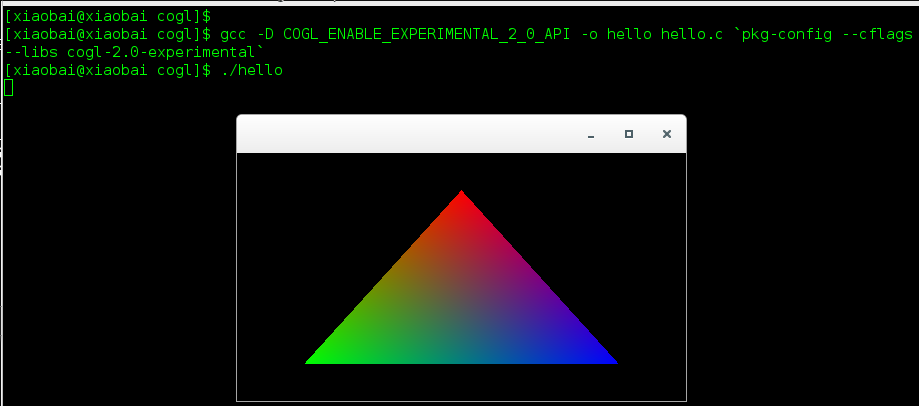
可用的pkg-config选项可以通过自动完成:
[xiaobai@xiaobai cogl]$ pkg-config --cflags --libs cogl-[Press Tab]
cogl-1.0                     cogl-pango-1.0               cogl-path-2.0-experimental
cogl-2.0-experimental        cogl-pango-2.0-experimental
cogl-gl-1.0                  cogl-path-1.0
[xiaobai@xiaobai cogl]$ Stack Overflow用户
发布于 2015-07-17 21:49:12
您应该使用cogl-2.0-experimental。这就是我在我的机器上得到的
$  pkg-config --cflags --libs cogl-2.0-experimental
-pthread -I/usr/include/cogl -I/usr/include/gdk-pixbuf-2.0 -I/usr/include/libpng12 -I/usr/include/glib-2.0 -I/usr/lib/x86_64-linux-gnu/glib-2.0/include -I/usr/include/libdrm -lcogl -lgmodule-2.0 -pthread -lgdk_pixbuf-2.0 -lgobject-2.0 -lglib-2.0 -lwayland-egl -lwayland-client -lgbm -ldrm -lwayland-server -lEGL -lX11 -lXext -lXdamage -lXfixes -lXcomposite -lXrandr https://stackoverflow.com/questions/31404721
复制相似问题
腾讯云开发者

Copyright © 2013 - 2026 Tencent Cloud. All Rights Reserved. 腾讯云 版权所有
深圳市腾讯计算机系统有限公司 ICP备案/许可证号:粤B2-20090059  粤公网安备44030502008569号
腾讯云计算(北京)有限责任公司 京ICP证150476号 | 京ICP备11018762号