
Java AttributedString,粗体和上标
Java AttributedString,粗体和上标
提问于 2015-07-11 16:50:24
我正在尝试渲染一个java.text.AttributedString,它既是粗体又是上标。虽然它可以使一些范围,无论是粗体还是迷信,渲染似乎不能处理的范围是粗体和上标。
下面的SSCCE显示,使用带有HTML的JLabel来呈现这一点很好。有没有办法在没有JLabel的情况下获得这种行为?
顺便说一句,我查看了创建的AttributedString属性,它们在我看来还不错,所以这无疑是一个呈现问题。
package funky.chart;

import java.awt.BorderLayout;
import java.awt.Dimension;
import java.awt.Font;
import java.awt.Graphics;
import java.awt.font.TextAttribute;
import java.text.AttributedString;
import javax.swing.JFrame;
import javax.swing.JLabel;
import javax.swing.JPanel;
import javax.swing.UIManager;

public class AttributedStringTest
{
    public static void main(String[] args) {
        // prevent using the default UI manager who renders in bold by default for the HTML label
        try {
            UIManager.setLookAndFeel(UIManager.getSystemLookAndFeelClassName());
        } catch (Exception ex) {
            System.err.println("Could not set look and feel: " + ex);
        }

        JFrame frame = new JFrame("AttributedString superscript with font");

        frame.getContentPane().add(new JPanel() {
            @Override
            public void paint(Graphics gfx) {
                super.paint(gfx);

                Font bold = gfx.getFont().deriveFont(Font.BOLD);

                // superscript and bold only works fine
                AttributedString test1 = new AttributedString("test superscript and bold");
                test1.addAttribute(TextAttribute.SUPERSCRIPT, TextAttribute.SUPERSCRIPT_SUPER, 5, 16);
                test1.addAttribute(TextAttribute.FONT, bold, 21, 25);

                // both superscript and bold is only rendered as bold
                AttributedString test2 = new AttributedString("test superscript and bold");
                test2.addAttribute(TextAttribute.SUPERSCRIPT, TextAttribute.SUPERSCRIPT_SUPER, 5, 25);
                test2.addAttribute(TextAttribute.FONT, bold, 5, 25);

                gfx.drawString(test1.getIterator(), 5, 20);
                gfx.drawString(test2.getIterator(), 5, 40);
            }

            @Override
            public Dimension getPreferredSize() {
                return new Dimension(200, 70);
            }
        });

        // HTML label works fine
        frame.getContentPane().add(
                new JLabel("<html>test <b>bold</b>, <sup>super</sup> and <b><sup>both</sup></b>"),
                BorderLayout.SOUTH);

        frame.pack();
        frame.setDefaultCloseOperation(JFrame.DISPOSE_ON_CLOSE);
        frame.setVisible(true);
    }
}回答 1
Stack Overflow用户
回答已采纳
发布于 2015-07-11 19:05:27
关于您的完整示例,请注意:
- 使用
TextAttribute.WEIGHT指定粗体。 - 使用
TextAttribute.SIZE指定字体大小。 - 使用
TextLayout计算首选大小,如这里所示。 - Swing GUI对象应该只在事件调度线程上构造和操作。
- "Swing程序应该覆盖
paintComponent(),而不是覆盖paint()。“-http://www.oracle.com/technetwork/java/painting-140037.html#callbacks。
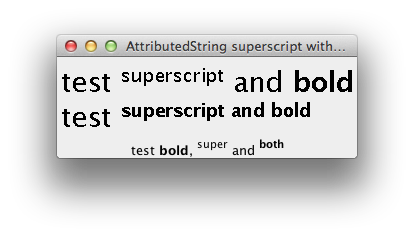
import java.awt.BorderLayout;
import java.awt.Dimension;
import java.awt.EventQueue;
import java.awt.Graphics;
import java.awt.font.TextAttribute;
import java.text.AttributedString;
import javax.swing.JFrame;
import javax.swing.JLabel;
import javax.swing.JPanel;

/** @see https://stackoverflow.com/a/31360762/230513 */
public class AttributedStringTest {

    public static void main(String[] args) {
        EventQueue.invokeLater(new AttributedStringTest()::display);
    }

    private void display() {
        JFrame frame = new JFrame("AttributedString superscript with font");
        frame.getContentPane().add(new JPanel() {
            @Override
            public void paintComponent(Graphics g) {
                super.paintComponent(g);

                // superscript and bold only works fine
                AttributedString test1 = new AttributedString("test superscript and bold");
                test1.addAttribute(TextAttribute.SIZE, 28, 0, 25);
                test1.addAttribute(TextAttribute.SUPERSCRIPT, TextAttribute.SUPERSCRIPT_SUPER, 5, 16);
                test1.addAttribute(TextAttribute.WEIGHT, TextAttribute.WEIGHT_BOLD, 21, 25);

                // both superscript and bold is only rendered as bold
                AttributedString test2 = new AttributedString("test superscript and bold");
                test2.addAttribute(TextAttribute.SIZE, 28, 0, 25);
                test2.addAttribute(TextAttribute.SUPERSCRIPT, TextAttribute.SUPERSCRIPT_SUPER, 5, 25);
                test2.addAttribute(TextAttribute.WEIGHT, TextAttribute.WEIGHT_BOLD, 5, 25);

                g.drawString(test1.getIterator(), 5, 35);
                g.drawString(test2.getIterator(), 5, 70);
            }

            @Override
            public Dimension getPreferredSize() {
                return new Dimension(300, 80);
            }
        });

        // HTML label works fine
        frame.getContentPane().add(new JLabel(
            "<html>test <b>bold</b>, <sup>super</sup> and <b><sup>both</sup></b>", JLabel .CENTER),
            BorderLayout.SOUTH);

        frame.pack();
        frame.setDefaultCloseOperation(JFrame.DISPOSE_ON_CLOSE);
        frame.setVisible(true);
    }
}页面原文内容由Stack Overflow提供。腾讯云小微IT领域专用引擎提供翻译支持
原文链接:
https://stackoverflow.com/questions/31359512
复制相关文章
相似问题
腾讯云开发者

Copyright © 2013 - 2026 Tencent Cloud. All Rights Reserved. 腾讯云 版权所有
深圳市腾讯计算机系统有限公司 ICP备案/许可证号:粤B2-20090059  粤公网安备44030502008569号
腾讯云计算(北京)有限责任公司 京ICP证150476号 | 京ICP备11018762号