
在图像背景下定位一个框
在图像背景下定位一个框
提问于 2015-07-10 23:44:55
到目前为止,我已经得到了相应的图像和盒子。然而,我的问题是,当我添加height时,它不是下降而是上升。
我的小提琴- https://jsfiddle.net/kg6pLk4e/
.post {
    height: 255px;
    font-size: 14px;
    position: relative;
    padding: 5px;
    margin-right: 3%;
    margin-top: 3%;
}
.box-one {
    background-image: url("http://www.getmdl.io/templates/blog/images/coffee.jpg");
    background-repeat: no-repeat;
    background-size: cover;
}
.image-text {
    position: absolute;
    width: 100%;
    margin: 0;
    left: 0;
    font-weight: bold;
    color: white;
    text-align: center;
    background: black;
    bottom: 0;
    padding: 5px;
    height: 40px;
}<div class="late-post grid-60 tablet-grid-50 mobile-grid-100">
<div class="post box-one">
<h1>Pottery</h1>
<p class="image-text">Lorem Ipsum is simply dummy text of the printing and</p>
</div>
</div>
基本上,我想在image-text中添加内容,但是更确切地说,是框向上,我希望它下降。我想说的是:
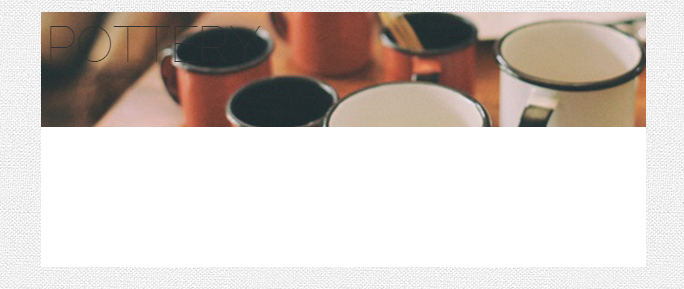
备注:白色方框正在上升,覆盖图像。我不想让它掩盖图像。我想要白色的盒子向下,而不是向上调整高度。
回答 3
Stack Overflow用户
回答已采纳
发布于 2015-07-11 00:24:00
对于已知的高度,编辑bottom值以匹配容器的height。
.image-text {
    bottom: -40px;
    height: 40px;
}
.post {
    height: 100px;
    width: 500px;
    font-size: 14px;
    position: relative;
    /* padding: 5px; */
    /* margin-right: 3%; */
    /* margin-top: 3%; */
}
.box-one {
    background-image: url("http://www.getmdl.io/templates/blog/images/coffee.jpg");
    background-repeat: no-repeat;
    background-size: cover;
    /* outline: 5px solid blue; */
}
.image-text {
    position: absolute;
    left: 0;
    bottom: -40px;
    width: 100%;
    margin: 0;
    font-weight: bold;
    color: white;
    text-align: center;
    background: black;
    /* opacity: .5; */
    /* padding: 5px; */
    height: 40px;
    line-height: 40px;
}<div class="post box-one">
<h1>Pottery</h1>
<p class="image-text">Lorem Ipsum is simply dummy text of the printing and</p>
</div>
如果高度未知,则可以使用transform属性。
.image-text {
    bottom: 0;
    transform: translateY(100%);
}
.post {
    height: 100px;
    width: 500px;
    font-size: 14px;
    position: relative;
    /* padding: 5px; */
    /* margin-right: 3%; */
    /* margin-top: 3%; */
}
.box-one {
    background-image: url("http://www.getmdl.io/templates/blog/images/coffee.jpg");
    background-repeat: no-repeat;
    background-size: cover;
    /* outline: 5px solid blue; */
}
.image-text {
    position: absolute;
    left: 0;
    bottom: 0;
    width: 100%;
    margin: 0;
    font-weight: bold;
    color: white;
    text-align: center;
    background: black;
    /* opacity: .5; */
    padding: 10px 0;
    /* height: 40px; */
    -webkit-transform: translateY(100%);
    -ms-transform: translateY(100%);
    transform: translateY(100%);
}<div class="post box-one">
<h1>Pottery</h1>
<p class="image-text">Lorem Ipsum is simply dummy text of the printing and</p>
</div>
Stack Overflow用户
发布于 2015-07-10 23:51:45
如果我能理解你的问题。你的..box一号没有位置设置。必须设置父元素的位置才能对子元素产生正确的效果。
.box-one {
position:relative;
}
.image-text {
position:absolute;
}看看这里:https://css-tricks.com/absolute-positioning-inside-relative-positioning/
Stack Overflow用户
发布于 2015-07-10 23:52:43
试着把“高度”变成一个负值。应该能工作,但我不能保证它会起作用。因此,与其:
height: 255px;做,
height: -255px;让我知道它是如何工作的!:)
页面原文内容由Stack Overflow提供。腾讯云小微IT领域专用引擎提供翻译支持
原文链接:
https://stackoverflow.com/questions/31351924
复制相关文章
相似问题
腾讯云开发者

Copyright © 2013 - 2026 Tencent Cloud. All Rights Reserved. 腾讯云 版权所有
深圳市腾讯计算机系统有限公司 ICP备案/许可证号:粤B2-20090059  粤公网安备44030502008569号
腾讯云计算(北京)有限责任公司 京ICP证150476号 | 京ICP备11018762号