
向数据库写入错误-Moodle
向数据库写入错误-Moodle
提问于 2015-07-07 18:01:14
我在Moodle中有一个页面,用户可以通过JQuery添加连续行,每次单击Save按钮时,表单中输入的数据将被写入数据库,但我得到了以下错误消息:
调试信息:您的SQL语法出现了错误;请检查与您的MySQL服务器版本相对应的手册,以便在第1行使用正确的语法(“1”、“Introduction Audio 1”、“1”)
INSERT INTO mobile (week,title,order) VALUES(?,?,?)
[array (
0 => 1,
1 => 'Introduction Audio 1',
2 => '1',
)]
连续行被追加到的窗体:
<form method="post" action="processMobileApp.php">
<br/>
<span class="add-week" style="float:right;"><input type='button' value="Add a New Week" style="font-weight:bold; font-size:17px;"/> </span>
<span class="add-row" style="float:right;"><input type='button' value="Add New Row" style="font-weight:bold; font-size:17px;"/> </span>
<span style="float:right;"><input type='submit' value="Save" style="font-weight:bold; font-size:17px;"/></span>
<br/><br/>
<table class="row-list" cellspacing="1" cellpadding="0">
<br/>
<tr>
<th>Week 1 Title</th><th>Order</th><th>Edit</th><th>Delete</th><th>Upload</th>
</tr>
<tr>
<td>
<input type="text" name="title0" />
</td>
<td>
<input type="text" name="order0" />
</td>
<td>
<a href="editapp.php"><u>Edit</u></a>
</td>
<td>
<a href="deleteapp.php"><u>Delete</u></a>
</td>
<td>
<a href="uploadapp.php"><u>Upload</u></a>
</td>
</tr>
</table>
</form>JQuery代码:
<script>
jQuery(function(){
    var counter = 1;
    jQuery('span.add-row').click(function(event){
        event.preventDefault();
        counter++;
        var newRow = jQuery('<tr><td><input type="text" name="title' +
            counter + '"/></td><td><input type="text" name="order' +
            counter + '"/></td><td><a href="editapp.php"><u>Edit</u></a></td></td><td><a href="deleteapp.php"><u>Delete</u></a></td><td><a href="uploadapp.php"><u>Upload</u></a></td></tr>');
        jQuery('table.row-list').append(newRow);
    });

    var count = 2;
    jQuery('span.add-week').click(function(event){
        event.preventDefault();
        counter++;
        var newWeek = jQuery('<tr><th>Week ' + (count++) + ' Title</th><th>Order</th><th>Edit</th><th>Delete</th><th>Update</th></tr><tr><td><input type="text" name="title' +
            counter + '"/></td><td><input type="text" name="order' +
            counter + '"/></td><td><a href="editapp.php"><u>Edit</u></a></td><td><a href="deleteapp.php"><u>Delete</u></a></td><td><a href="uploadapp.php"><u>Upload</u></a></td></tr>');
        jQuery('table.row-list').append(newWeek);
    });

});

</script>
处理表单数据并将其提交给数据库的页面:
<?php

    require_once(dirname(dirname(dirname(__FILE__))) . '/config.php');

    global $DB;

    $countWeek = 1;
    $counter = 0;
    $week = $countWeek++;
    $title = required_param("title0", PARAM_TEXT);
    $order = required_param("order0", PARAM_TEXT);

    $counter+1;

    $record2 = new stdClass();
    $record2->week = $week;
    $record2->title = $title;
    $record2->order = $order;
    $record2->displayorder = '10000';

    // Insert one record at a time.

    $lastinsertid2 = $DB->insert_record('mobile', $record2);

    if(!$lastinsertid2)
    {
        echo "Could not insert";
    }
    else
    {
        echo "Successful";
    }

?>
下面是包含表单的页面截图:
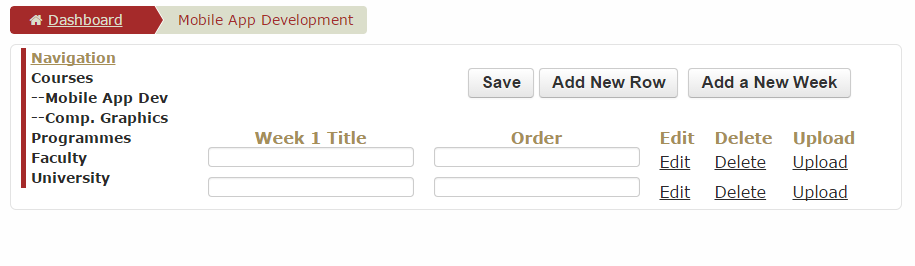
有什么帮助吗?谢谢。
回答 2
Stack Overflow用户
回答已采纳
发布于 2015-07-07 18:03:50
订单和周是保留的词。https://dev.mysql.com/doc/refman/5.5/en/keywords.html
他们需要倒车。
INSERT INTO mobile (`week`,title,`order`) VALUES(?,?,?)Stack Overflow用户
发布于 2015-07-07 20:51:25
您应该使用xmldb编辑器创建install.xml文件,该文件为本地插件创建表。这将检查表中的保留字和字段名- editor。
它可以通过站点管理->开发-> xmldb编辑器获得。
避免使用backticks,因为它们依赖于数据库。Moodle支持多个数据库,而不仅仅是mysql。最好继续使用$DB->insert_record()函数。
页面原文内容由Stack Overflow提供。腾讯云小微IT领域专用引擎提供翻译支持
原文链接:
https://stackoverflow.com/questions/31276065
复制相关文章
相似问题
腾讯云开发者

Copyright © 2013 - 2026 Tencent Cloud. All Rights Reserved. 腾讯云 版权所有
深圳市腾讯计算机系统有限公司 ICP备案/许可证号:粤B2-20090059  粤公网安备44030502008569号
腾讯云计算(北京)有限责任公司 京ICP证150476号 | 京ICP备11018762号