
ExpandableListAdapter onClickListener,调用notifyDataSetChanged()
我有一个使用onclickListener来更改父文本的自定义适配器,我不知道如何让notifyDataSetChanged方法在适配器中工作。
应该发生的是,我有一个可扩展的视图,当您单击子元素内的按钮时,它会用子元素的文本更新父进程.
这是一个应该发生什么的图片例子。在单击按钮之前,请使用以下命令:
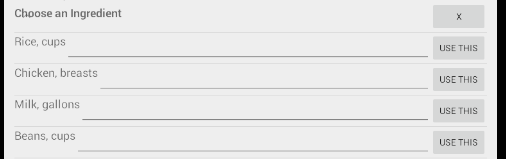
单击按钮后,请使用以下命令:

“选择一种成分”改为“米饭、杯子”或任何点击的东西。
所以,在我显示的代码中,在单击按钮之后,它应该更新父进程,然后刷新视图,而由于某些原因,我不能这样做?
这是我的代码,谢谢!
    package com.example.andrew.mypantry;

import android.content.Context;
import android.graphics.Typeface;
import android.util.Log;
import android.view.LayoutInflater;
import android.view.View;
import android.view.ViewGroup;
import android.widget.BaseExpandableListAdapter;
import android.widget.Button;
import android.widget.EditText;
import android.widget.TextView;

import org.w3c.dom.Text;

import java.util.HashMap;
import java.util.List;

/**
 * Created by andrew on 7/1/2015.
 */
public class IngExpandableListAdapter extends BaseExpandableListAdapter {

private Context context;
private List<String> listDataHeader; //header titles
//child data in format of <header title, child title>
private HashMap<String, List<String>> listDataChild;

public IngExpandableListAdapter(Context context, List<String> listDataHeader,
                                HashMap<String, List<String>> listDataChild) {
    this.context = context;
    this.listDataHeader = listDataHeader;
    this.listDataChild = listDataChild;
}

@Override
public Object getChild(int groupPosition, int childPosition) {
    return this.listDataChild.get(this.listDataHeader.get(groupPosition)).get(childPosition);
}

@Override
public long getChildId(int groupPosition, int childPosition) {
    return childPosition;
}

private void test() {


    //notifyDataSetChanged();
    //super.notifyDataSetChanged();
    //this.notifyDataSetChanged();
}
@Override
public View getChildView(final int groupPosition, final int childPosition, boolean isLastChild,
                         View convertView, ViewGroup parent) {
    final String childText = (String) getChild(groupPosition,childPosition);

    if (convertView == null) {
        LayoutInflater layoutInflater = (LayoutInflater) this.context.getSystemService(Context.LAYOUT_INFLATER_SERVICE);
        convertView = layoutInflater.inflate(R.layout.ingredient_list_item, null);
    }

    TextView txtListChild = (TextView) convertView.findViewById(R.id.ingredientContentTextView);

    txtListChild.setText(childText);

    //handle button
    Button ingredientButton = (Button)convertView.findViewById(R.id.useIngredient_button);
    ingredientButton.setOnClickListener(new View.OnClickListener() {
        @Override
        public void onClick(View v) {
            //change header to ingredient selected
            listDataHeader.set(groupPosition, childText);
            //test();
        }
    });

    return convertView;
}

@Override
public int getChildrenCount(int groupPosition) {
    return this.listDataChild.get(this.listDataHeader.get(groupPosition)).size();
}

@Override
public Object getGroup(int groupPostion) {
    return this.listDataHeader.get(groupPostion);
}

@Override
public int getGroupCount() {
    return this.listDataHeader.size();
}

@Override
public long getGroupId(int groupPosition) {
    return groupPosition;
}

@Override
public View getGroupView(int groupPosition, boolean isExpanded,
                         View convertView, ViewGroup parent) {

    String headerTitle = (String) getGroup(groupPosition);

    if(convertView == null) {
        LayoutInflater layoutInflater = (LayoutInflater) this.context.getSystemService(context.LAYOUT_INFLATER_SERVICE);
        convertView = layoutInflater.inflate(R.layout.ingredient_list_group, null);
    }

    //handle textView
    final TextView listHeader = (TextView) convertView.findViewById(R.id.ingredientGroupTextView);
    listHeader.setTypeface(null, Typeface.BOLD);
    listHeader.setText(headerTitle);

    //handle button
    Button deleteButton = (Button)convertView.findViewById(R.id.deleteButton);
    deleteButton.setOnClickListener(new View.OnClickListener() {
        @Override
        public void onClick(View v) {
            //remove item from list
            Log.d("TESTING", "item should be removed");

        }
    });


    return convertView;
}

@Override
public boolean hasStableIds() {
    return false;
}

@Override
public boolean isChildSelectable(int groupPosition, int childPosition) {
    return true;
}
}
回答 5
Stack Overflow用户
发布于 2015-07-16 05:59:22
我认为问题在于您使用的数据结构。您可以在哈希表中保存分配给父名的子列表。当父级名称在父级列表中更改时,哈希表中的老子项分配不再有效。
我建议您将SparseArray<List<String>>或List<List<String>>用于listDataChild字段。它将直接将组位置映射到儿童列表。因此,在listDataHeader中更改父级名称不会破坏数据一致性,因为组位置将保持不变。现在,您应该能够安全地使用notifyDataSetChanged()方法来更新标头。
希望这能有所帮助。
Stack Overflow用户
发布于 2015-07-16 16:04:27
正如beworker提到的,您的问题来自于使用错误的数据结构,这就是您的应用程序崩溃的原因。您正在使用头标题作为hashmap的键,当您在listDataHeader中修改标题时,修改是正确地应用于它,而不是应用于hashmap中的键对象。这意味着您的子代仍然存在于hashmap中旧的标题键下,而新的标题键以null作为其值。因此,当您调用
this.listDataChild.get(this.listDataHeader.get(groupPosition)).get(childPosition);因为
this.listDataChild.get(this.listDataHeader.get(groupPosition))返回Null
解决方案是将ArrayList用于标题标题,ArrayList>用于子标题。这两个arrayLists中的关键是您的组索引。
Stack Overflow用户
发布于 2015-07-03 18:56:43
而不是使用notifyDataSetChanged();,而是从数据来的地方创建一个接口,并实现它是您的适配器,然后更改该接口函数中父函数的值,因为getChildView()是在每个子函数更新列表视图父函数之后调用的。因为我也有同样的问题
假设您想要将数据从Adapter传输到Adapter
adapter.java
public interface data { public void dataMethod(String data); }
并在adapter中实现了该方法。
public void dataMethod(String data) { this.data = data; }
从dataMethod()调用getChildView()并更新字符串,如我所示
并在适配器中设置getViewChild方法中的数据。
https://stackoverflow.com/questions/31212466
复制相似问题
腾讯云开发者

Copyright © 2013 - 2026 Tencent Cloud. All Rights Reserved. 腾讯云 版权所有
深圳市腾讯计算机系统有限公司 ICP备案/许可证号:粤B2-20090059  粤公网安备44030502008569号
腾讯云计算(北京)有限责任公司 京ICP证150476号 | 京ICP备11018762号