
UIMenuController方法setTargetRect:inView:不在UITableView中工作
我在我的tableview中像这样显示自定义的tableview
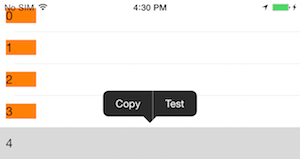
但问题是,它是显示在中心,我想显示它在label之上,这是橙色的。为了在label上显示,我在下面完成了这个[menu setTargetRect:CGRectMake(10, 10, 0, 0) inView:self.lbl];,这是整个代码。
但是,如果我显示的是没有UIMenuController的UITableView,setTargetRect可以正常工作。
为什么setTargetRect不使用UITableView
setTargetRect医生说:
(a)此目标矩形(targetRect)通常是所选内容的边界矩形。UIMenuController将编辑菜单放置在此矩形之上;如果该菜单的空间不足,则将其定位在矩形下面。菜单的指针被适当地放置在目标矩形顶部或底部的中心。 (b)请注意,如果将目标矩形的宽度或高度设为零,则UIMenuController将目标区域视为用于定位的直线或点(例如插入插入符号或单个点)。 (c)一旦设置了目标矩形,目标矩形就不会跟踪视图;如果视图移动(如滚动视图中会发生的那样),则必须相应地更新目标矩形。
我错过了什么?
MyViewController
-(NSInteger)tableView:(UITableView *)tableView numberOfRowsInSection:(NSInteger)section {
    return 5;
}

-(UITableViewCell *)tableView:(UITableView *)tableView cellForRowAtIndexPath:(NSIndexPath *)indexPath {
    TheCell *cell = [tableView dequeueReusableCellWithIdentifier:@"cid" forIndexPath:indexPath];

    cell.lbl.text = [NSString stringWithFormat:@"%ld", (long)indexPath.row];

    return cell;
}

- (BOOL)tableView:(UITableView *)tableView shouldShowMenuForRowAtIndexPath:(NSIndexPath *)indexPath {
    return YES;
}

-(BOOL)tableView:(UITableView *)tableView canPerformAction:(SEL)action forRowAtIndexPath:(NSIndexPath *)indexPath withSender:(id)sender {
    return YES;
}

- (void)tableView:(UITableView *)tableView performAction:(SEL)action forRowAtIndexPath:(NSIndexPath *)indexPath withSender:(id)sender {
    // required
}
MyCustomCell
- (void)awakeFromNib {
    // Initialization code

    UIMenuItem *testMenuItem = [[UIMenuItem alloc] initWithTitle:@"Test" action:@selector(test:)];
    UIMenuController *menu = [UIMenuController sharedMenuController];
    [menu setMenuItems: @[testMenuItem]];

    [menu setTargetRect:CGRectMake(10, 10, 0, 0) inView:self.lbl];

    [menu update];
}

- (void)setSelected:(BOOL)selected animated:(BOOL)animated {
    [super setSelected:selected animated:animated];

    // Configure the view for the selected state
}

-(BOOL) canPerformAction:(SEL)action withSender:(id)sender {
    return (action == @selector(copy:) || action == @selector(test:));
}

/// this methods will be called for the cell menu items
-(void) test: (id) sender {
    NSLog(@"test");
}

-(void) copy:(id)sender {
    UIMenuController *m = sender;
    NSLog(@"copy");
}回答 1
Stack Overflow用户
发布于 2015-07-06 10:47:08
1)首先,请在视图控制器的viewDidLoad方法中这样做。
 UIMenuItem *testMenuItem = [[UIMenuItem alloc] initWithTitle:@"Test"
    action:@selector(test:)];
[[UIMenuController sharedMenuController] setMenuItems: @[testMenuItem]];
 [[UIMenuController sharedMenuController] update];

 [[NSNotificationCenter defaultCenter] addObserver:self selector:@selector(menuControllerWillShow:) name:UIMenuControllerWillShowMenuNotification object:nil];

[[NSNotificationCenter defaultCenter] addObserver:self selector:@selector(menuControllerWillHide:) name:UIMenuControllerWillHideMenuNotification object:nil];2)然后,添加这两种方法。并将menuFrame inView设置为单元格
-(void)menuControllerWillShow:(NSNotification *)notification{
 //Remove Will Show Notification to prevent
 // "menuControllerWillShow" function to be called multiple times
 [[NSNotificationCenter defaultCenter]removeObserver:self name:UIMenuControllerWillShowMenuNotification object:nil];

//Hide the Original Menu View
UIMenuController* menuController = [UIMenuController sharedMenuController];
CGSize size = menuController.menuFrame.size;
CGRect menuFrame;
menuFrame.origin.x = self.tableView.frame.origin.x;
menuFrame.size = size;
[menuController setMenuVisible:NO animated:NO];

//Modify its target rect and show it again to prevent glitchy appearance
   [menuController setTargetRect:menuFrame inView:cell];
    [menuController setMenuVisible:YES animated:YES];
}

 -(void)menuControllerWillHide:(NSNotification *)notification{
    //re-register menuControllerWillShow
    [[NSNotificationCenter defaultCenter] addObserver:self selector:@selector(menuControllerWillShow:)
 name:UIMenuControllerWillShowMenuNotification object:nil];
 }
3)实现tableView代理并实现这些方法。
- (BOOL)tableView:(UITableView *)tableView shouldShowMenuForRowAtIndexPath:(NSIndexPath *)indexPath {
    cell = (TableViewCell*)[tableView cellForRowAtIndexPath:indexPath];

    return YES;
}
-(BOOL)tableView:(UITableView *)tableView canPerformAction:(SEL)action forRowAtIndexPath:(NSIndexPath *)indexPath withSender:(id)sender {
    return NO;
}
- (void)tableView:(UITableView *)tableView performAction:(SEL)action forRowAtIndexPath:(NSIndexPath *)indexPath withSender:(id)sender {
    // required
}
4)设置单元格(子类UITableViewCell)
 -(BOOL) canPerformAction:(SEL)action withSender:(id)sender {
    return (action == @selector(copy:) || action == @selector(test:)); } /// this methods will be called for the cell menu items
 -(void) test: (id) sender {
     NSLog(@"test"); }

 -(void) copy:(id)sender {
NSLog(@"copy"); }https://stackoverflow.com/questions/31183894
复制相似问题
腾讯云开发者

Copyright © 2013 - 2026 Tencent Cloud. All Rights Reserved. 腾讯云 版权所有
深圳市腾讯计算机系统有限公司 ICP备案/许可证号:粤B2-20090059  粤公网安备44030502008569号
腾讯云计算(北京)有限责任公司 京ICP证150476号 | 京ICP备11018762号