
如何在FinderSync系统首选项中启用macOS扩展
如何在FinderSync系统首选项中启用macOS扩展
提问于 2015-07-02 06:24:47
我正在将FinderSync扩展集成到我的可可应用程序中,以便在文件和文件夹中显示徽章。请看以下两种场景:
- 当我使用FinderSync扩展(如DemoFinderSync)运行应用程序时,请查看下面图像中的蓝色弹出,在这种情况下,扩展将添加到带有复选标记的系统首选项中,并调用主体类"FinderSync.m“。
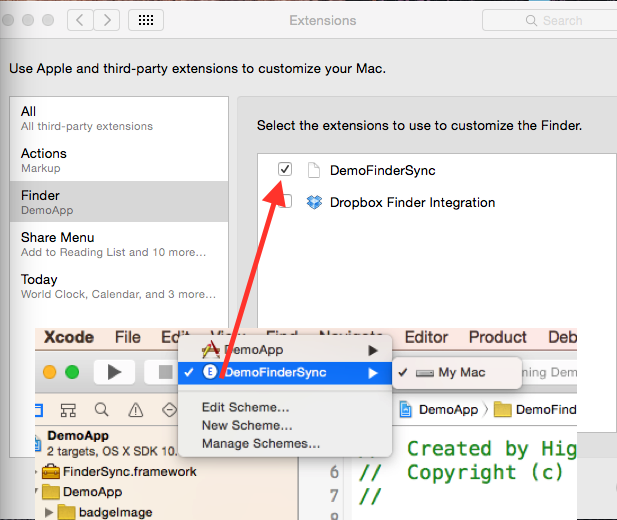
- 当我使用应用程序方案(如DemoApp)运行应用程序时,请查看下面图像中的蓝色弹出,在这种情况下,扩展将添加到系统首选项中,但没有选中标记,并且主体类"FinderSync.m“不调用,FinderSync扩展在这种情况下不起作用。
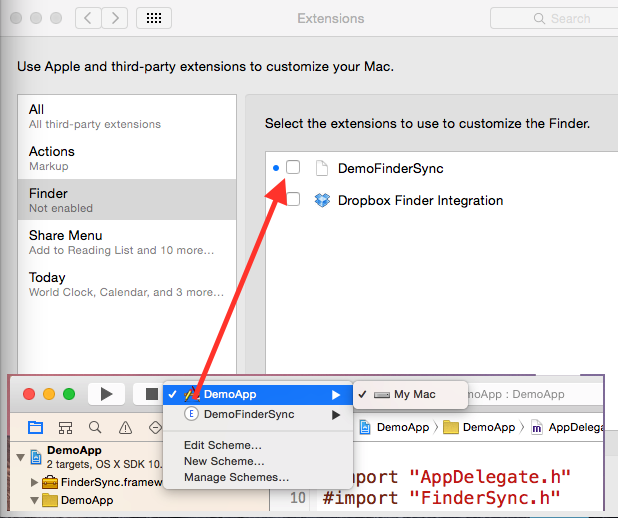
有人知道如何使用第二种方案在系统首选项中启用Finder扩展吗?
回答 2
Stack Overflow用户
回答已采纳
发布于 2015-07-07 09:50:36
我找到了解决办法:
启用扩展的代码(包ID)
system("pluginkit -e use -i YourAppBundleID")禁用扩展的代码(包ID)
system("pluginkit -e ignore -i YourAppBundleID")在我使用之前:
system("pluginkit -e use -i AppBundleID.FinderSync")所以只要去掉".FinderSync“就行了。
Stack Overflow用户
发布于 2015-07-06 22:07:03
非调试方案(#if!调试):
system("pluginkit -e use -i com.domain.my-finder-extension");在调试器下运行时,直接给出扩展的路径:
NSString *pluginPath = [[[NSBundle mainBundle] builtInPlugInsPath] stringByAppendingPathComponent:@"My Finder Extension.appex"];
NSString *pluginkitString = [NSString stringWithFormat:@"pluginkit -e use -a \"%@\"", pluginPath];
system([pluginkitString cStringUsingEncoding:NSUTF8StringEncoding]);
在applicationDidFinishLaunching方法中指定这一点。您还应该手动打开它一次,这样如果用户在系统首选项中关闭了扩展,那么应用程序启动时就不会打开它。在用户第一次启动具有finder同步扩展支持的应用程序时,我设置了一个NSUserDefaults键。
页面原文内容由Stack Overflow提供。腾讯云小微IT领域专用引擎提供翻译支持
原文链接:
https://stackoverflow.com/questions/31176942
复制相关文章
相似问题
腾讯云开发者

Copyright © 2013 - 2026 Tencent Cloud. All Rights Reserved. 腾讯云 版权所有
深圳市腾讯计算机系统有限公司 ICP备案/许可证号:粤B2-20090059  粤公网安备44030502008569号
腾讯云计算(北京)有限责任公司 京ICP证150476号 | 京ICP备11018762号