
按键列将列排序为行(具有随机长度)
按键列将列排序为行(具有随机长度)
提问于 2015-06-27 17:11:15
快乐的骄傲日复一日!
一段时间以来我一直在努力解决的一个棘手的问题。
我试图把三列排列成3到11个单元格之间的任意长度行,其中A&B列基本上是键。
我想要实现的一个简单的例子是:
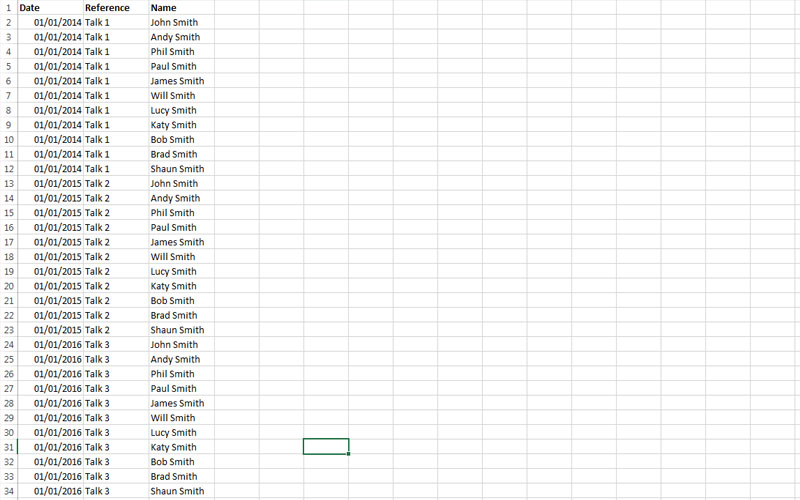
变成:
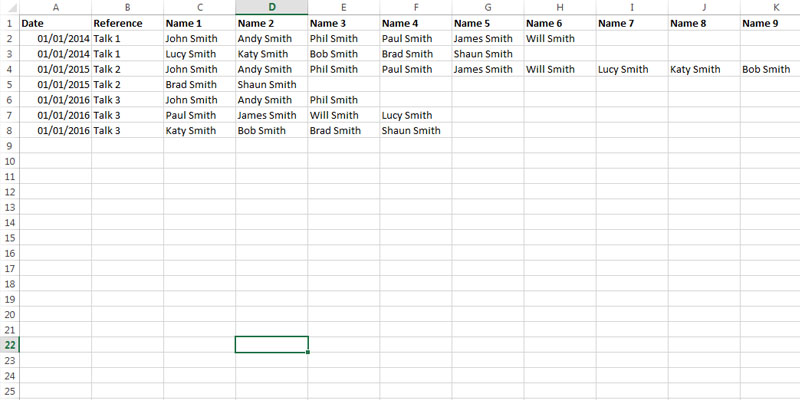
需要注意的一些关键问题是:
- 一行中的最大单元格数应为11。
- 一排细胞的数量必须是随机长度,在3-11之间不超过11 (随机化并不重要)。
- 第一列(A)和第二列(B)是键。
下面是一些代码,我一直试图修改,以尝试这一点,以及一些网站和堆栈溢出的人试图实现类似的东西,以供参考。
Sub mergeCategoryValues()
    Dim lngRow As Long

    With ActiveSheet
        Dim columnToMatch As Integer: columnToMatch = 2
        Dim columnToConcatenate As Integer: columnToConcatenate = 1

        lngRow = .Cells(65536, columnToMatch).End(xlUp).Row
        .Cells(columnToMatch).CurrentRegion.Sort key1:=.Cells(columnToMatch), Header:=xlYes

        Do
            If .Cells(lngRow, columnToMatch) = .Cells(lngRow - 1, columnToMatch) Then
                .Cells(lngRow - 1, columnToConcatenate) = .Cells(lngRow - 1, columnToConcatenate) & "; " & .Cells(lngRow, columnToConcatenate)
            .Rows(lngRow).Delete
            End If

            lngRow = lngRow - 1
        Loop Until lngRow = 1
    End With
End Sub
参考文献:
回答 1
Stack Overflow用户
回答已采纳
发布于 2015-06-27 18:10:36
我可能会把它作为一个2步的过程来处理,而不是试图重新安排工作表。首先将所有数据收集到适当的结构中,然后清除工作表并将结果写回给它。
对于数据收集,“集合字典”是一个很好的方法,因为它将允许您根据两个列键收集数据。由于您不知道需要存储多少值,因此Collection是一个很好的容器(尽管字符串数组也能工作)。数据收集功能如下所示:
Private Function GatherData(sheet As Worksheet) As Scripting.Dictionary
    Dim results As New Scripting.Dictionary
    With sheet
        Dim key As String
        Dim currentRow As Long
        For currentRow = 2 To .Cells(.Rows.Count, 2).End(xlUp).Row
            key = .Cells(currentRow, 1) & "|" & .Cells(currentRow, 2)
            If Not results.Exists(key) Then results.Add key, New Collection
            results(key).Add .Cells(currentRow, 3).Value
        Next currentRow
    End With
    Set GatherData = results
End Function
您需要添加对Microsoft脚本运行时的引用。还请注意,这不需要对输入进行排序。
一旦您有了数据,写出它是相当容易的。只需迭代键并根据需要的任何参数编写集合:
Private Sub WriteResults(sheet As Worksheet, data As Scripting.Dictionary)
    Dim currentRow As Long
    Dim currentCol As Long
    Dim index As Long
    Dim key As Variant
    Dim id() As String
    Dim values As Collection

    currentRow = 2
    For Each key In data.Keys
        id = Split(key, "|")
        Set values = data(key)
        currentCol = 3
        With sheet
            .Cells(currentRow, 1) = id(0)
            .Cells(currentRow, 2) = id(1)
            For index = 1 To values.Count
                .Cells(currentRow, currentCol) = values(index)
                currentCol = currentCol + 1
                If currentCol > 11 And index < values.Count Then
                    currentRow = currentRow + 1
                    currentCol = 3
                    .Cells(currentRow, 1) = id(0)
                    .Cells(currentRow, 2) = id(1)
                End If
            Next index
            currentRow = currentRow + 1
        End With
    Next key
End Sub
请注意,如果每个行的名称或数字超过9,这不会随机化,但是将内部循环提取到另一个Sub中是相当容易的。
把这一切像这样组合在一起:
Sub mergeCategoryValues()
    Dim target As Worksheet
    Dim data As Scripting.Dictionary

    Set target = ActiveSheet
    Set data = GatherData(target)
    target.UsedRange.ClearContents
    WriteResults target, data
End Sub页面原文内容由Stack Overflow提供。腾讯云小微IT领域专用引擎提供翻译支持
原文链接:
https://stackoverflow.com/questions/31091343
复制相关文章
相似问题
腾讯云开发者

Copyright © 2013 - 2026 Tencent Cloud. All Rights Reserved. 腾讯云 版权所有
深圳市腾讯计算机系统有限公司 ICP备案/许可证号:粤B2-20090059  粤公网安备44030502008569号
腾讯云计算(北京)有限责任公司 京ICP证150476号 | 京ICP备11018762号