
如何通过HtmlTableRow显示以前隐藏的jQuery?
我有一个四行的HtmlTable。前两行(“列标题”行和常规数据行)始终显示。如果用户选择一个"+“按钮,则应该添加另一个按钮,然后再添加一个按钮(最多四行)。
两个“休眠”行是在C#中创建的,但最初是通过将其高度设置为0来“隐藏”的(无论如何,这就是目的):
boxIndex2 = new TextBox()
{
    CssClass = "finaff-webform-field-input",
    Width = TEXTBOX_WIDTH,
    Height = 0,
    ID = "boxIndex2foapalrow3"
};
cellColIndex2.Controls.Add(boxIndex2);
注意:这只是HtmlTableRow中六个“文本框”中的一个;它们的高度都设置为0。
这部分起作用:
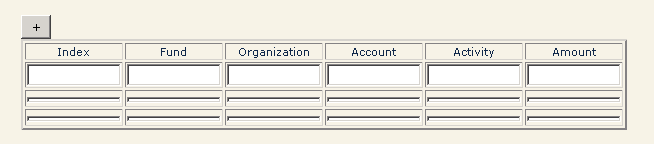
正如您所看到的,第三行和第四行是短的,但不是不可见的/隐藏的。单击"+“按钮可以使它们达到完全高度:
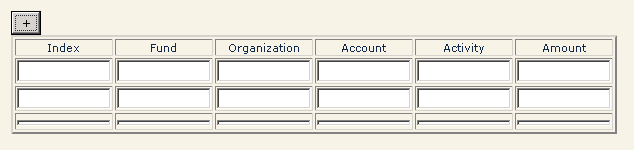
...and再次选择"+“按钮”充气“最后一个缩略行:
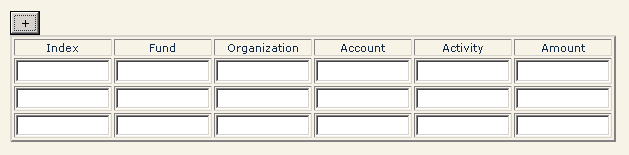
我为此使用的jQuery是:
$(document).on("click", '[id$=btnAddFoapalRow]', function (e) {
    var textboxHeight = 15;
    if ($('[id$=boxIndex2foapalrow3]').height() === 0) {
        $('[id$=boxIndex2foapalrow3').height(textboxHeight);
        $('[id$=boxFund2foapalrow3').height(textboxHeight);
        $('[id$=boxOrg2foapalrow3').height(textboxHeight);
        $('[id$=boxAccount2foapalrow3').height(textboxHeight);
        $('[id$=boxActivity2foapalrow3').height(textboxHeight);
        $('[id$=boxAmount2foapalrow3').height(textboxHeight);
    }
    else if ($('[id$=boxIndex3foapalrow4]').height() === 0) {
        $('[id$=boxIndex3foapalrow4').height(textboxHeight);
        $('[id$=boxFund3foapalrow4').height(textboxHeight);
        $('[id$=boxOrg3foapalrow4').height(textboxHeight);
        $('[id$=boxAccount3foapalrow4').height(textboxHeight);
        $('[id$=boxActivity3foapalrow4').height(textboxHeight);
        $('[id$=boxAmount3foapalrow4').height(textboxHeight);
    }
});
那么,在选择"add a row“("+")按钮之前,如何使这些行完全不显示呢?
我已经尝试了我所能想到的一切,让Web部件上的两行“开始生活”不可见,然后以编程方式将它们可视化。
我试过:
将它们的可见属性设置为false (C#代码隐藏),然后使用各种客户端/jQuery代码来显示它们。我尝试了以下jQuery (JavaScript?)方法:
.toggle()
.show()
.slidedown()
...like so:
/* This is supposed to make the rows visible, but is not yet working... */
$(document).on("click", '[id$=btnAddFoapalRow]', function (e) {
    if ($('[id$=foapalrow3]').not(":visible")) {
        alert('reached the foapalrow3 not visible branch');
        //$('[id$=foapalrow3]').slideDown();
        //$('[id$=foapalrow3]').toggle();
        $('[id$=foapalrow3]').show();
    }
    else if ($('[id$=foapalrow4]').not(":visible")) {
        alert('reached the foapalrow4 not visible branch');
        $('[id$=foapalrow4]').slideDown();
    }
});
...but这些都不起作用。我在上面的代码中看到了“到达foapalrow3不可见分支”警报。
那么,我是否需要走一条完全不同的路径,例如使这些单独的一行表,并使这些表可见?也就是说,单击"+“按钮使具有第二数据行(第三行总体)的表可见,单击该按钮再次使第三数据行(第四行)可见?或者怎么做?
更新
在jmoreno的请求/建议下,这里是HTML,如“查看源”所示:
<button id="ctl00_ctl24_g_5f3fedca_19f7_4bc3_b84e_efbef0c48a33_ctl00_btnAddFoapalRow" type="button">+</button>
    <table border="2">
        <tr>
            <td width="88px" style="text-align:center;"><span class="dplatypus-webform-field-label">Index</span></td>
            <td width="88px" style="text-align:center;"><span class="dplatypus-webform-field-label" style="text-align:center;">Fund</span></td>
            <td width="88px" style="text-align:center;"><span class="dplatypus-webform-field-label" style="text-align:center;">Organization</span></td>
            <td width="88px" style="text-align:center;"><span class="dplatypus-webform-field-label" style="text-align:center;">Account</span></td>
            <td width="88px" style="text-align:center;"><span class="dplatypus-webform-field-label" style="text-align:center;">Activity</span></td>
            <td width="88px" style="text-align:center;"><span class="dplatypus-webform-field-label" style="text-align:center;">Amount</span></td>
        </tr>
        <tr>
            <td width="88px"><input name="ctl00$ctl24$g_5f3fedca_19f7_4bc3_b84e_efbef0c48a33$ctl00$ctl130" type="text" class="dplatypus-webform-field-input" style="width:88px;" /></td>
            <td width="88px"><input name="ctl00$ctl24$g_5f3fedca_19f7_4bc3_b84e_efbef0c48a33$ctl00$ctl132" type="text" class="dplatypus-webform-field-input" style="width:88px;" /></td>
            <td width="88px"><input name="ctl00$ctl24$g_5f3fedca_19f7_4bc3_b84e_efbef0c48a33$ctl00$ctl134" type="text" class="dplatypus-webform-field-input" style="width:88px;" /></td>
            <td width="88px"><input name="ctl00$ctl24$g_5f3fedca_19f7_4bc3_b84e_efbef0c48a33$ctl00$ctl136" type="text" class="dplatypus-webform-field-input" style="width:88px;" /></td>
            <td width="88px"><input name="ctl00$ctl24$g_5f3fedca_19f7_4bc3_b84e_efbef0c48a33$ctl00$ctl138" type="text" class="dplatypus-webform-field-input" style="width:88px;" /></td>
            <td width="88px"><input name="ctl00$ctl24$g_5f3fedca_19f7_4bc3_b84e_efbef0c48a33$ctl00$ctl140" type="text" class="dplatypus-webform-field-input" style="width:88px;" /></td>
        </tr>
        <tr id="ctl00_ctl24_g_5f3fedca_19f7_4bc3_b84e_efbef0c48a33_ctl00_foapalrow3">
            <td width="88px"><input name="ctl00$ctl24$g_5f3fedca_19f7_4bc3_b84e_efbef0c48a33$ctl00$boxIndex2foapalrow3" type="text" id="ctl00_ctl24_g_5f3fedca_19f7_4bc3_b84e_efbef0c48a33_ctl00_boxIndex2foapalrow3" class="dplatypus-webform-field-input" style="height:0px;width:88px;" /></td>
            <td width="88px"><input name="ctl00$ctl24$g_5f3fedca_19f7_4bc3_b84e_efbef0c48a33$ctl00$boxFund2foapalrow3" type="text" id="ctl00_ctl24_g_5f3fedca_19f7_4bc3_b84e_efbef0c48a33_ctl00_boxFund2foapalrow3" class="dplatypus-webform-field-input" style="height:0px;width:88px;" /></td>
             <td width="88px"><input name="ctl00$ctl24$g_5f3fedca_19f7_4bc3_b84e_efbef0c48a33$ctl00$boxOrg2foapalrow3" type="text" id="ctl00_ctl24_g_5f3fedca_19f7_4bc3_b84e_efbef0c48a33_ctl00_boxOrg2foapalrow3" class="dplatypus-webform-field-input" style="height:0px;width:88px;" /></td>
             <td width="88px"><input name="ctl00$ctl24$g_5f3fedca_19f7_4bc3_b84e_efbef0c48a33$ctl00$boxAccount2foapalrow3" type="text" id="ctl00_ctl24_g_5f3fedca_19f7_4bc3_b84e_efbef0c48a33_ctl00_boxAccount2foapalrow3" class="dplatypus-webform-field-input" style="height:0px;width:88px;" /></td>
             <td width="88px"><input name="ctl00$ctl24$g_5f3fedca_19f7_4bc3_b84e_efbef0c48a33$ctl00$boxActivity2foapalrow3" type="text" id="ctl00_ctl24_g_5f3fedca_19f7_4bc3_b84e_efbef0c48a33_ctl00_boxActivity2foapalrow3" class="dplatypus-webform-field-input" style="height:0px;width:88px;" /></td>
            <td width="88px"><input name="ctl00$ctl24$g_5f3fedca_19f7_4bc3_b84e_efbef0c48a33$ctl00$boxAmount2foapalrow3" type="text" id="ctl00_ctl24_g_5f3fedca_19f7_4bc3_b84e_efbef0c48a33_ctl00_boxAmount2foapalrow3" class="dplatypus-webform-field-input" style="height:0px;width:88px;" /></td>
        </tr>
        <tr id="ctl00_ctl24_g_5f3fedca_19f7_4bc3_b84e_efbef0c48a33_ctl00_foapalrow4">
            <td width="88px"><input name="ctl00$ctl24$g_5f3fedca_19f7_4bc3_b84e_efbef0c48a33$ctl00$boxIndex3foapalrow4" type="text" id="ctl00_ctl24_g_5f3fedca_19f7_4bc3_b84e_efbef0c48a33_ctl00_boxIndex3foapalrow4" class="dplatypus-webform-field-input" style="height:0px;width:88px;" /></td>
            <td width="88px"><input name="ctl00$ctl24$g_5f3fedca_19f7_4bc3_b84e_efbef0c48a33$ctl00$boxFund3foapalrow4" type="text" id="ctl00_ctl24_g_5f3fedca_19f7_4bc3_b84e_efbef0c48a33_ctl00_boxFund3foapalrow4" class="dplatypus-webform-field-input" style="height:0px;width:88px;" /></td>
            <td width="88px"><input name="ctl00$ctl24$g_5f3fedca_19f7_4bc3_b84e_efbef0c48a33$ctl00$boxOrg3foapalrow4" type="text" id="ctl00_ctl24_g_5f3fedca_19f7_4bc3_b84e_efbef0c48a33_ctl00_boxOrg3foapalrow4" class="dplatypus-webform-field-input" style="height:0px;width:88px;" /></td>
            <td width="88px"><input name="ctl00$ctl24$g_5f3fedca_19f7_4bc3_b84e_efbef0c48a33$ctl00$boxAccount3foapalrow4" type="text" id="ctl00_ctl24_g_5f3fedca_19f7_4bc3_b84e_efbef0c48a33_ctl00_boxAccount3foapalrow4" class="dplatypus-webform-field-input" style="height:0px;width:88px;" /></td>
            <td width="88px"><input name="ctl00$ctl24$g_5f3fedca_19f7_4bc3_b84e_efbef0c48a33$ctl00$boxActivity3foapalrow4" type="text" id="ctl00_ctl24_g_5f3fedca_19f7_4bc3_b84e_efbef0c48a33_ctl00_boxActivity3foapalrow4" class="dplatypus-webform-field-input" style="height:0px;width:88px;" /></td>
            <td width="88px"><input name="ctl00$ctl24$g_5f3fedca_19f7_4bc3_b84e_efbef0c48a33$ctl00$boxAmount3foapalrow4" type="text" id="ctl00_ctl24_g_5f3fedca_19f7_4bc3_b84e_efbef0c48a33_ctl00_boxAmount3foapalrow4" class="dplatypus-webform-field-input" style="height:0px;width:88px;" /></td>
        </tr>
    </table>
...and是如何在服务器端C#中创建的所有内容( HtmlTable及其行、单元格和内容):
private void GenerateSection5()
{
    HtmlTable tblSection5 = null;

    var headerLabel = new Label
    {
        CssClass = "dplatypus-webform-field-label",
        Text = "<h2>FOAPAL / Payment Amount Information</h2>"
    };
    this.Controls.Add(headerLabel);

    AddVerticalSpace();

    tblSection5 = GetSection5Table();
    if (null != tblSection5)
    {
        this.Controls.Add(tblSection5);
    }

    AddVerticalSpace();
    var totalLabel = new Label
    {
        CssClass = "dplatypus-webform-field-label",
        Text = "Total: "
    };
    this.Controls.Add(totalLabel);
    boxSection5Total = new TextBox()
    {
        CssClass = "dplatypus-webform-field-input"
    };
    this.Controls.Add(boxSection5Total);

    AddVerticalSpace();
}

private HtmlTable GetSection5Table()
{
    const int TEXTBOX_WIDTH = 88;
    const String CELL_WIDTH = "88px";
    foapalHTMLTable = new HtmlTable();
    foapalHTMLTable.Border = 2;

    // Create Row 1
    var row1 = new HtmlTableRow();

    var cellColTitle1 = new HtmlTableCell();
    cellColTitle1.Width = CELL_WIDTH;
    cellColTitle1.Style.Add("text-align", "center");
    row1.Cells.Add(cellColTitle1);
    var cellColTitle2 = new HtmlTableCell();
    cellColTitle2.Width = CELL_WIDTH;
    cellColTitle2.Style.Add("text-align", "center");
    row1.Cells.Add(cellColTitle2);
    var cellColTitle3 = new HtmlTableCell();
    cellColTitle3.Width = CELL_WIDTH;
    cellColTitle3.Style.Add("text-align", "center");
    row1.Cells.Add(cellColTitle3);
    var cellColTitle4 = new HtmlTableCell();
    cellColTitle4.Width = CELL_WIDTH;
    cellColTitle4.Style.Add("text-align", "center");
    row1.Cells.Add(cellColTitle4);
    var cellColTitle5 = new HtmlTableCell();
    cellColTitle5.Width = CELL_WIDTH;
    cellColTitle5.Style.Add("text-align", "center");
    row1.Cells.Add(cellColTitle5);
    var cellColTitle6 = new HtmlTableCell();
    cellColTitle6.Width = CELL_WIDTH;
    cellColTitle6.Style.Add("text-align", "center");
    row1.Cells.Add(cellColTitle6);

    var indexStr = new Label
    {
        CssClass = "dplatypus-webform-field-label",
        Text = "Index"
    };
    cellColTitle1.Controls.Add(indexStr);
    var fundStr = new Label
    {
        CssClass = "dplatypus-webform-field-label",
        Text = "Fund"
    };
    fundStr.Style.Add("text-align", "center");
    cellColTitle2.Controls.Add(fundStr);
    var orgStr = new Label
    {
        CssClass = "dplatypus-webform-field-label",
        Text = "Organization"
    };
    orgStr.Style.Add("text-align", "center");
    cellColTitle3.Controls.Add(orgStr);
    var accountStr = new Label
    {
        CssClass = "dplatypus-webform-field-label",
        Text = "Account"
    };
    accountStr.Style.Add("text-align", "center");
    cellColTitle4.Controls.Add(accountStr);
    var activityStr = new Label
    {
        CssClass = "dplatypus-webform-field-label",
        Text = "Activity"
    };
    activityStr.Style.Add("text-align", "center");
    cellColTitle5.Controls.Add(activityStr);
    var amountStr = new Label
    {
        CssClass = "dplatypus-webform-field-label",
        Text = "Amount"
    };
    amountStr.Style.Add("text-align", "center");
    cellColTitle6.Controls.Add(amountStr);
    foapalHTMLTable.Rows.Add(row1);

    btnAddFoapalRow = new HtmlButton();
    btnAddFoapalRow.Attributes["type"] = "button";
    btnAddFoapalRow.InnerHtml = "+";
    btnAddFoapalRow.ID = "btnAddFoapalRow";
    this.Controls.Add(btnAddFoapalRow);

    // Create row 2
    foapalrow2 = new HtmlTableRow();

    var cellColIndex1 = new HtmlTableCell();
    cellColIndex1.Width = CELL_WIDTH;
    foapalrow2.Cells.Add(cellColIndex1);
    var cellColFund1 = new HtmlTableCell();
    cellColFund1.Width = CELL_WIDTH;
    foapalrow2.Cells.Add(cellColFund1);
    var cellColOrg1 = new HtmlTableCell();
    cellColOrg1.Width = CELL_WIDTH;
    foapalrow2.Cells.Add(cellColOrg1);
    var cellColAccount1 = new HtmlTableCell();
    cellColAccount1.Width = CELL_WIDTH;
    foapalrow2.Cells.Add(cellColAccount1);
    var cellColActivity1 = new HtmlTableCell();
    cellColActivity1.Width = CELL_WIDTH;
    foapalrow2.Cells.Add(cellColActivity1);
    var cellColAmount1 = new HtmlTableCell();
    cellColAmount1.Width = CELL_WIDTH;
    foapalrow2.Cells.Add(cellColAmount1);

    boxIndex1 = new TextBox()
    {
        CssClass = "dplatypus-webform-field-input",
        Width = TEXTBOX_WIDTH
    };
    cellColIndex1.Controls.Add(boxIndex1);
    boxFund1 = new TextBox()
    {
        CssClass = "dplatypus-webform-field-input",
        Width = TEXTBOX_WIDTH
    };
    cellColFund1.Controls.Add(boxFund1);
    boxOrganization1 = new TextBox()
    {
        CssClass = "dplatypus-webform-field-input",
        Width = TEXTBOX_WIDTH
    };
    cellColOrg1.Controls.Add(boxOrganization1);
    boxAccount1 = new TextBox()
    {
        CssClass = "dplatypus-webform-field-input",
        Width = TEXTBOX_WIDTH
    };
    cellColAccount1.Controls.Add(boxAccount1);
    boxActivity1 = new TextBox()
    {
        CssClass = "dplatypus-webform-field-input",
        Width = TEXTBOX_WIDTH
    };
    cellColActivity1.Controls.Add(boxActivity1);
    boxAmount1 = new TextBox()
    {
        CssClass = "dplatypus-webform-field-input",
        Width = TEXTBOX_WIDTH
    };
    cellColAmount1.Controls.Add(boxAmount1);

    foapalHTMLTable.Rows.Add(foapalrow2);

    // Row 3
    foapalrow3 = new HtmlTableRow();
    foapalrow3.ID = "foapalrow3";

    var cellColIndex2 = new HtmlTableCell();
    cellColIndex2.Width = CELL_WIDTH;
    foapalrow3.Cells.Add(cellColIndex2);
    var cellColFund2 = new HtmlTableCell();
    cellColFund2.Width = CELL_WIDTH;
    foapalrow3.Cells.Add(cellColFund2);
    var cellColOrg2 = new HtmlTableCell();
    cellColOrg2.Width = CELL_WIDTH;
    foapalrow3.Cells.Add(cellColOrg2);
    var cellColAccount2 = new HtmlTableCell();
    cellColAccount2.Width = CELL_WIDTH;
    foapalrow3.Cells.Add(cellColAccount2);
    var cellColActivity2 = new HtmlTableCell();
    cellColActivity2.Width = CELL_WIDTH;
    foapalrow3.Cells.Add(cellColActivity2);
    var cellColAmount2 = new HtmlTableCell();
    cellColAmount2.Width = CELL_WIDTH;
    foapalrow3.Cells.Add(cellColAmount2);

    boxIndex2 = new TextBox()
    {
        CssClass = "dplatypus-webform-field-input",
        Width = TEXTBOX_WIDTH,
        Height = 0,
        ID = "boxIndex2foapalrow3"
    };
    cellColIndex2.Controls.Add(boxIndex2);

    boxFund2 = new TextBox()
    {
        CssClass = "dplatypus-webform-field-input",
        Width = TEXTBOX_WIDTH,
        Height = 0,
        ID = "boxFund2foapalrow3"
    };
    cellColFund2.Controls.Add(boxFund2);

    boxOrganization2 = new TextBox()
    {
        CssClass = "dplatypus-webform-field-input",
        Width = TEXTBOX_WIDTH,
        Height = 0,
        ID = "boxOrg2foapalrow3"
    };
    cellColOrg2.Controls.Add(boxOrganization2);

    boxAccount2 = new TextBox()
    {
        CssClass = "dplatypus-webform-field-input",
        Width = TEXTBOX_WIDTH,
        Height = 0,
        ID = "boxAccount2foapalrow3"
    };
    cellColAccount2.Controls.Add(boxAccount2);

    boxActivity2 = new TextBox()
    {
        CssClass = "dplatypus-webform-field-input",
        Width = TEXTBOX_WIDTH,
        Height = 0,
        //Visible = false, <= this does work
        ID = "boxActivity2foapalrow3"
    };
    cellColActivity2.Controls.Add(boxActivity2);

    boxAmount2 = new TextBox()
    {
        CssClass = "dplatypus-webform-field-input",
        Width = TEXTBOX_WIDTH,
        Height = 0,
        ID = "boxAmount2foapalrow3"
    };
    cellColAmount2.Controls.Add(boxAmount2);
    foapalHTMLTable.Rows.Add(foapalrow3);

    // Row 4
    foapalrow4 = new HtmlTableRow();
    foapalrow4.ID = "foapalrow4";

    var cellColIndex3 = new HtmlTableCell();
    cellColIndex3.Width = CELL_WIDTH;
    foapalrow4.Cells.Add(cellColIndex3);
    var cellColFund3 = new HtmlTableCell();
    cellColFund3.Width = CELL_WIDTH;
    foapalrow4.Cells.Add(cellColFund3);
    var cellColOrg3 = new HtmlTableCell();
    cellColOrg3.Width = CELL_WIDTH;
    foapalrow4.Cells.Add(cellColOrg3);
    var cellColAccount3 = new HtmlTableCell();
    cellColAccount3.Width = CELL_WIDTH;
    foapalrow4.Cells.Add(cellColAccount3);
    var cellColActivity3 = new HtmlTableCell();
    cellColActivity3.Width = CELL_WIDTH;
    foapalrow4.Cells.Add(cellColActivity3);
    var cellColAmount3 = new HtmlTableCell();
    cellColAmount3.Width = CELL_WIDTH;
    foapalrow4.Cells.Add(cellColAmount3);

    boxIndex3 = new TextBox()
    {
        CssClass = "dplatypus-webform-field-input",
        Height = 0,
        Width = TEXTBOX_WIDTH,
        ID = "boxIndex3foapalrow4"
    };
    cellColIndex3.Controls.Add(boxIndex3);

    boxFund3 = new TextBox()
    {
        CssClass = "dplatypus-webform-field-input",
        Width = TEXTBOX_WIDTH,
        Height = 0,
        ID = "boxFund3foapalrow4"
    };
    cellColFund3.Controls.Add(boxFund3);

    boxOrganization3 = new TextBox()
    {
        CssClass = "dplatypus-webform-field-input",
        Width = TEXTBOX_WIDTH,
        Height = 0,
        ID = "boxOrg3foapalrow4"
    };
    cellColOrg3.Controls.Add(boxOrganization3);

    boxAccount3 = new TextBox()
    {
        CssClass = "dplatypus-webform-field-input",
        Width = TEXTBOX_WIDTH,
        Height = 0,
        ID = "boxAccount3foapalrow4"
    };
    cellColAccount3.Controls.Add(boxAccount3);

    boxActivity3 = new TextBox()
    {
        CssClass = "dplatypus-webform-field-input",
        Width = TEXTBOX_WIDTH,
        Height = 0,
        ID = "boxActivity3foapalrow4"
    };
    cellColActivity3.Controls.Add(boxActivity3);

    boxAmount3 = new TextBox()
    {
        CssClass = "dplatypus-webform-field-input",
        Width = TEXTBOX_WIDTH,
        Height = 0,
        ID = "boxAmount3foapalrow4"
    };
    cellColAmount3.Controls.Add(boxAmount3);

    foapalHTMLTable.Rows.Add(foapalrow4);

    // Add more rows if necessary (up to 6, if that's the limit? Or create a method that will add another one, no matter how many are required)

    return foapalHTMLTable;
}
更新2
@Jon :正如我在您运行的示例中所看到的,您的代码确实有效。然而,我对它的执行仍然不起作用。我将此代码添加到项目的*.ascx文件中。
CSS
<style>
/* Hide the FOAPAL rows */
.inputTable tr:nth-child(n + 3) {display:none;}
/* Standardize input width */
.inputTable input[type="text"] {width: 88px;}
</style>
jQuery
$(".expander").click(function () {
    alert("expander click entered - remove this alert after seeing it");
    $('.inputTable').find('tr:hidden:first').show();
});
但是,单击按钮时没有看到警报,尽管我将类(“扩展器”)添加到"+“按钮中,如下所示:
C#
btnAddFoapalRow = new HtmlButton();
btnAddFoapalRow.Attributes["type"] = "button";
btnAddFoapalRow.InnerHtml = "+";
btnAddFoapalRow.ID = "btnAddFoapalRow";
btnAddFoapalRow.Attributes["class"] = "expander"; // <= This is how to do it, right?
所以,我补充说:
$(document).on("click", '[id$=btnAddFoapalRow]', function (e) {
    alert("btnAddFoapalRow click entered - remove this alert after seeing it");
    $('.inputTable').find('tr:hidden:first').show();
});
...and将最后两行(第3行和第4行)设置为不可见,如下所示:
foapalrow3.Visible = false;
. . .
foapalrow4.Visible = false;
...but,虽然我现在开始只看到一行,但是当混合"+“按钮时,附加的行没有展开/添加/可视化;是否需要将属性”显示“设置为"none",或者??
注意:我已经将表设置为使用"inputTable“类,如下所示:
foapalHTMLTable = new HtmlTable();
foapalHTMLTable.Attributes["class"] = "inputTable";
两个类都出现在呈现的HTML (“查看源”)中,如下所示:
<button id="ctl00_ctl24_g_5f3fedca_19f7_4bc3_b84e_efbef0c48a33_ctl00_btnAddFoapalRow" type="button" class="expander">
+</button><table border="2" class="inputTable">
...so我不知道问题出在哪里。应该可见的最后一行(第二行)的Textboxes如下所示:
boxAmount1 = new TextBox()
{
    CssClass = "dplatypus-webform-field-input",
    Width = TEXTBOX_WIDTH
};
cellColAmount1.Controls.Add(boxAmount1);
表示为“不可见的”的...whereas是这样的(将高度设置为0,这只是部分工作):
boxIndex2 = new TextBox()
{
    CssClass = "dplatypus-webform-field-input",
    Width = TEXTBOX_WIDTH,
    Height = 0,
    ID = "boxIndex2foapalrow3"
};
cellColIndex2.Controls.Add(boxIndex2);
表的呈现HTML属于以下类:
<table border="2" class="inputTable">
                        <tr>
                            <td width="88px" style="text-align:center;"><span class="dplatypus-webform-field-label">Index</span></td>
                            <td width="88px" style="text-align:center;"><span class="dplatypus-
webform-field-label" style="text-align:center;">Fund</span></td>
更新3
试图以这种方式纠正问题:
//foapalrow3.Visible = false;
foapalrow3.Attributes["display"] = "none";
. . .
//foapalrow4.Visible = false;
foapalrow4.Attributes["display"] = "none";
...also不起作用(这让我回到了表的原始外观--前两行正常,最后两行可见,但“高度挑战”)。
更新4
我甚至试过这个:
(a)在表中添加一个ID:
foapalHTMLTable.ID = "foapalhtmltable";(b)当"+“按钮被捣碎时,找到桌子并对其采取行动:
$(document).on("click", '[id$=btnAddFoapalRow]', function (e) {
    alert("btnAddFoapalRow click entered - remove this alert after seeing it");
    //$('.inputTable').find('tr:hidden:first').show();
    $('[id$=foapalhtmltable]').find('tr:hidden:first').show();
});
...but,唉!尽管我大概是这样隐藏着行的:
foapalrow3.Attributes["display"] = "none";
foapalrow4.Attributes["display"] = "none";.(如前所述),它仍然不起作用。我需要“边界崩溃”(请参阅o.k.w的答案夏尔)吗?
更新5
我确实注意到,在"foapalrow3“或"foapalrow4”的“查看源”中没有"display:none“--当我用如下代码设置它时,为什么Heckle和Jeckle没有:
foapalrow3.Attributes["display"] = "none";
foapalrow4.Attributes["display"] = "none";回答 4
Stack Overflow用户
发布于 2015-07-08 04:23:37
你可以做所有的客户端。构建整个服务器端的表,不要做任何花哨的事情。
使用CSS隐藏除前2行之外的所有内容:
.inputTable tr:nth-child(n + 3) {display:none;} 现在使用jQuery来显示第一个隐藏行(我已经将click作为一种习惯,可以随意使用on):
$(".expander").click(function(){
    $('.inputTable').find('tr:hidden:first').slideDown();
});注意,我已经给按钮一个类expander和表一个类的inputTable
使用html的示例:
$(".expander").click(function(){
    $('.inputTable').find('tr:hidden:first').show();
});/* Hide the rows */
.inputTable tr:nth-child(n + 3) {display:none;}
/* Standardize input width */
.inputTable input[type="text"] {width: 88px;}<script src="https://ajax.googleapis.com/ajax/libs/jquery/1.11.1/jquery.min.js"></script>
<button id="ctl00_ctl24_g_5f3fedca_19f7_4bc3_b84e_efbef0c48a33_ctl00_btnAddFoapalRow" type="button" class="expander">+</button>
<table border="2" class="inputTable">
<tr>
<td width="88px" style="text-align:center;"><span class="dplatypus-webform-field-label">Index</span></td>
<td width="88px" style="text-align:center;"><span class="dplatypus-webform-field-label" style="text-align:center;">Fund</span></td>
<td width="88px" style="text-align:center;"><span class="dplatypus-webform-field-label" style="text-align:center;">Organization</span></td>
<td width="88px" style="text-align:center;"><span class="dplatypus-webform-field-label" style="text-align:center;">Account</span></td>
<td width="88px" style="text-align:center;"><span class="dplatypus-webform-field-label" style="text-align:center;">Activity</span></td>
<td width="88px" style="text-align:center;"><span class="dplatypus-webform-field-label" style="text-align:center;">Amount</span></td>
</tr>
<tr>
<td width="88px"><input name="ctl00$ctl24$g_5f3fedca_19f7_4bc3_b84e_efbef0c48a33$ctl00$ctl130" type="text" class="dplatypus-webform-field-input" style="width:88px;" /></td>
<td width="88px"><input name="ctl00$ctl24$g_5f3fedca_19f7_4bc3_b84e_efbef0c48a33$ctl00$ctl132" type="text" class="dplatypus-webform-field-input" style="width:88px;" /></td>
<td width="88px"><input name="ctl00$ctl24$g_5f3fedca_19f7_4bc3_b84e_efbef0c48a33$ctl00$ctl134" type="text" class="dplatypus-webform-field-input" style="width:88px;" /></td>
<td width="88px"><input name="ctl00$ctl24$g_5f3fedca_19f7_4bc3_b84e_efbef0c48a33$ctl00$ctl136" type="text" class="dplatypus-webform-field-input" style="width:88px;" /></td>
<td width="88px"><input name="ctl00$ctl24$g_5f3fedca_19f7_4bc3_b84e_efbef0c48a33$ctl00$ctl138" type="text" class="dplatypus-webform-field-input" style="width:88px;" /></td>
<td width="88px"><input name="ctl00$ctl24$g_5f3fedca_19f7_4bc3_b84e_efbef0c48a33$ctl00$ctl140" type="text" class="dplatypus-webform-field-input" style="width:88px;" /></td>
</tr>
<tr id="ctl00_ctl24_g_5f3fedca_19f7_4bc3_b84e_efbef0c48a33_ctl00_foapalrow3">
<td width="88px"><input name="ctl00$ctl24$g_5f3fedca_19f7_4bc3_b84e_efbef0c48a33$ctl00$boxIndex2foapalrow3" type="text" id="ctl00_ctl24_g_5f3fedca_19f7_4bc3_b84e_efbef0c48a33_ctl00_boxIndex2foapalrow3" class="dplatypus-webform-field-input" /></td>
<td width="88px"><input name="ctl00$ctl24$g_5f3fedca_19f7_4bc3_b84e_efbef0c48a33$ctl00$boxFund2foapalrow3" type="text" id="ctl00_ctl24_g_5f3fedca_19f7_4bc3_b84e_efbef0c48a33_ctl00_boxFund2foapalrow3" class="dplatypus-webform-field-input" /></td>
<td width="88px"><input name="ctl00$ctl24$g_5f3fedca_19f7_4bc3_b84e_efbef0c48a33$ctl00$boxOrg2foapalrow3" type="text" id="ctl00_ctl24_g_5f3fedca_19f7_4bc3_b84e_efbef0c48a33_ctl00_boxOrg2foapalrow3" class="dplatypus-webform-field-input" /></td>
<td width="88px"><input name="ctl00$ctl24$g_5f3fedca_19f7_4bc3_b84e_efbef0c48a33$ctl00$boxAccount2foapalrow3" type="text" id="ctl00_ctl24_g_5f3fedca_19f7_4bc3_b84e_efbef0c48a33_ctl00_boxAccount2foapalrow3" class="dplatypus-webform-field-input" /></td>
<td width="88px"><input name="ctl00$ctl24$g_5f3fedca_19f7_4bc3_b84e_efbef0c48a33$ctl00$boxActivity2foapalrow3" type="text" id="ctl00_ctl24_g_5f3fedca_19f7_4bc3_b84e_efbef0c48a33_ctl00_boxActivity2foapalrow3" class="dplatypus-webform-field-input" /></td>
<td width="88px"><input name="ctl00$ctl24$g_5f3fedca_19f7_4bc3_b84e_efbef0c48a33$ctl00$boxAmount2foapalrow3" type="text" id="ctl00_ctl24_g_5f3fedca_19f7_4bc3_b84e_efbef0c48a33_ctl00_boxAmount2foapalrow3" class="dplatypus-webform-field-input" /></td>
</tr>
<tr id="ctl00_ctl24_g_5f3fedca_19f7_4bc3_b84e_efbef0c48a33_ctl00_foapalrow4">
<td width="88px"><input name="ctl00$ctl24$g_5f3fedca_19f7_4bc3_b84e_efbef0c48a33$ctl00$boxIndex3foapalrow4" type="text" id="ctl00_ctl24_g_5f3fedca_19f7_4bc3_b84e_efbef0c48a33_ctl00_boxIndex3foapalrow4" class="dplatypus-webform-field-input" /></td>
<td width="88px"><input name="ctl00$ctl24$g_5f3fedca_19f7_4bc3_b84e_efbef0c48a33$ctl00$boxFund3foapalrow4" type="text" id="ctl00_ctl24_g_5f3fedca_19f7_4bc3_b84e_efbef0c48a33_ctl00_boxFund3foapalrow4" class="dplatypus-webform-field-input" /></td>
<td width="88px"><input name="ctl00$ctl24$g_5f3fedca_19f7_4bc3_b84e_efbef0c48a33$ctl00$boxOrg3foapalrow4" type="text" id="ctl00_ctl24_g_5f3fedca_19f7_4bc3_b84e_efbef0c48a33_ctl00_boxOrg3foapalrow4" class="dplatypus-webform-field-input" /></td>
<td width="88px"><input name="ctl00$ctl24$g_5f3fedca_19f7_4bc3_b84e_efbef0c48a33$ctl00$boxAccount3foapalrow4" type="text" id="ctl00_ctl24_g_5f3fedca_19f7_4bc3_b84e_efbef0c48a33_ctl00_boxAccount3foapalrow4" class="dplatypus-webform-field-input" /></td>
<td width="88px"><input name="ctl00$ctl24$g_5f3fedca_19f7_4bc3_b84e_efbef0c48a33$ctl00$boxActivity3foapalrow4" type="text" id="ctl00_ctl24_g_5f3fedca_19f7_4bc3_b84e_efbef0c48a33_ctl00_boxActivity3foapalrow4" class="dplatypus-webform-field-input" /></td>
<td width="88px"><input name="ctl00$ctl24$g_5f3fedca_19f7_4bc3_b84e_efbef0c48a33$ctl00$boxAmount3foapalrow4" type="text" id="ctl00_ctl24_g_5f3fedca_19f7_4bc3_b84e_efbef0c48a33_ctl00_boxAmount3foapalrow4" class="dplatypus-webform-field-input" /></td>
</tr>
</table>
更新
将表保留为服务器端,不试图隐藏任何内容--,因此移除所有foapalrow3.Attributes["display"] = "none";、foapalrow3.visible = false;等。我的回答中的CSS为您完成了隐藏行的工作,因此服务器端不需要做任何事情来隐藏行。
只需重复检查,inputTable作为类添加到表中,expander作为类添加到按钮中。
添加类的替代版本是
foapalHTMLTable.Attributes.Add("class","inputTable");foapalrow4.Attributes["display"] = "none";什么也不做的原因是因为没有html display属性,您可能希望更改条目style属性,因为display是CSS样式的一部分。
Stack Overflow用户
发布于 2015-06-27 17:04:51
Stack Overflow用户
发布于 2015-06-27 17:10:50
假设所有行都是相同的,您可以尝试在隐藏表中使用模板行,在添加新行时使用jQuery选择器获取该行,如下所示
var newRow = $("#my_template_row").clone();参见jQuery克隆引用- https://api.jquery.com/clone/
然后,可以将克隆的行附加到可见表中。
https://stackoverflow.com/questions/31091241
复制相似问题
腾讯云开发者

Copyright © 2013 - 2026 Tencent Cloud. All Rights Reserved. 腾讯云 版权所有
深圳市腾讯计算机系统有限公司 ICP备案/许可证号:粤B2-20090059  粤公网安备44030502008569号
腾讯云计算(北京)有限责任公司 京ICP证150476号 | 京ICP备11018762号