
C# ListBox DrawItem不工作
C# ListBox DrawItem不工作
提问于 2015-06-27 12:22:27
我想重写DrawItem函数的ListBox,但失败了。我尝试过来自网络和msdn的各种片段,但是它不起作用的一些原因。源代码只是为了测试,所以我不关心好的结构等。我想要一个工作脚本,我可以学习,并可能改进。
我正在使用MS 2015 RC和添加事件通过形式设计师。
目前,我有以下源代码。我的日志rte也没有显示drawitem条目,所以没有添加它。
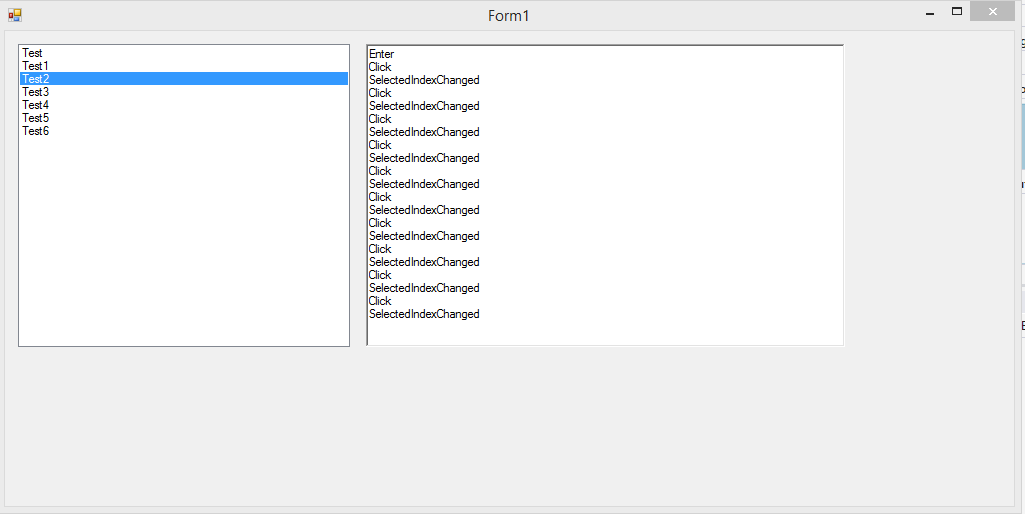
Form1.cs
using System;
using System.Drawing;
using System.Windows.Forms;

namespace CustomFormElements
{
public partial class Form1 : Form
{
    public Form1()
    {
        InitializeComponent();
        this.listBox1.Items.Add("Test");
        this.listBox1.Items.Add("Test1");
        this.listBox1.Items.Add("Test2");
        this.listBox1.Items.Add("Test3");
        this.listBox1.Items.AddRange( new Object[] { "Test4", "Test5", "Test6" });
    }

    private void Form1_Load(object sender, EventArgs e)
    {

    }

    private void button1_Click(object sender, EventArgs e)
    {

    }

    private void AddToLog(string text)
    {
        this.richTextBox1.Text = this.richTextBox1.Text + text + "\r\n";
    }

    private void listBox1_SelectedIndexChanged(object sender, EventArgs e)
    {
        this.AddToLog("SelectedIndexChanged");
    }

    private void listBox1_DrawItem(object sender, DrawItemEventArgs e)
    {
        this.AddToLog("DrawItem");
        bool isSelected = ((e.State & DrawItemState.Selected) == DrawItemState.Selected);

        if (e.Index > -1)
        {
            /* If the item is selected set the background color to SystemColors.Highlight
             or else set the color to either WhiteSmoke or White depending if the item index is even or odd */
            Color color = isSelected ? SystemColors.Highlight :
                e.Index % 2 == 0 ? Color.Green : Color.SandyBrown;

            // Background item brush
            SolidBrush backgroundBrush = new SolidBrush(color);
            // Text color brush
            SolidBrush textBrush = new SolidBrush(e.ForeColor);

            // Draw the background
            e.Graphics.FillRectangle(backgroundBrush, e.Bounds);
            // Draw the text
            e.Graphics.DrawString(listBox1.GetItemText(listBox1.Items[e.Index]), e.Font, textBrush, e.Bounds, StringFormat.GenericDefault);

            // Clean up
            backgroundBrush.Dispose();
            textBrush.Dispose();
        }
        e.DrawFocusRectangle();
    }

    private void listBox1_MeasureItem(object sender, MeasureItemEventArgs e)
    {
        this.AddToLog("MeasureItem");
    }

    private void listBox1_Enter(object sender, EventArgs e)
    {
        this.AddToLog("Enter");
    }

    private void listBox1_Leave(object sender, EventArgs e)
    {
        this.AddToLog("Leave");
    }

    private void listBox1_Click(object sender, EventArgs e)
    {
        this.AddToLog("Click");
    }
}
}
Form1.Designer.cs
namespace CustomFormElements
{
partial class Form1
{
    /// <summary>
    /// Erforderliche Designervariable.
    /// </summary>
    private System.ComponentModel.IContainer components = null;

    /// <summary>
    /// Verwendete Ressourcen bereinigen.
    /// </summary>
    /// <param name="disposing">True, wenn verwaltete Ressourcen gelöscht werden sollen; andernfalls False.</param>
    protected override void Dispose(bool disposing)
    {
        if (disposing && (components != null))
        {
            components.Dispose();
        }
        base.Dispose(disposing);
    }

    #region Vom Windows Form-Designer generierter Code

    /// <summary>
    /// Erforderliche Methode für die Designerunterstützung.
    /// Der Inhalt der Methode darf nicht mit dem Code-Editor geändert werden.
    /// </summary>
    private void InitializeComponent()
    {
        this.listBox1 = new System.Windows.Forms.ListBox();
        this.richTextBox1 = new System.Windows.Forms.RichTextBox();
        this.SuspendLayout();
        //
        // listBox1
        //
        this.listBox1.FormattingEnabled = true;
        this.listBox1.Location = new System.Drawing.Point(13, 13);
        this.listBox1.Name = "listBox1";
        this.listBox1.Size = new System.Drawing.Size(332, 303);
        this.listBox1.TabIndex = 0;
        this.listBox1.Click += new System.EventHandler(this.listBox1_Click);
        this.listBox1.DrawItem += new System.Windows.Forms.DrawItemEventHandler(this.listBox1_DrawItem);
        this.listBox1.MeasureItem += new System.Windows.Forms.MeasureItemEventHandler(this.listBox1_MeasureItem);
        this.listBox1.SelectedIndexChanged += new System.EventHandler(this.listBox1_SelectedIndexChanged);
        this.listBox1.Enter += new System.EventHandler(this.listBox1_Enter);
        this.listBox1.Leave += new System.EventHandler(this.listBox1_Leave);
        //
        // richTextBox1
        //
        this.richTextBox1.Location = new System.Drawing.Point(361, 13);
        this.richTextBox1.Name = "richTextBox1";
        this.richTextBox1.Size = new System.Drawing.Size(479, 303);
        this.richTextBox1.TabIndex = 1;
        this.richTextBox1.Text = "";
        //
        // Form1
        //
        this.AutoScaleDimensions = new System.Drawing.SizeF(6F, 13F);
        this.AutoScaleMode = System.Windows.Forms.AutoScaleMode.Font;
        this.ClientSize = new System.Drawing.Size(1009, 475);
        this.Controls.Add(this.richTextBox1);
        this.Controls.Add(this.listBox1);
        this.Name = "Form1";
        this.Text = "Form1";
        this.Load += new System.EventHandler(this.Form1_Load);
        this.ResumeLayout(false);

    }

    #endregion

    private System.Windows.Forms.ListBox listBox1;
    private System.Windows.Forms.RichTextBox richTextBox1;
}
}回答 1
Stack Overflow用户
回答已采纳
发布于 2015-06-27 12:31:09
根据MSDN for ListBox.DrawMode
此事件由所有者绘制的ListBox使用。只有当DrawMode属性设置为DrawMode.OwnerDrawFixed或DrawMode.OwnerDrawVariable时,才会引发该事件。可以使用此事件执行在ListBox中绘制项所需的任务。如果有可变大小的项(当DrawMode属性设置为DrawMode.OwnerDrawVariable),则在绘制项之前,将引发MeasureItem事件。可以为MeasureItem事件创建事件处理程序,以指定要在事件处理程序中为DrawItem事件绘制的项的大小。
页面原文内容由Stack Overflow提供。腾讯云小微IT领域专用引擎提供翻译支持
原文链接:
https://stackoverflow.com/questions/31088713
复制相关文章
相似问题
腾讯云开发者

Copyright © 2013 - 2026 Tencent Cloud. All Rights Reserved. 腾讯云 版权所有
深圳市腾讯计算机系统有限公司 ICP备案/许可证号:粤B2-20090059  粤公网安备44030502008569号
腾讯云计算(北京)有限责任公司 京ICP证150476号 | 京ICP备11018762号