
Python生成具有透明和固定宽度的缩略图
Python生成具有透明和固定宽度的缩略图
提问于 2015-06-24 14:56:32
因此,我正在尝试使用Python/Django sorl-thumbnail库生成缩略图,并被要求生成一个150x150图像,类似这样的图像(以防在顶部和底部看不到一些透明的边距:
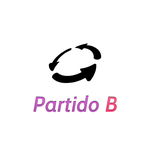
我试着做:
get_thumbnail(
            original_image, '150x150', quality=99, format='PNG'
)我能用sorl-thumbnail做这个吗?我的意思是在顶部和底部加上透明,并保持完整的图像大小为150×150?如果不是,我如何使用另一个python包来实现这一点?
谢谢
回答 1
Stack Overflow用户
回答已采纳
发布于 2015-06-24 15:39:58
我不确定sorl-缩略图,但你可以用图像。你基本上需要创建一个透明的150×150图片,并将你的缩略图放在上面。
#!/usr/bin/python

from PIL import Image

margin=20
X=150
Y=150
in_path="flower.jpg"
out_path="thumbnail.png"

#creates a transparent background, RGBA mode, and size 150 by 150.
background = Image.new('RGBA', (X,Y))


# opening an image and converting to RGBA:
img = Image.open(in_path).convert('RGBA')

# Resizing the image

img = img.resize((X, Y-margin*2), Image.ANTIALIAS)

# Putting thumbnail on background

background.paste(img, (0, margin), img)
background.save(out_path)
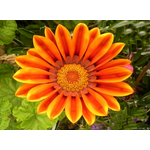
顶部和底部有透明条纹的输出:
页面原文内容由Stack Overflow提供。腾讯云小微IT领域专用引擎提供翻译支持
原文链接:
https://stackoverflow.com/questions/31029984
复制相关文章
相似问题
腾讯云开发者

Copyright © 2013 - 2026 Tencent Cloud. All Rights Reserved. 腾讯云 版权所有
深圳市腾讯计算机系统有限公司 ICP备案/许可证号:粤B2-20090059  粤公网安备44030502008569号
腾讯云计算(北京)有限责任公司 京ICP证150476号 | 京ICP备11018762号