
GoogleMaps地图Infoview中的超链接未打开本机GoogleMaps
GoogleMaps地图Infoview中的超链接未打开本机GoogleMaps
提问于 2015-06-20 16:52:04
我正在开发一个带有自定义GoogleMap的InfoView地图。在我的InfoView中,我想要一个超链接,用我的经度和纬度点击打开本机GoogleMap应用程序。
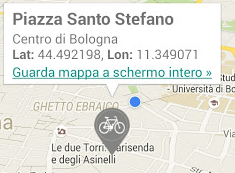
我尝试使用Common Intents API指南并使用以下语法创建超链接:
geo:latitude,longitude在我的代码中:
            TextView link = (TextView) v.findViewById(R.id.infoview_link);
            link.setText(Html.fromHtml("<a href='geo:44.492198,11.349071'>"
                            +"Guarda mappa a schermo intero »</a>"));
            link.setClickable(true);
            link.setOnClickListener(new View.OnClickListener() {
                @Override
                public void onClick(View v) {
                    Intent intent = new Intent(getActivity(), MainActivity.class);
                    startActivity(intent);
                    Toast.makeText(
                            getActivity(),"InfoView link Clicked",
                    Toast.LENGTH_LONG).show();
                }
});指向我的InfoView的TextView。下划线链接正在显示,但是当我点击它时什么也不会发生。
完整的代码:
@Override
public View onCreateView(LayoutInflater inflater, ViewGroup container,
                         final Bundle savedInstanceState) {
    final String br = "<br>";
    // Inflate the layout for this fragment
    rootView = inflater.inflate(R.layout.details_fragment_two, container, false);

    MapFragment mapFragment = (MapFragment) getActivity().getFragmentManager()
            .findFragmentById(R.id.mapFrag);
    mapFragment.getMapAsync(this);
    gmap = mapFragment.getMap();

    // Setting a custom info window adapter for the google map
    gmap.setInfoWindowAdapter(new GoogleMap.InfoWindowAdapter() {

        // Use default InfoWindow frame
        @Override
        public View getInfoWindow(Marker arg0) {
            return null;
        }

        // Defines the contents of the InfoWindow
        @Override
        public View getInfoContents(Marker arg0) {

            // Getting view from the layout file info_window_layout
            View v = getLayoutInflater(savedInstanceState).inflate(R.layout.windowlayout, null);

            // Getting the position from the marker
            LatLng latLng = arg0.getPosition();
            String latitude = "<b>Lat: </b>"+latLng.latitude+", ";
            String longitude = "<b>Lon: </b>"+latLng.longitude;

            // Getting reference to the TextView to set latitude
            TextView title = (TextView) v.findViewById(R.id.infoview_title);
            // Getting reference to the TextView to set longitude
            TextView body = (TextView) v.findViewById(R.id.infoview_body);

            TextView link = (TextView) v.findViewById(R.id.infoview_link);
            link.setText(Html.fromHtml("<a href='geo:44.492198,11.349071'>"
                            +"Guarda mappa a schermo intero »</a>"));
            link.setClickable(true);
            link.setOnClickListener(new View.OnClickListener() {
                @Override
                public void onClick(View v) {
                    Intent intent = new Intent(getActivity(), MainActivity.class);
                    startActivity(intent);
                    Toast.makeText(
                            getActivity(),"InfoView link Clicked",
                    Toast.LENGTH_LONG).show();
                }
            });

            title.setText(Html.fromHtml("<b>Piazza Santo Stefano</b>"));

            // Setting the longitude //"Longitude:" + latLng.longitude
            body.setText(Html.fromHtml("Centro di Bologna"+br
                    +latitude + longitude));
            // Returning the view containing InfoWindow contents
            return v;
        }
    });

    LinearLayout separator = (LinearLayout) rootView.findViewById(R.id.map_separator);
        TextView sep = (TextView) separator.findViewById(R.id.separator_header);
        sep.setText("Punto di ritrovo");
    TextView title = (TextView) rootView.findViewById(R.id.mapInfo);
    title.setText(Html.fromHtml("<b>Piazza Santo Stefano</b>"+
            ", davanti alla Basilica di Santo Stefano"));

    return rootView;
}
@Override
public void onMapReady(GoogleMap map) {
           CameraPosition cameraPosition = new CameraPosition.Builder()
            .target(new LatLng(44.492198, 11.349071))
            .zoom(15f)
            .tilt(60)
            .build();

    map.addMarker(new MarkerOptions()
            .icon(BitmapDescriptorFactory.fromResource(R.drawable.ic_markerbyc))
            .position(new LatLng(44.492198, 11.349071)))
            .showInfoWindow();

    UiSettings uiSettings = map.getUiSettings();
        uiSettings.setAllGesturesEnabled(true);
        uiSettings.setZoomControlsEnabled(true);
        uiSettings.setIndoorLevelPickerEnabled(true);
        uiSettings.setCompassEnabled(true);
        uiSettings.setMapToolbarEnabled(true);
        uiSettings.setMyLocationButtonEnabled(true);

    map.setMapType(GoogleMap.MAP_TYPE_NORMAL);
    map.setMyLocationEnabled(true);
    map.animateCamera(CameraUpdateFactory.newCameraPosition(cameraPosition));

}layout/details_fragment_two.xml:
<LinearLayout android:id="@+id/map"
    xmlns:android="http://schemas.android.com/apk/res/android"
    android:layout_height="match_parent" android:layout_width="match_parent"
    android:orientation="vertical"> <!--android:paddingRight="16dp"--> <!--android:paddingLeft="16dp"-->

    <LinearLayout android:layout_height="0dp" android:layout_weight="8"
            android:layout_width="match_parent"
            android:orientation="vertical" android:paddingBottom="1dp"
            android:background="@drawable/image_border">
        <!--android:layout_height="wrap_content"-->
        <fragment xmlns:android="http://schemas.android.com/apk/res/android"
            android:id="@+id/mapFrag"
            android:layout_height="fill_parent" android:layout_width="match_parent"
            android:name="com.google.android.gms.maps.MapFragment" />
    </LinearLayout>

    <LinearLayout
        android:layout_width="wrap_content"
        android:layout_height="0dp" android:layout_weight="2.2"
        android:orientation="vertical"
        android:paddingLeft="16dp" android:paddingRight="16dp"
        android:paddingTop="16dp">

        <include android:id="@+id/map_separator"
            android:layout_width="fill_parent" android:layout_height="wrap_content"
            android:layout_marginTop="0dp" android:layout_marginBottom="0dp"
            layout="@layout/prenota_separator">
        </include>

        <TextView android:id="@+id/mapInfo"
            android:layout_marginTop="8dp" android:layout_marginBottom="16dp"
            android:gravity='left'
            android:layout_height="wrap_content"
            android:layout_width="match_parent"
            android:text='Partenza da: Piazza Santo Stefano'
            android:textSize="@dimen/textSizeSmall" android:textColor="@color/textLightBlack"
            />
    </LinearLayout>

</LinearLayout>
layout/windowlayout.xml
<?xml version="1.0" encoding="utf-8"?>
<LinearLayout xmlns:android="http://schemas.android.com/apk/res/android"
    android:layout_width="wrap_content"
    android:layout_height="wrap_content"
    android:orientation="vertical">

    <TextView
        android:id="@+id/infoview_title" android:textSize="@dimen/textSizeBig"
        android:layout_width="wrap_content"
        android:layout_height="wrap_content" />

    <TextView
        android:id="@+id/infoview_body"
        android:layout_width="wrap_content"
        android:layout_height="wrap_content" />
    <TextView
        android:id="@+id/infoview_link" android:clickable="true"
        android:layout_width="wrap_content"
        android:layout_height="wrap_content"
        android:textColor="@color/md_orange_700"/>

</LinearLayout>回答 2
Stack Overflow用户
回答已采纳
发布于 2015-06-20 17:29:18
看起来不可能使InfoWindow中的任何单个项目都可以单击。请参阅这个答案。
另外,在文档这里中
正如上一节中提到的信息窗口,信息窗口不是实时视图,而是将视图作为图像呈现到地图上。因此,您在视图上设置的任何侦听器都将被忽略,并且无法区分视图各个部分上的单击事件。建议您不要在自定义信息窗口中放置交互式组件(例如按钮、复选框或文本输入)。
您可以做的是让整个InfoWindow可以用OnInfoWindowClickListener点击,例如:
gmap.setOnInfoWindowClickListener(new GoogleMap.OnInfoWindowClickListener() {
        @Override
        public void onInfoWindowClick(Marker marker) {
            //get location of Marker that was just clicked
            LatLng latLon = marker.getPosition();

            // get the title of Marker that was just clicked
            String title = marker.getTitle();

            //set up your location info based on the Marker info
            //........

           Intent intent = new Intent(getActivity(), MainActivity.class);
           getActivity().startActivity(intent);
           Toast.makeText(
                        getActivity(),"InfoView link Clicked",
                Toast.LENGTH_LONG).show();


        }
});Stack Overflow用户
发布于 2016-08-31 19:00:06

找到附图ya!
页面原文内容由Stack Overflow提供。腾讯云小微IT领域专用引擎提供翻译支持
原文链接:
https://stackoverflow.com/questions/30956579
复制相关文章
相似问题
腾讯云开发者

Copyright © 2013 - 2026 Tencent Cloud. All Rights Reserved. 腾讯云 版权所有
深圳市腾讯计算机系统有限公司 ICP备案/许可证号:粤B2-20090059  粤公网安备44030502008569号
腾讯云计算(北京)有限责任公司 京ICP证150476号 | 京ICP备11018762号