
更改1 1Password扩展导航栏标题颜色
更改1 1Password扩展导航栏标题颜色
提问于 2015-06-19 08:27:44
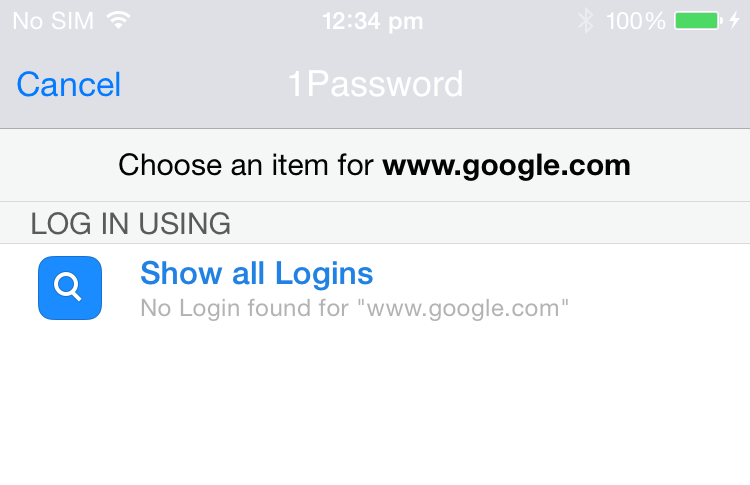
我试图改变导航栏的颜色标题和状态栏项目在1 1Password应用程序扩展。我找不到办法做这件事。
请给我下面的图片。
一定有办法做的,优步应用正在做。请找到下面的图片。
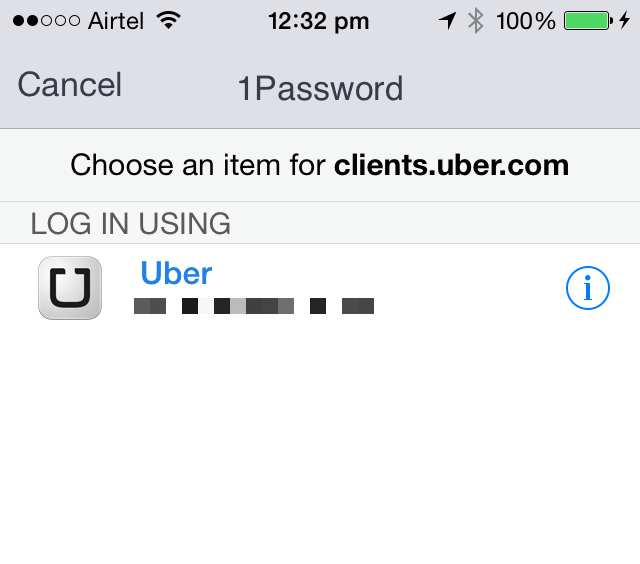
有人能建议我怎么做吗?
回答 2
Stack Overflow用户
回答已采纳
发布于 2015-06-19 10:10:50
在呈现1密码屏幕之前,将外观设置如下。
[[UINavigationBar appearance] setBarTintColor:nil];
[[UINavigationBar appearance] setTintColor:[UIColor blackColor]];
[[UIBarButtonItem appearance] setTintColor:[UIColor blackColor]];
[[UINavigationBar appearance] setTitleTextAttributes: @{NSForegroundColorAttributeName:[UIColor blackColor]}];
在1通道的完成块中,将您的外观重置为应用程序的特定外观。
Stack Overflow用户
发布于 2015-06-19 08:56:58
更改navigationBar标题颜色:
self.navigationController.navigationBar.titleTextAttributes = @{NSForegroundColorAttributeName:[UIColor grayColor]};更改状态栏字体颜色:1.在Info.plist添加项: UIViewControllerBasedStatusBarAppearance NO

2.在viewController viewDidLoad中添加代码
提示:如果您需要更改所有viewController状态字体颜色,则应添加AppDelegate应用程序:didFinishLaunchingWithOptions:
[UIApplication sharedApplication] setStatusBarStyle:UIStatusBarStyleLightContent];页面原文内容由Stack Overflow提供。腾讯云小微IT领域专用引擎提供翻译支持
原文链接:
https://stackoverflow.com/questions/30933476
复制相关文章
相似问题
腾讯云开发者

Copyright © 2013 - 2026 Tencent Cloud. All Rights Reserved. 腾讯云 版权所有
深圳市腾讯计算机系统有限公司 ICP备案/许可证号:粤B2-20090059  粤公网安备44030502008569号
腾讯云计算(北京)有限责任公司 京ICP证150476号 | 京ICP备11018762号