
LookupError:来自nltk.book导入*
在iPython控制台中,我输入了from nltk.book import,得到了几个LookupErrors。下面显示了我得到的代码。
*** Introductory Examples for the NLTK Book ***
Loading text1, ..., text9 and sent1, ..., sent9
Type the name of the text or sentence to view it.
Type: 'texts()' or 'sents()' to list the materials.
---------------------------------------------------------------------------
LookupError Traceback (most recent call last)
<ipython-input-3-8446809acbd4> in <module>()
 ----> 1 from nltk.book import*

C:\Users\dell\Anaconda\lib\site-packages\nltk-3.0.3-py2.7.egg\nltk\book.py in <module>()
 20 print("Type: 'texts()' or 'sents()' to list the materials.")
 21
---> 22 text1 = Text(gutenberg.words('melville-moby_dick.txt'))
 23 print("text1:", text1.name)
 24

 C:\Users\dell\Anaconda\lib\site-packages\nltk-3.0.3-py2.7.egg\nltk\corpus\util.pyc in __getattr__(self, attr)
 97             raise AttributeError("LazyCorpusLoader object has no attribute '__bases__'")
 98
 ---> 99         self.__load()
100         # This looks circular, but its not, since __load() changes our
101         # __class__ to something new:

 C:\Users\dell\Anaconda\lib\site-packages\nltk-3.0.3-py2.7.egg\nltk\corpus\util.pyc in __load(self)
 62             except LookupError as e:
 63                 try: root = nltk.data.find('corpora/%s' % zip_name)
 ---> 64                 except LookupError: raise e
 65
 66         # Load the corpus.

 LookupError:
 **********************************************************************
 Resource u'corpora/gutenberg' not found.  Please use the NLTK
 Downloader to obtain the resource:  >>> nltk.download()
 Searched in:
- 'C:\\Users\\dell/nltk_data'
- 'C:\\nltk_data'
- 'D:\\nltk_data'
- 'E:\\nltk_data'
- 'C:\\Users\\dell\\Anaconda\\nltk_data'
- 'C:\\Users\\dell\\Anaconda\\lib\\nltk_data'
- 'C:\\Users\\dell\\AppData\\Roaming\\nltk_data'
**********************************************************************

In [4]:
我能知道为什么会有这些错误吗?
回答 4
Stack Overflow用户
发布于 2015-06-18 08:01:51
您丢失了Gutenberg语料库在nltk.book,因此错误。错误是自我描述的。
您需要使用nltk.download()下载语料库。
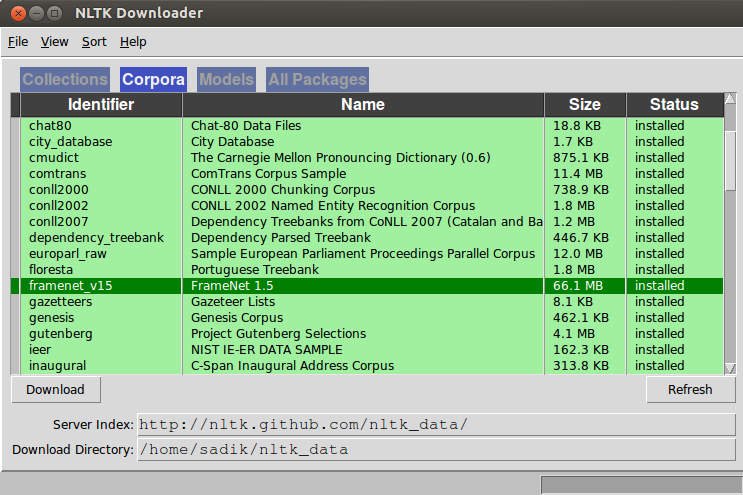
一旦下载了语料库,请重新运行命令,并检查错误是否再次出现。如果是的话,那就属于另一个公司了。也下载那个语料库。
from nltk.book import *不是首选的方法,建议只导入您在代码中使用的语料库。你可以用from nltk.corpus import gutenberg代替。
参见链接参考资料
Stack Overflow用户
发布于 2015-06-18 22:24:04
正如NLTK的书所说,准备使用这本书的方法是打开nltk.download()弹出窗口,转到选项卡“collection”,并下载" book“集合。这样做,你就可以在没有意外的情况下阅读这本书的其余部分。
顺便说一句,您可以通过执行nltk.download("book")从python控制台执行相同的操作,而不需要弹出。
Stack Overflow用户
发布于 2018-02-21 17:42:15
似乎它只在特定的地方搜索数据(如错误描述中提到的)。尝试将nltk的内容复制到其中一个目录中(或者创建一个目录),比如D:\nltk_data ,这解决了的问题(因为即使Guttenber已经下载了,因为它在那个地方找不到它,错误也会继续出现)。
从您得到的错误中摘录:(这些是您可以选择将nltk内容放在哪里以便找到它的目录)
- ‘c:\用户\dell/nltk_data’
- 'C:\nltk_data‘
- 'D:\nltk_data‘
- 'E:\nltk_data‘
- 'C:\Users\dell\Anaconda\nltk_data‘
- 'C:\Users\dell\Anaconda\lib\nltk_data‘
- 'C:\Users\dell\AppData\Roaming\nltk_data‘
https://stackoverflow.com/questions/30908903
复制相似问题
腾讯云开发者

Copyright © 2013 - 2026 Tencent Cloud. All Rights Reserved. 腾讯云 版权所有
深圳市腾讯计算机系统有限公司 ICP备案/许可证号:粤B2-20090059  粤公网安备44030502008569号
腾讯云计算(北京)有限责任公司 京ICP证150476号 | 京ICP备11018762号